Search This Blog

Wednesday, December 31, 2014

Regular Expressions (re module) in WLST

Python based WLST tutorial is to present a detailed and descriptive introduction into regular expressions. Every scripting language powered up with this regular expressions.


Regular expressions examples in WLST
Regular Expressions in WLST

In scripting, Very complex problems can be resolved with simple regular expressions. If you are not aware of each expressions meaning then it would be Greek &  Latin. You need to understand how they can be applicable then you can construct your WLST script in such a way that it could give a fantastic outcomes. A regular expression is that a set of possible input raw strings (includes alphanumerical, whitespaces, symbols).

Regular expressions descends from fundament concept in Computer Science called finite automata theory. A regular expression can match a string in more than one place.

Meta Characters in WLST

The special meaning for each symbol that we use in the regular expression. We have the following meta characters allowed in WLST.
WLST using meta chars


Dot . in expression – any char

The . dot or period regular expression can be used to matches any character. Remember this don’t matches new line ‘\n’.


The Character classes

Character classes [] can be used to match any specific set of characters.
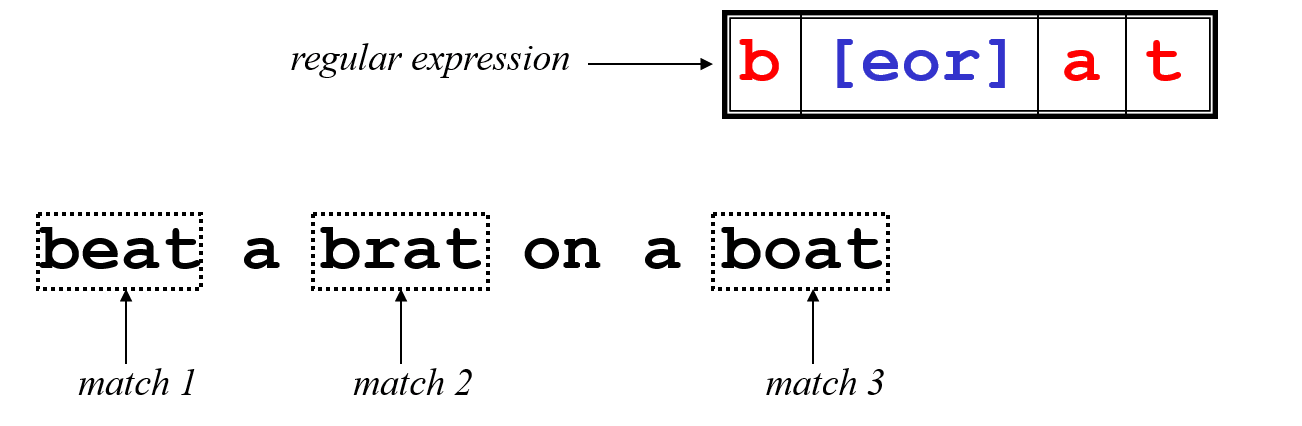
Here is the example to understand the expression that uses character class. The expression second char can be one of the three chars given in the char class [eor]. So the pattern matches three words from the given text.

Negate character class

Character class can be negated with ^ symbol inside the character class. That is [^].
[aeiou] will match any of the characters a, e, i, o, or u
[yY]es will match Yes or yes
Negate Character class in re


Ranges can also be specified in character classes
[1-9] is the same as [123456789]
[abcde] is equivalent to [a-e]


You can also combine multiple ranges in the pattern
[abcde123456789] is equivalent to [a-e1-9]

Note that the hyphen - character has a special meaning in a character class but only if it is used within a range, if you use hypen at beginning its meaning changes it doesn't meant for range.
[-123] would match the characters -, 1, 2, or 3

Commonly used character classes can be referred to by name (alpha, lower, upper, alnum, digit, punct, cntrl)
Syntax [:name:]
[a-zA-Z]       [[:alpha:]]
[a-zA-Z0-9]    [[:alnum:]]
[45a-z]      [45[:lower:]]
Important for portability across languages
compile - search, match patterns on data 

import re

t="Demoadmin, demo_ms1, demo_ms2, my_clustr1"
p=re.compile('(d\w+)',re.I)
pos=0
while 1:
        m=p.search(t, pos)
        if m:
                print "Now search start position :", pos
                print m.group()
                pos=m.end()
        else:
                break


Regular expression Compile pattern on search method

Regular expression FLAGS


re.I == re.IGNORECASE Ignore case
re.L == re.LOCALE Make \w, \b, and \s locale dependent
re.M == re.MULTILINE Multiline
re.S == re.DOTALL Dot matches all (including newline)
re.U == re.UNICODE Make \w, \b, \d, and \s unicode dependent
re.X == re.VERBOSE Verbose (unescaped whitespace in pattern
is ignored, and '#' marks comment lines)


5 important re functions on WLST

There are few regular expression functions defined in the re module. Lets experiment with each one and see how they work.
wls:/offline> dir(re)
['DOTALL', 'I', 'IGNORECASE', 'L', 'LOCALE', 'M', 'MULTILINE', 'S', 'U', 'UNICODE', 'VERBOSE', 'X', '__all__', '__doc__', '__file__', '__name__', 'compile', 'error', 'escape', 'findall', 'match', 'module', 'name', 'purge', 'search', 'split', 'sre', 'sub', 'subn', 'sys', 'template']
The re module methods and their functionality

Lets begin here...

  1. The re.match() method
  2. The match() method works is that it will only find matches if they occur at the start of the string being searched.
    wls:/offline> import re
    wls:/offline> str="WLST WebLogic wsadmin WebSphere"
    wls:/offline> mo=re.match(r'WLST',str)
    wls:/offline> mo.group(0)
    'WLST'
    

  3. The re.split() method
  4. The re.split() method accepts a pattern argument. This pattern specifies the delimiter(s) with it, we can use any text that matches a pattern as the delimiter to separate text data. This is powerful to get the desired data from the text data.

     
    clstrAddress="machine01.vybhava.com:8901,machine02.vybhava.com:8902"
    wls:/offline>  s=re.split(r"[:,]\d{4}",clstrAddress)
    wls:/offline> s
    ['machine01.vybhava.com', ',machine02.vybhava.com', '']
    

    Now lets experiment with simple script where various forms of split works.

     
    Split method samples in WLST
    import re
    
    servers="admin, ms1, ms2, ms3, cluster1"
    print re.split('\W+', servers)
    
    print re.split('(\W+)', servers)
    
    print re.split('\W+', servers, 2)
    
    print re.split('\W+', servers, 3)
    
    # The split mehtod works with multiple delimiters
    e=os.environ['PATH']
    for p in re.split(r':', e):
        print p


  1. The re.search() method 
  2. The following examples will illustrate how to search function with re module flags without it.
    #=====================================================================
    # Created by : Manish K
    # Updated by : Pavan Devarakonda
    # Date : 20 Dec 2014
    #=====================================================================
    import re
    
    s1 = "India is a country!"
    s2 = "Delhi is the capital of India"
    str = s1 + "\n" + s2
    
    ###### To Search first char in multilne
    mo = re.search(r"^D[\w]*", str, re.M)
    print "searched word with first char D:",mo.group()
    
    ###### To Search last char in multilne
    
    mo1 = re.search(r"I[\w]*$", str, re.M)
    print "Searched India:", mo1.group()
    
    ##### To match ignoring case
    
    mo2 = re.search(r"india", str, re.I)
    print "Ignore case:", mo2.group()
    
    if re.search(r'[!@#$%^&*()]', str):
     print "Some special Char found"
    else:
     print "Nothing special found"
    
    print "Original str:", str
    splitstr = re.split("\n", str)
    print "split string with newline:",splitstr
    
    ## Optional Items
    optSearch = "Find date Feb 2015, 12"
    mo3 = re.search(r"Feb(ruary)? 2015", optSearch)
    print "Optional search:", mo3.group()
    
    ## using +
    mo4 = re.search(r"(Feb(ruary)?) ([0-9]+)", optSearch)
    print "Search with + : ", mo4.group()
    
    
    ## unsing *
    mo5 = re.search(r"[0-9].*", optSearch)
    print "Using *", mo5.group()
    
    ### Grouping by the use of ()
    
    gprStr = "Customer number: 232454, Date: February 12, 2015"
    mo6 = re.search("([0-9]+).*: (.*)", gprStr)
    print "Grouping with ():"
    print mo6.group()
    print mo6.group(1)
    print mo6.group(2)
    print mo6.groups()
    
    
    Lets execute the above experiment on search function.
    $ wlst search_re.py
    
    Initializing WebLogic Scripting Tool (WLST) ...
    
    Welcome to WebLogic Server Administration Scripting Shell
    
    Type help() for help on available commands
    
    searched word with first char D: Delhi
    Searched India: India
    Ignore case: India
    Some special Char found
    Original str: India is a country!
    Delhi is the capital of India
    split string with newline: ['India is a country!', 'Delhi is the capital of India']
    Optional search: Feb 2015
    Search with + :  Feb 2015
    Using * 2015, 12
    Grouping with ():
    232454, Date: February 12, 2015
    232454
    February 12, 2015
    ('232454', 'February 12, 2015')


  3. The re.findall() method

  4. When there is the need to find the multiple occurrences of a pattern in a text then findall() is the best function to use. This function returns a list of resulted strings.

    Example on findall method in re module.
    import re
    line="WebLogic Automation course helps WebLogic Admins fish best opportunities"
    
    print "words starts with A"
    print re.findall(r"\bA[\w]*",line)
    
    print "Find all five characthers long words"
    print re.findall(r"\b\w{5}\b", line)
    
    # Find all four, six characthers long words
    print "4, 6 char long words"
    print re.findall(r"\b\w{4,6}\b", line)
    
    # Find all words which are at least 13 characters long
    print "13 char"
    print re.findall(r"\b\w{13,}\b", line)
    
    Execution of the above example gives the output as follows:
    $ wlst findallre.py
    
    Initializing WebLogic Scripting Tool (WLST) ...
    
    Welcome to WebLogic Server Administration Scripting Shell
    
    Type help() for help on available commands
    
    words starts with A
    ['Automation', 'Admins']
    Find all five characthers long words
    ['helps']
    4, 6 char long words
    ['course', 'helps', 'Admins', 'fish', 'best']
    13 char
    ['opportunities']


  5. The re.sub() method in WLST

  6. One of the most important function in the re module is sub(). It works like 'find and replace'.
    sub(pattern, repl, string [, count=0])


    This method replaces all occurrences of the re pattern in the given string with repl, substituting all occurrences unless max count provided. This method would return modified string as output.
    #!/usr/bin/python
    import re
    
    DOB = "28-11-2003# This is DOB "
    
    # Delete Python-style comments
    num = re.sub(r'#.*$', "", DOB)
    print "DOB Num : ", num
    
    # Remove anything other than digits
    x = re.sub(r'\D', "", DOB)
    print "DOB without - : ", x
    
    # Substituting other symbol in anything other than digits
    FDOB = re.sub(r'\D', "/", num)
    print "DOB in new format : ", FDOB
    
    This find and replacement experiment output
    DOB Num :  28-11-2003
    DOB without - :  28112003
    DOB in new format :  28/11/2003
    

    Hope this has given you some basic idea on re module usage in WLST shell. This can help you when you write a monitoring script and that will be given to reporting or graph designs on UI.

    Extract hostname and IP from a String using re

    Python gives us wonderful option to name the pattern which you are searching for. To make it possible ?P will be used in the searching pattern and within angular braces name will be defined.
    wls:/offline> s='www.vybhava.com=192.168.33.100'
    wls:/offline> hi=re.match(r'(?P[_a-z]\w*\.[_a-z]\w*.[_a-z]\w*)\s*=\s*(?P\d+\.\d+\.\d+\.\d+)',s)
    wls:/offline> hi.group('hostname')
    'www.vybhava.com'
    wls:/offline> hi.group('ip')
    '192.168.33.100'
    
Write back to us with your Feedback, queries on regular expressions usage in WLST.

Thursday, December 25, 2014

File IO in WLST: How to store output of WLST/Jython?

Hey WLST scripting enthos Guys!!

I was prepared some of industry most reffered WLST monitoring scripts... they are running well and good... Now the need is to store the result of this monitoring script into a FILE. How to make this? how to redirect this output... normally output is coming from print command in the jython/python. I was searching in google for this output storing to a file from WLST not really good outcomes... then I thought better I choose file style as in C programming allows Standard Output to a files with file pointers. This found a jython tutorial which is already available in online...

WLST File input output operations

-->

Standard Out and Error


Standard output and standard error (commonly abbreviated stdout and stderr) are pipes that are built into every unix-like platform. The stdout (fileObject) is defined in the Python standard sys module, and it is a stream object. Calling its write() function which will print out whatever string you pass as argument to it, then return the length of the output. In fact, this is what the print function really does; it adds a carriage return to the end of the string that you’re printing, and calls sys.stdout.write function.
##############################################
# This program is to illustrate sys fileojects
# Standard Output stdout
# Standard Error stderr
##############################################
print "Normal print..."
for i in range(3):
        print "WLST is awesome!!!"

import sys
print "sys.stdout...."
for i in range(5):
        l=sys.stdout.write('WLST By Examples\n')

print "sys.stderr...."
for i in range(4):
        errline=sys.stderr.write('WLST in 12.1.3 Wonderful!! ')

Here it shows the difference of print, write function with/without carriage return example.
$ wlst fileObj_sys.py

Initializing WebLogic Scripting Tool (WLST) ...

Welcome to WebLogic Server Administration Scripting Shell

Type help() for help on available commands

Normal print...
WLST is awesome!!!
WLST is awesome!!!
WLST is awesome!!!
sys.stdout....
WLST By Examples
WLST By Examples
WLST By Examples
WLST By Examples
WLST By Examples
sys.stderr....
WLST in 12.1.3 Wonderful!! WLST in 12.1.3 Wonderful!! WLST in 12.1.3 Wonderful!!

In the simplest case, sys.stdout and sys.stderr send their output to the same place. In Python, standard output, standard error does not add carriage returns for you. If you want carriage returns. you’ll need to write manually include the carriage return characters. sys.stdout and sys.stderr are stream objects, but they are write-only. Here important fact is that when you attempting to call their read() method will always raise an IOError.

Redirecting output with file descriptor is fine worked good... 
now one more thing... need a timestamp for everytime when you run the monitoring script...
Solution again available in the same tutorial...
jython is going to support Java internally... Java's Date utility gives you the facility to have a time stamp redirect this print to the same file descriptor ... your job is done!!
fileObj = open('test.txt', 'w')
writeList=["I am an Indian", "I love my India", \
"I want to go to USA", "I want to earn dollars", \
"I want to die in India"]

for i in writeList:
 print >>fileObj, i

fileObj.close()

# Default file mode is read (r)
fileObj = open('test.txt')

# We can move fileObj position here it is 0
fileObj.seek(0)

for lines in fileObj.readlines():
 print lines

fileObj.close()
Creates test.txt with lines in list and then will read lines from same file.
wls:/offline> execfile('filereadWrite.py')
I am an Indian

I love my India

I want to go to USA

I want to earn dollars

I want to die in India


The file attributes

Following table have the list of the file object attributes. Which we can directly access them public.
AttributeDescription
file.closedReturns true if file is closed, false otherwise.
file.modeReturns access mode with which file was opened.
file.nameReturns name of the file.
# This program illustrates the file attributes

f=open('fileattr.py')
print "mode:",f.mode
print "name:",f.name

if f.closed:
        print f.name, " is closed"
else:
        print f.name," is not closed"

Its execution gives the output as follows
wls:/offline> execfile('fileattr.py')
mode: r
name: fileattr.py
fileattr.py  is not closed

Testing

with-as operation on Files

Following example shows how to use with

How do I test a simple Jython script at Jython prompt?

You can use the following lines to invoke Jython Shell on your WebLogic environment. This is possible because WLST is based on Jython Shell, obviously you can get a Jython prompt in the WebLogic environment.
Normally you can get with
$ java  org.python.util.jython

Otherwise use the following way to skip caching:
$ java -Dpython.cachedir.skip=true org.python.util.jython

Remember that, WebLogic 9.2 supports Jython 2.1 featured shell, The new Oracle Fusion middleware, WebLogic 11g supports Jython 2.2 features.

In many capacity planning analysis you need the statistcs of day or hour by hour etc., These statistics can be for JVM monitoring or for JMS or JDBC DataSource or Thread Count of a WebLogic domain.
Simply printing to standard output you can redirect them to your desired filenames which you specify in the Jython script. To do print to a file use:
f = open("JVMStat.txt", "w")
# JVM monitoasring Script loop
       print >>f, "JVM Status Line here"
f.close()
And to add to the end of a existing file use:
f = open("JVMStat.txt", "a")
       print >>f, "Added lines comes here"
f.close()

Hope this will give you hint for your need in WLST and file usage. For any issue keep writing back to me.

Enjoy with Jython!!! in WLST !!!

Friday, December 19, 2014

Object Oriented Programming in WLST

I taught Object orientation programming with C++ and Java previously. With that experiance I am  trying to explore more in the Pythonic OOP in WLST.

class definition in WLST Script


In WLST every thing is object as its base scripting language is Python suppose the same. If you create normal variable assignment uses their base objects like int, float, str etc. Each object will be created on JVM with ID, Type (object type) and value. In this post you will get to know about Object orientation for WLST scripts. The four pillars of Object orientation are supported in WLST as well.

  • Encapsulation - How you hide within object
  • Abstraction - How the object make interact with the world
  • Inheritance -Reusing functionalities of a object
  • Polymorphism - Dynamism to your methods

Why should I use OOP in WLST?

The best features identified and designed for object oriented programming mainly following:
  • Object are natural easy to understand and write
  • Objects are more reusable
  • Objects are more maintainable
  • Objects can be extended

What is class in WLST?

A class is a special user defined data type, which defines how to build a certain kind of objects. These classes also stores some common data itms that are shared by all its instances of the class. Instances are objects that are created which follow the definition given inside of the class.

In simple words class is a blue print for constructing the objects. 
Initializer method __init__
The functions that you define within the class are called methods. for all methods must use the first argument as self.

What is 'self' do in WLST?

The Self is object pointer like in C++, Java we have this pointer that refers to the newly created runtime object attributes values.In __init__, self refers to the object currently being created. In WLST classes self used more often than Java. You don't need to give a value for self. When you call the method VM automatically provides the value for self.

What is Instance?

An instance can be created in the main program that is after completing the class block. To create we need the className followed by perantesis.

i=className()

calling the method can be done with instance period followed by method signature with required parameters. 

Magical methods
There are some methods which are executed without calling them! Example initializer method, printing the object into string type using __repr__, and __str__ .When you call the instance in print command it will automaticall invoke these magical methods.

Best practics for class definitons
  • While you defining a class the class name must begin with Capital letter 
  • Explicit inheriting object type give more power to your class
  • Define a method like a function. must have a first argument as self which provide access to current instance attribute values
  • Better to have a DocString for each method you define in the class 
class level methods
static methods
Inheritance 

Multiple Inheritance

# This illustrates the subclassing
# Empty class with pass 
# usage of issubclass function

class Animal(object): pass
class Snake(Animal):
 def __init__(self):
  print "Ssss n a k e!!"
class Python(Snake):
 "I like Python class"
 atr=0
 def __init__(self):
  print "Busssshhhh!!!"
  Snake.__init__(self)
  self.atr+=1
 def __repr__(self):
  return 'This is Python object'

print "issubclass(Animal,object:)",issubclass(Animal,object)
print "issubclass(Snake,Animal:)",issubclass(Snake,Animal)
print "issubclass(Python, Snake:)",issubclass(Python, Snake)

p=Python()
print "Instance printing:", p
print "docString:", p.__doc__
print "p is from class:", p.__class__

print "p type:",type(p)
print "p id:", id(p)
print "p attribute:", p.atr
 

Private variables in class

In Python classes by default everything is public access. to provide encapsulation for the object double underscore represents the private variables(__var1). 

  Exercise for Learners

  1. Create a class for configuring a simple domain with initializer method that will load all properties that required to configure. [managed servers, machines, cluster]
  2. Create a singleton class that would allow single connection object that can be preserved and used for monitoring JVM, Threads etc.

Tuesday, December 2, 2014

I will Protect WebLogic Environments : storeUserConfig

There are many monitoring scripts that requires secure connection to admin server. Creation of username, password in encrypted and stored into a file UserConfigFile you can name it as per your domain requirements. That encryption would be done with private secure key that can be stored in another file User Key File.

Prerequisites

To run the storeUserConfig command you must be in online mode. Before you execute you need to connect to the admin server. You can create secure files for admin user or nodemanager user. nm = Optional. Boolean value specifying whether to store the username and password for Node Manager or WebLogic Server. If set to true, the Node Manager username and password is stored. This argument default to false.

WLST storeUserConfig usage

Execution of storeUserConfig command on WLST

You can execute without any parameters it will store the user secure files with the Operating systtem username and it will be stored in the domain path. storeUserConfig() You are allow to specifying the path where to store the secure files.
wls:/demodomain/serverConfig>  storeUserConfig('/home/wldomains/demodomain/demodomain.config', '/home/wldomains/demodomain/demodomain.key')

Once you create this storeUserConfig files you can use these in two scenarios where it invokes connect command on offline WLST to online WLST:

  • Interactive WLST mode
  • Script mode
  • Useful for weblogic.Admin utility
  • Useful for weblogic.Deployer utility

Once you created this secure config files for a new domain where you can apply for the following:

  • Reconfiguration new system resources like datasources, JMS 
  • Application deployments, undeployment, and redeployments
  • Monitoring WebLogic runtime mbeans.


Note: Creating the key file can reduce the security of your system if it is not kept in a secured location after it is created.

Generic script for protect your domain scripts

The following script is ready use script it is generic script it will interactive with you to connect to a domain and generates user config file, key files in the specified location. It will also validates the newly created the secure files working as expected or not.
"""
DescriptionT :  This script will create user config file, key file
Author   :   Manish Khatwani
Date   :  2/12/2014
"""

def getConnect(user, password, AdminURL):
 connect(user, password, AdminURL)

def testValues(userconf, keyconf, AdminURL):
 print "Connecting to Admin with userConfigFiles"
 connect(userConfigFile=userconf, userKeyFile=keyconf, url=AdminURL)

def createUCFUKF():
 user = raw_input("Enter user Name: ")
 password = raw_input("Enter Password: ")
 AdminURL = raw_input("Admin URL: ")
 configPath = raw_input("Enter Path for storing config files : ")
 userPath = configPath + '/YOURDOMAIN.ucf'
 keyPath = configPath + '/YOURDOMAIN.ukf'
 print "Connecting to Admin"
 getConnect(user, password, AdminURL)
 storeUserConfig( userPath, keyPath)
 disconnect()
 # Reconnecting with newly created secure files
 print "disconnected from Admin, Lets Validate..."
 testValues(userPath, keyPath, AdminURL)
 ls ()
 disconnect()

# =================== MAIN PROGRAM ================================
if __name__=='main':
 redirect('/dev/null','false')
 createUCFUKF()
 redirect('/dev/null','true')
exit()

Execution Procedure
The sample execution look like this:
java weblogic.WLST createUCFUKF.py
enter user name: weblogic
enter password: Webl0gic
enter url: t3://192.168.1.105:7001
Enter Path for stroring config files : /home/wldomains/demodomain
Connecting to Admin
Connecting to t3://192.168.1.105:7001 with userid weblogic ...
Successfully connected to Admin Server 'AdminServer' that belongs to domain 'demodomain'.
 
Warning: An insecure protocol was used to connect to the
server. To ensure on-the-wire security, the SSL port or
Admin port should be used instead.
 
Creating the key file can reduce the security of your system if it is not kept in a secured location after it is created. Do you want to create the key file? y or ny
...

Applicability to WLST
UCF='/home/wlsadmin/wldomains/demodomain/demodomain.ucf'
UKF='/home/wlsadmin/wldomains/demodomain/demodomain.ukf'
connect(UCF, UKF, admurl)

Applicability for Deployer tool

java weblogic.Deployer -userConfigFile /home/wlsadmin/wldomains/demodomain/demodomain.ucf -userKeyFile /home/wlsadmin/wldomains/demodomain/demodomain.ukf -deploy benefits.war -targets democlstr

Applicability of Admin utility

For your monitoring server state purpose you can use weblogic.Admin utility tool use GETSTATE.
#######################################################
# FileName         :           serverstate.sh
# Date             :           03/12/2014
#######################################################
clear
ucf=/home/wlsadmin/wldomains/demodomain/demodomain.ucf
ukf=/home/wlsadmin/wldomains/demodomain/demodomain.ukf
admurl=t3://192.168.1.105:7001

java weblogic.Admin -url $admurl -userconfigfile $ucf -userkeyfile $ukf GETSTATE demoMan1
java weblogic.Admin -url $admurl -userconfigfile $ucf -userkeyfile $ukf GETSTATE demoMan2

GetSate using weblogic.Admin utility

Current state of "demoMan1" : RUNNING


Current state of "demoMan2" : RUNNING

Note this out is executes multiple times JVM creations. Better way is using WLST :)
Thats all for now...
Cheers guys,


share your thought on this post!!

Saturday, October 4, 2014

WLST Issues

NoClassDefFoundError: weblogic.WLST issue

While starting WLST Script you might encounter this issue
Exception in thread "main" java.lang.NoClassDefFoundError: weblogic.WLST
   at gnu.java.lang.MainThread.run(libgcj.so.7rh)
Caused by: java.lang .ClassNotFoundException: weblogic.WLST not found in gnu.gcj.runtime.SystemClassLoader{urls=[file:./], parent=gnu.gcj.runtime.ExtensionClassLoader{urls=[], parent=null}}
   at java.net.URLClassLoader.findClass(libgcj.so.7rh)
   at java.lang.ClassLoader.loadClass(libgcj.so.7rh)
   at java.lang.ClassLoader.loadClass(libgcj.so.7rh)
   at gnu.java.lang.MainThread.run(libgcj.so.7rh)


What to do? What is the fix? searched in google but they all said run setWLSEnv.sh or cmd. Here my way is setup two environment variable availble to your shell.

  1. WL_HOME your weblogic installation path
  2. CLASSPATH with WL_HOME/server/lib/weblogic.jar
You can update these environment variables in your .bash_profile or .bashrc or .profile in the Home directory.

One more alternative method is use the wlst.sh script with absolute path.


alias wlst='${MW_HOME}/oracle_common/common/bin/wlst.sh'

Now you can directly use wlst mypthon.py my.properties

Still have problem in invoking WLST?
$ java weblogic.WLST

Initializing WebLogic Scripting Tool (WLST) ...

Problem invoking WLST - java.lang.NoClassDefFoundError: weblogic.management.scripting.WLScriptContext
Solution for this issue is set the JAVA_HOME properly. that means don't use Linux provided Java instead you have to use Oracle JDK or Jrockit as follows:

export JAVA_HOME=/apps/softwares/weblogic/jdk160_05
or 
export JAVA_HOME=/apps/softwares/weblogic/jrockit_160_05
export PATH=$JAVA_HOME/bin:$PATH

Update these lines in your .bash_profile or .profile check in new Window/Terminal or execute your .bash_profile by placing dot.
$ . .bash_profile

Permission Denied issue

Today when I have tried to workout on WLST it was throwing error.It was shocked me! till yesterday it was working why it is not working now. This is common sentence for every issue :) Need to analyze the problem.
pavanbsd@ubuntu:~$ wlst

Initializing WebLogic Scripting Tool (WLST) ...

Jython scans all the jar files it can find at first startup. Depending on the system
, this process may take a few minutes to complete, and WLST may not return a prompt
right away.

*sys-package-mgr*: can't create package cache dir, '/tmpWLSTTemppavanbsd/packages'
java.io.IOException: Permission denied
        at java.io.UnixFileSystem.createFileExclusively(Native Method)
        at java.io.File.createNewFile(File.java:1006)
        at java.io.File.createTempFile(File.java:1989)
        at java.io.File.createTempFile(File.java:2040)
        at com.oracle.cie.domain.script.jython.WLST_offline.getWLSTOfflineInitFilePath(WLST_offline.java:239)
        at sun.reflect.NativeMethodAccessorImpl.invoke0(Native Method)
        at sun.reflect.NativeMethodAccessorImpl.invoke(NativeMethodAccessorImpl.java:57)
        at sun.reflect.DelegatingMethodAccessorImpl.invoke(DelegatingMethodAccessorImpl.java:43)
        at java.lang.reflect.Method.invoke(Method.java:606)
        at weblogic.management.scripting.utils.WLSTUtil.getOfflineWLSTScriptPathInternal(WLSTUtil.java:104)
        at weblogic.management.scripting.utils.WLSTUtil.setupOfflineInternal(WLSTUtil.java:300)
        at weblogic.management.scripting.utils.WLSTUtil.setupOffline(WLSTUtil.java:277)
        at weblogic.management.scripting.utils.WLSTUtilWrapper.setupOffline(WLSTUtilWrapper.java:29)
        at weblogic.management.scripting.utils.WLSTInterpreter.(WLSTInterpreter.java:168)
        at weblogic.management.scripting.WLST.main(WLST.java:130)
        at sun.reflect.NativeMethodAccessorImpl.invoke0(Native Method)
        at sun.reflect.NativeMethodAccessorImpl.invoke(NativeMethodAccessorImpl.java:57)
        at sun.reflect.DelegatingMethodAccessorImpl.invoke(DelegatingMethodAccessorImpl.java:43)
        at java.lang.reflect.Method.invoke(Method.java:606)
        at weblogic.WLST.main(WLST.java:29)
Problem invoking WLST - java.lang.NullPointerException

Problem here is OS Permission denied to create files in /tmp path. I've remmebered that when I want to try re-install the Weblogic software encountered not enough space in /tmp path. So I had removed all the files forcefully using root user. That makes in accessable to weblogic user to write into the /tmp path.
Here is the solution
sudo chmod 1777 /tmp


Issues in WLST 2 :


This again While Starting with the WLST Shell, we were facing the below issue, offcourse this is common for the first time WLST users:

bash-3.00$ java weblogic.WLST
Initializing WebLogic Scripting Tool (WLST) ...
*sys-package-mgr*: can't write cache file for '/HomeServerInstancepath/bea/jdk150_10/jre/lib/rt.jar'
*sys-package-mgr*: can't write cache file for '/HomeServerInstancepath/bea/weblogic92/server/lib/weblogic.jar'
*sys-package-mgr*: can't write cache file for '/HomeServerInstancepath/bea/jdk150_10/jre/lib/rt.jar'
*sys-package-mgr*: can't write cache file for '/HomeServerInstancepath/bea/jdk150_10/jre/lib/jsse.jar'
*sys-package-mgr*: can't write cache file for '/HomeServerInstancepath/bea/jdk150_10/jre/lib/jce.jar'
*sys-package-mgr*: can't write cache file for '/HomeServerInstancepath/bea/jdk150_10/jre/lib/charsets.jar'
*sys-package-mgr*: can't write cache file for '/HomeServerInstancepath/bea/jdk150_10/jre/lib/ext/sunjce_provider.jar'
*sys-package-mgr*: can't write cache file for '/HomeServerInstancepath/bea/jdk150_10/jre/lib/ext/sunpkcs11.jar'
*sys-package-mgr*: can't write cache file for '/HomeServerInstancepath/bea/jdk150_10/jre/lib/ext/dnsns.jar'
*sys-package-mgr*: can't write cache file for '/HomeServerInstancepath/bea/jdk150_10/jre/lib/ext/localedata.jar'
*sys-package-mgr*: can't write index file
Welcome to WebLogic Server Administration Scripting Shell
Type help() for help on available commands
wls:/offline>

animations
-->

To Fix the above issue, we have two options:

1) This problem I had encountered in Solaris machine, We need to change the permissions of /var/tmp/wlstTemp directory content must be accessed by all users means to use "chmod 777"
or
2) we need to define the cache directory path using open for every user path as /tmp/wlstTemp

bash-3.00$ java -Dpython.cachedir=/tmp/wlstTemp weblogic.WLST
Initializing WebLogic Scripting Tool (WLST) ...

Welcome to WebLogic Server Administration Scripting Shell
Type help() for help on available commands

wls:/offline>
I found very good referrence blog who always talks technically :) that 'Techtalks'
http://www.prasannatech.net/2009/02/jython-sys-package-mgr-processing-jar.html

Now your turn to comment on this issue how do you feel when you see this on your Solaris machine or Linux machine :)
Keep posting your suggestions too...

Related Posts

Sunday, September 28, 2014

WebLogic 12c new features in WLST

WLST Change in 12c domain template path

When you create a new Domain with default domain template wls.jar it is moved from 
$WL_HOME/common/templates/domain/wls.jar 
to
$WL_HOME/common/templates/wls/wls.jar 
Notify this and update your old scripts with this new template path

WLST Security Stronger

WebLogic 11g or previous versions allows password with any number of lines, but now in WebLogic 12c it has changed. You need to change the password to at obey the minimum 8 alphanumerics with atleast a number or any symbol. Example you can have like 'Welcome1'
If you directly executing your WebLogic 10 WLST offline scripts you might encounter following error:
60455: The password must be at least 8 alphanumeric characters with at least one number or special character.
60455: Correct the password.

JLine associated with WLST 12c version

While working on Martin book we have found that Linux/Unix environments don't have feature like in Windows - WLST shell had. To enable that Martin suggested Apache JLine 0.9 need to installed and keep in the path. but now in WebLogic 12c (12.1.3) version it is buit-in.


  • You can use up arrow and down arrow for navigating to previous WLST commands
  • There would be separate history hidden file created .jline-WLST.history in the home directory, it is similar to .bash_history 
[wladmin@srv2 ~]$ cat .jline-WLST.history
exit
execfile('createDomain.py')
exit
exit()
print os.pathsep
help('nmConnect')
nmConnect('weblogic','welcome1','183.82.51.72','5556','sivaDomain','/home/wladmin/wldomain/sivaDomain','plain')
nmConnect('weblogic','welcome1','183.82.51.72','5556','sivaDomain','/home/wladmin/wldomains/sivaDomain','plain')
nm()
nmKill('managed3')
help(nmKill)
help('nmKill')
nmKill('managed3')
nmStart('managed3')
nmDisconnect()

This has been tested and executed on RHEL environment.

What if we don't have 12c latest version?

You can download jLine from sorceforge.net site and include the library path into your CLASSPATH then run your WLST. RefLink: JLine sourceforge.net

Related Posts

Saturday, August 2, 2014

Create Managed Server using WLST Automation

This post is intended for those who just started working on WLST for configuration of WebLogic domain. Here I have a sample WLST script that creates a Managed server. You have two choices to configure managed server: offline and online mode. Here we have online configuration script. Here the first trail with the direct connection parameter passing. I have tried it on my Oracle VirtualBox running WebLogic 12.1.2. I know this is bad coding style that is using hardcoding the values in the script.

Better you might try with properties file that can be updated frequently for your domains.
def createMS(name, listenadr, port):
        connect('weblogic', 'welcome1', 't3://192.168.1.106:9100')
        edit()
        startEdit()
        cd('/')
        cmo.createServer(name)
        cd('/Servers/' + name)
        cmo.setListenAddress(listenadr)
        cmo.setListenPort(port)
        activate()

#=========MAIN PROGRAM =========================
name=raw_input('Please enter managed server:')
listenip=raw_input('please enter listenip:')
port=int(input('please enter port:'))
createMS(name, listenip, port)

Script best practices says all the domain parameters must be generic and develop using propertice file.
try it yourself :)

The output of the above script
pavanbsd@ubuntu:~/pybin$ wlst createms.py

Initializing WebLogic Scripting Tool (WLST) ...

Welcome to WebLogic Server Administration Scripting Shell

Type help() for help on available commands

Please enter managed server:BAms2
please enter listenip:192.168.1.106
please enter port:9102
Connecting to t3://192.168.1.106:9100 with userid weblogic ...
Successfully connected to Admin Server "BA_admin" that belongs to domain "BAdomain".

Warning: An insecure protocol was used to connect to the
server. To ensure on-the-wire security, the SSL port or
Admin port should be used instead.

Location changed to edit tree. This is a writable tree with
DomainMBean as the root. To make changes you will need to start
an edit session via startEdit().

For more help, use help('edit')
You already have an edit session in progress and hence WLST will
continue with your edit session.

Starting an edit session ...
Started edit session, please be sure to save and activate your
changes once you are done.
Activating all your changes, this may take a while ...
The edit lock associated with this edit session is released
once the activation is completed.
Activation completed


Write your feedback in the comment box. Thank you for visit this article.

Thursday, June 5, 2014

Advanced WebLogic Server Automation : Book Review

Great news for WebLogic users, administrators. The first WLST and JMX book now available in the market and online!! Almost 2 years of efforts. Here I am happy to share my first interaction with the author Martin Heinzl


First review and foreword of Advanced WebLogic Server Automation book

I started working on Jython automation in 2009. That time there were very few online forums  such as StackOverflow on the automation scripts. Most documents where either insufficient or with same repeated contents. I thought why not to start a WLST community to help JEE application users who uses WebLogic as application server. Initially starting with the first prominent social network “Google’s Orkut”,  I created the WLST community and started  working on various Jython scripting issues and initiatives to automate the WebLogic administration tasks. Now it was It’s the time for new social network, like where Linkedin which is exclusively developed for professionals. I have opened a ‘WLST’ group, later renamed to ‘WLST by Examples’. It has continuous growing Middleware experts who are looking for WLST. Here is where I first time saw Martin Heinzl discussion posting on the group with "Work-in-progress: Weblogic automation book”.  We both had exchange of thoughts on the book to come up with the best. 

Martin is my and many more aspirants’ mentor, guide. Martin is endowed with an ocean of profound automation knowledge and the best part is, Martin never hesitates to share   his thoughts and suggestions. The book is having three parts, part 1 gives you the intent of the each part and why you need to choose  that part. 

The way WLST is developed from WebLogic 8.1 onwards, enhancing with new features with every new released version 12c to be more user friendly and efficient. WebLogic Jython implementation with robust scripting capabilities is much better than other application server in the JEE market.
The second part is a deep dive of Jython scripting for the WebLogic configurations, deployment, and monitoring, tuning concepts. Whereas Oracle developing the strategies to stand in the number one position in the Middleware market with huge scope on cloud computing focused in WebLogic 12c suite. The business People changed and they are looking for cost-cutting options with private or public clouds. Oracle Fussion Middleware suite come with SOA, BPEL, Developer, WebCenter suites. 

The third part is JMX, it is targeted for those who are already know the Java programming. If you are thinking ‘What if there is a better way than using Jython for WLST?’  Then this is part to refer. I am a JMX newbie. I ran through this part and understood the greatness of the JMX. It has achieved many of the technical goals that JMX API strives for.

Martins ‘Advanced WebLogic Server Automation’ book will be a perfect  guide for experience and novice WebLogic users. The book is formatted with focus on many real-life scenarios, most of the WebLogic administrators, architects use them. This book enables those Administrators to work on automation to save their productive hours.  I liked Martin way of explanation, motivation to readers, and in-detailed orientation for each scenario. Hope I forever remain shadowed under his exorbitant wisdom. 

The book starts from the nothing to building blocks for the enterprise architecture with dynamic automations with fine intent to grow or customized further for the technical needs.

Specifically I wondered for the JMX part, where it covered various resource configurations and also equally had the monitoring capabilities that it does with WLST.  One requires good knowledge on 

Java programming and also idea on JMX APIs.
The book is one place to find most of the Jython scripting for effective system administration on WebLogic suites and shows the greater automation power. And not to forget the way the book is drafted as “Simplicity at its best ". 

Thank you Martin for being guide with great book ‘Advanced WebLogic Server Automation’.

My friends from Oracle Sunil Nagavelli, and Rakesh Panigrahi from Amdocs shared their thoughts and inputs to make this great draft for Preface of the Book. 


Monday, August 19, 2013

Invoking WLST from Ant

There are many Middleware Admins who knows do build and deployment out there using Ant to automate their Oracle Fusion Middleware suite configurations on WebLogic domain. and if you would like to embed your WLST configuration scripts into your ant build.xml script files, you can certainly do so. This is simple and easy task which I suppose to post it long back :)

Invoking WLST from a build.xml


Invoking WLST from ANT Script

We can use the WLST script within the build.xml that is between
The other option is you can develop a WLST script in regular fashion, invoke with script path.
We can use both of them part of ANT script(build.xml) invokes part of WLST individual file(.py) then there would be priority which part must be executed first that we can handle with the attribute 'executeScriptBeforeFile' by default it is true you can use false when you don't want.

There are situations where you need to invoke the WLST script from ANT script. There are following possibilities:

  • configure WebLogic resources with ANT
  • Server Control using ANT
  • Monitoring using ANT
The main advantages of using 'WLST with ANT' comes when there is complete templatization of the WebLogic domain configurations for heavy resource configurations as part, such as JMS Resources, JDBC datasources, Message Bridges etc.,

Sample WLSTbuild.xml


Sample WLSTbuild.properties file

Now create a properties file say wlstbuild.properties that initialized in the ant script with property element.
weblogic.home.dir=C:/Oracle/Middleware/wlserver_10.3
weblogic.lib.dir=${weblogic.home.dir}/server/lib
wlst.script.source=C:/pbin/test.py

Sample Python script invoked in ant script

The test.py WLST Script will fetch the Server list online WLST.
# Started recording all user actions at Tue Dec 18 22:41:59 IST 2012
svrs = cmo.getServers() 
print 'Servers in the domain are' 
for x in svrs: 
        print x.getName()

How to invoke WLST from ant?

Here the pre-requisite to run the ant script assumed that the WebLogic domain already created and Running fine. Some of the build experts prefer to start internal targets with dashes just to make sure users cannot run them from the command line. In fact, I make it a standard practice to have all internal targets start with - just for this reason. You can try the old double-dash trick. I don't have Ant installed on my current system, so I can't test it. Double dashes is a common Unix trick that most commands use to help end parameters when you have files and stuff that start with a dash. By the way, the tasks should be the last thing on your command line:
$ ant -f wlstbuild.xml -- -stopservers
Targets beginning with a hyphen such as "-stopservers" is valid, and it can be used to name targets that should not be called directly from the command line. Usually, it would be called by someother target such as app-deployment depends on targets as -stopapp, -undeploy, -deploy, -startapp, -stopservers, -startservers etc.

To invoke you need to run the setWLSEnv.sh/cmd
prompt$ ant -f wlstbuild.xml
Running ant embed WLST script

Wednesday, June 26, 2013

JMS Bridges using WLST


My new project where I found many new things to learn about JMS. I was searching for a Configure JMS bridge using Python, but there very few blog posts found and that too, their scope limited to target to AdminServer and they are limited for single bridge configuration only. We have analyzed and developed this where you can take complete advantage.

Oracle WebLogic JMS- MQ Series


WebLogic JMS Bridge to MQ Series broker

Oracle WebLogic JMS-JMS


The JMS bridge configuration is dependency on Local and remote Queues or Topics. The bridge can be established between source and targeted destinations need to be created with the following parameters :
  •  JMS bridge destination
  •  Connection URL
  • JMS ConnectionFactory JNDI Name
  •  JMS destination JNDIName

Once the source and target is configured you can configure the message bridges. The bridge configuration requires the following:
  • Bridge name
  •  Source destination
  • Target destination
  • JMS Bridge deployment target Cluster or server

Usually there could be different messaging systems can communicate with JMS Bridges. Bridge can be JMS-JMS communication or external systems can be integrated with messages. This messages can be plain Text or xml files or Java objects. To handle them JEE applications must use Message driven Beans MDB.

#========================================
#  JMS Bridge Configuration script.
#  FileName:  jmsBridges.py
#=========================================
from java.util import *
from java.io import FileInputStream
def createdestination(JMSBridgeDestination,ConnectionURL,ConnectionFactoryJNDIName,DestinationJNDIName):
        cmo.createJMSBridgeDestination(JMSBridgeDestination)
        JMSBridgeDestination = cmo.lookupJMSBridgeDestination(JMSBridgeDestination)
        JMSBridgeDestination.setClasspath('')
        JMSBridgeDestination.setConnectionURL(ConnectionURL)
        JMSBridgeDestination.setAdapterJNDIName('eis.jms.WLSConnectionFactoryJNDINoTX')
        JMSBridgeDestination.setConnectionFactoryJNDIName(ConnectionFactoryJNDIName)
        JMSBridgeDestination.setDestinationJNDIName(DestinationJNDIName)
        return JMSBridgeDestination
 
def create_bridge(MessagingBridge,Cluster,srcbdest,TJMSBridgeDestination,qos):
        cmo.createMessagingBridge(MessagingBridge)
        bridge = cmo.lookupMessagingBridge(MessagingBridge)
        cluster = cmo.lookupCluster(Cluster)
        targets = bridge.getTargets()
        targets.append(cluster)
        bridge.setTargets(targets)
        bridge.setSourceDestination(srcbdest)
        bridge.setTargetDestination(TJMSBridgeDestination)
        bridge.setStarted(true)
        bridge.setSelector('')
        bridge.setQualityOfService(qos)

 
def getp(x):
        return configProps.get(""+x+"")
 
envproperty=""
if (len(sys.argv) > 1):
  envproperty=sys.argv[1]
else:
    print "Environment Property file not specified"
    sys.exit(2)
 
propInputStream=FileInputStream(envproperty)
configProps=Properties()
configProps.load(propInputStream)
 
USER=configProps.get("USER")
PASSWD=configProps.get("PASSWD")
ADMNURL=configProps.get("ADMNURL")
 
print 'CONNECT TO ADMIN SERVER'
connect(USER, PASSWD, ADMNURL)
 
print 'START EDIT MODE'
n=int(getp("num_of_bridges")) # number of Brdiges
edit()
startEdit()
try:
        print 'CREATE SOURCE JMS BRIDGE DESTINATION'
        for i in range(1,n+1):
                # if Bridge already exists skip
                MessagingBridge=getp("MessagingBridge"+str(i))
                print "checking ... ", MessagingBridge
                ref = getMBean("/MessagingBridges/"+MessagingBridge)
                if(ref == None):
                        S_Dest=getp("S_Dest"+str(i))
                        S_ConnURL=getp("S_ConnURL"+str(i))
                        S_ConnFJNDI=getp("S_ConnFJNDI"+str(i))
                        S_DestJNDI=getp("S_DestJNDI"+str(i))
                        src=createdestination(S_Dest,S_ConnURL,S_ConnFJNDI,S_DestJNDI)

                        print 'CREATE TARGET JMS BRIDGE DESTINATION'+str(i)

                        T_Dest=getp("T_Dest"+str(i))
                        T_ConnURL=getp("T_ConnURL"+str(i))
                        T_ConnFJNDI=getp("T_ConnFJNDI"+str(i))
                        T_DestJNDI=getp("T_DestJNDI"+str(i))

                        target=createdestination(T_Dest,T_ConnURL,T_ConnFJNDI,T_DestJNDI)
                        print 'CREATE MESSAGING BRIDGE'
                        cluster=getp("jms_mod_target1")
                        qos=getp("QualityOfService"+str(i))
                        create_bridge(MessagingBridge,cluster,src,target,qos)
                else:
                        pass


Flexibility in defining Bridges Passed through many patterns and learnings, I have developed this as reusable, generic as possible. Scope for further extendable.

I believe "Do it One at Once", To make work simple, Here I had used JMS Bridges with non-transactional. You can change if required. Correspondingly there is the implication with "Atmost-once" option. The "Exactly-Once" option is best suitable choice for non-transnational messages QoS.

WLST Bridge Configuration Properties


You need to customize it according to your domains. This script allows you to create as many bridges as you wish. Just one thing you need to change in the properties is that num_of_bridges value.
Here is the Sample properties file where you can replace the values according to your requirements. The WebLogic destination can be identified with t3 protocol, whereas MQ series uses file:// protocol which requires the full path of the path so it looks like three slashes (file:///)

In the sample CF are connectionFactories that participate in the bridge communication. The name with Dest indicates the Queues/Topics which are involved in the message holders.
#JMS BRIDGES CONFIGURATION FOR MQ

numBridges=1

MessagingBridge1=com.my.TestBridge
QualityOfService1=Atmost-once

S_ConnFJNDI=mywlsCF
S_ConnURL=t3://hostname:port
T_ConnURL=file:///mqlocal/jndi/bindings
T_ConnFJNDI=MQCF

S_Dest1=com.mq.bridge.my.Qsrc
S_DestJNDI1=test/outgoing/request
T_Dest1=com.mq.bridge.my.Qdest
T_DestJNDI1=QSRC_TO_QDEST

To execute the above Python script for JMS Bridge configuration can be done as follows:
java weblogic.WLST JmsBridge.py bridge.properties

Scalability for Bridge

After a while working in the project there is new requirement came in to add few more bridges to the existing  Domain. Now my task is that, need to skip those bridges which are existing bridges list and need to create the new bridge only when it is NOT in the list.  To do so I have solution that using Bridge Runtime MBean finding in the run-time domain, pass is keyword to skip them. So need to update the numBrige variable in properies file and append the new bridge details at the end.

The key logic is here...

              # if Bridge already exists skip
                MessagingBridge=getp("MessagingBridge"+str(i))
                print "checking ... ", MessagingBridge
                ref = getMBean("/MessagingBridges/"+MessagingBridge)
                if(ref == None):
                       #create the bridge
                else:
                       pass # skipping

Monitoring Bridges
In WebLogic 11g (10.3.x version) we can only able to fetch the monitoring information about Bridges configured on the domain using weblogic.Admin. The KSH script developed for bridge monitoring status.

Sunday, June 23, 2013

Network Communicaiton module using in WLST Automations

Network Socket with Python/WLST

Internet protocol libraries for Python can be used in WLST. hostname you can use to make most generic for your automation scripts. Use this idea in build and deployment process.
Python libraries that can be imported to WLST shell


Let's start exploring the most network related libraries useful for WLST scripts

Benefits of Python network, communication libraries importing in WLST

  • Use `socket` to verify if WebLogic servers, admin servers, or managed servers are reachable on specific ports (e.g., 7001 for HTTP, 7002 for HTTPS).
  • Automated Alerts: Send email notifications for WebLogic events, such as server crashes, deployment failures, or performance thresholds (e.g., high CPU usage). 
  • Integration with CI/CD: Include email alerts in deployment scripts to inform teams about successful or failed deployments.
  • Enhances communication in automated workflows, reducing manual oversight.
  • Supports proactive incident management by notifying teams instantly.
  • Customizable for different recipients or conditions (e.g., based on server metrics).
:
wls:/offline> import socket
wls:/offline> print(socket.gethostname())
pavanb.wlst.by.examples.com

There are many socket related modules and built-in functions available to check we can run dir command on each to know wha is inside that package.
wls:/offline> import smtplib
wls:/offline> dir(smtplib)
['CRLF', 'OLDSTYLE_AUTH', 'SMTP', 'SMTPAuthenticationError', 'SMTPConnectError',
 'SMTPDataError', 'SMTPException', 'SMTPHeloError', 'SMTPRecipientsRefused', 'SM
TPResponseException', 'SMTPSenderRefused', 'SMTPServerDisconnected', 'SMTP_PORT'
, 'SSLFakeFile', 'SSLFakeSocket', '__all__', '__doc__', '__file__', '__name__',
'base64', 'encode_base64', 'hmac', 'quoteaddr', 'quotedata', 're', 'rfc822', 'so
cket', 'types']

FTP library in WLST

wls:/offline> import ftplib
wls:/offline> dir(ftplib)
['CRLF', 'Error', 'FTP', 'FTP_PORT', 'MSG_OOB', 'Netrc', '_150_re', '_227_re', '
__all__', '__doc__', '__file__', '__name__', 'all_errors', 'error_perm', 'error_
proto', 'error_reply', 'error_temp', 'ftpcp', 'os', 'parse150', 'parse227', 'par
se229', 'parse257', 'print_line', 'socket', 'string', 'sys', 'test']

Did you ever thought of using FTP from WLST?

IMAPLIB in WLST

wls:/offline> import imaplib
wls:/offline> dir(imaplib)
['AllowedVersions', 'CRLF', 'Commands', 'Continuation', 'Debug', 'Flags', 'IMAP4
', 'IMAP4_PORT', 'Int2AP', 'InternalDate', 'Internaldate2tuple', 'Literal', 'Mon
2num', 'ParseFlags', 'Response_code', 'Time2Internaldate', 'Untagged_response',
'Untagged_status', '_Authenticator', '__all__', '__doc__', '__file__', '__name__
', '__version__', '_cmd_log', '_cmd_log_len', '_dump_ur', '_log', '_mesg', 'bina
scii', 'print_log', 'random', 're', 'socket', 'sys', 'time']
This is implib

telnet Library in WLST

Just for connectivity before create your database connection pools.
wls:/offline> import telnetlib
wls:/offline> dir(telnetlib)
['AO', 'AUTHENTICATION', 'AYT', 'BINARY', 'BM', 'BRK', 'CHARSET', 'COM_PORT_OPTI
ON', 'DEBUGLEVEL', 'DET', 'DM', 'DO', 'DONT', 'EC', 'ECHO', 'EL', 'ENCRYPT', 'EO
R', 'EXOPL', 'FORWARD_X', 'GA', 'IAC', 'IP', 'KERMIT', 'LFLOW', 'LINEMODE', 'LOG
OUT', 'NAMS', 'NAOCRD', 'NAOFFD', 'NAOHTD', 'NAOHTS', 'NAOL', 'NAOLFD', 'NAOP',
'NAOVTD', 'NAOVTS', 'NAWS', 'NEW_ENVIRON', 'NOOPT', 'NOP', 'OLD_ENVIRON', 'OUTMR
K', 'PRAGMA_HEARTBEAT', 'PRAGMA_LOGON', 'RCP', 'RCTE', 'RSP', 'SB', 'SE', 'SEND_
URL', 'SGA', 'SNDLOC', 'SSPI_LOGON', 'STATUS', 'SUPDUP', 'SUPDUPOUTPUT', 'SUPPRE
SS_LOCAL_ECHO', 'TELNET_PORT', 'TLS', 'TM', 'TN3270E', 'TSPEED', 'TTYLOC', 'TTYP
E', 'TUID', 'Telnet', 'VT3270REGIME', 'WILL', 'WONT', 'X3PAD', 'XASCII', 'XAUTH'
, 'XDISPLOC', '__all__', '__doc__', '__file__', '__name__', 'select', 'socket',
'sys', 'test', 'theNULL']
This is having more functions and variables check it...

httplib in WLST for Sanity check

You can use 'httplib' for checking sanity of an application after deployment.
wls:/offline> import httplib
wls:/offline> dir(httplib)
['BadStatusLine', 'CannotSendHeader', 'CannotSendRequest', 'FakeSocket', 'HTTP',
 'HTTPConnection', 'HTTPException', 'HTTPMessage', 'HTTPResponse', 'HTTPS', 'HTTPSConnection', 'HTTPS_PORT', 'HTTP_PORT', 'ImproperConnectionState', 'IncompleteRead', 'InvalidURL', 'LineAndFileWrapper', 'NotConnected', 'ResponseNotReady', 'SSLFile', 'SharedSocket', 'SharedSocketClient', 'StringIO', 'UnimplementedFileMode', 'UnknownProtocol', 'UnknownTransferEncoding', '_CS_IDLE', '_CS_REQ_SENT', '_CS_REQ_STARTED', '_UNKNOWN', '__all__', '__doc__', '__file__', '__name__', 'errno', 'error', 'mimetools', 'socket', 'test', 'urlsplit']
Here, I fond the HTTPLIB example given by Valdmir blog post->Python: HTTP Basic authentication with httplib. Where in the Python script used to do the Sanity test for a provided application URL, which uses the authentication provided using base64 module.

The xmlrpclib library for WLST

This is xmrpclib can be used while interacting with config.xml file. have a look and decide :)
wls:/offline> import xmlrpclib
wls:/offline> dir(xmlrpclib)

['ArrayType', 'Binary', 'Boolean', 'BuiltinFunctionType', 'BuiltinMethodType', 'ClassType', 'CodeType', 'ComplexType', 'DateTime', 'DictProxyType', 'DictType','DictionaryType', 'EllipsisType', 'Error', 'ExpatParser', 'False', 'FastParser',
 'FastUnmarshaller', 'Fault', 'FileType', 'FloatType', 'FrameType', 'FunctionType', 'GeneratorType', 'InstanceType', 'IntType', 'LambdaType', 'ListType', 'LongType', 'MAXINT', 'MININT', 'Marshaller', 'MethodType', 'ModuleType', 'NoneType',
'ObjectType', 'ProtocolError', 'ResponseError', 'SafeTransport', 'Server', 'ServerProxy', 'SgmlopParser', 'SliceType', 'SlowParser', 'StringType', 'StringTypes', 'TracebackType', 'Transport', 'True', 'TupleType', 'TypeType', 'UnboundMethodT
ype', 'UnicodeType', 'Unmarshaller', 'WRAPPERS', 'XRangeType', '_Method', '__doc__', '__file__', '__name__', '__version__', '_decode', '_stringify', 'binary', 'boolean', 'classDictInit', 'datetime', 'dumps', 'escape', 'getparser', 'loads','operator', 're', 'string', 'time']

Saturday, June 15, 2013

SOA & ADF Bounce script


We were working on SOA doamin for automation with WLST. After woring on the retiring and activation  of  the composites of SOA_Infra we are ready for shutdown the managed servers. Now the task is simple we have break-down the task into two simple functions.

  1. stop the cluster
  2. start the cluster
  3. Main program
Here the main program uses the logic of fetching the cluster list from the admin server. The functions are made in such a way that each cluster control operation can be tracked with state command, that will tell about all the managed servers in the cluster state. Once we did a trial found that there could be some time required for shutdown the managed servers. Double checked the state with Console as well. Re-run the same script with the menu option to start the Cluster.

Here NodeManager is independently running on each machines where the cluster spread across the  managed servers are running. So, this script only controls the clustered managed servers.

You can extend the same script to turn down the Admin server as well. after cluster down you can have that action. The command is shutdown('AdminServer', 'Server')


If you want more stories on the automation go thru the recommended book!
  
#====================================
# 
# Description: This script objective is to provide the choices to perform operation
#    1 is for stop the cluster
#    2 is for start the cluster
#    other is for exit from this script
#  this uses two functions startClstr and stopClstr which takes parameter as 'cluster name'.
#
#====================================
# Stop all instances of a Cluster 
#====================================
def stopClstr(clstrName):
 try:
  shutdown(clstrName,"Cluster")
  java.lang.Thread.sleep(25000)
  state(clstrName,"Cluster")
 except Exception, e:
  print 'Error while shutting down cluster ',e
 
#====================================
# Startp all instances of a Cluster 
#====================================
def startClstr(clstrName):
 try:
  start(clstrName,"Cluster")
  state(clstrName,"Cluster")
 except Exception, e:
  print 'Error while shutting down cluster ',e
 

if __name__== "main":
 connect('weblogic','welcome1','t3://localhost:7001')
 print "1.To Stop Instances"
 print "2.To Start Instances"
 print "3.Exit from Menu"
 ch=input('Enter Your Choice: ')
 cd("Clusters")
 clstrList=ls(returnMap='true')
 if ch== 1 :
  for clstr in clstrList:
   stopClstr(clstr)
 elif ch == 2 :
  for clstr in clstrList:
   startClstr(clstr)
 else:
  exit()

SOA Retire Activate Composites


Why we need retire and activate composites?

Before you go for bouncing the SOA Suite Domain which contains SOA, ADF Clusters with multiple managed servers, where each Weblogic server hosted all the sessions which are in execution state on them must be persisted to a restore further when Servers back to RUNNING state. To make this possible we need to use the retire composites and then after RUNNING servers bring them back to activate state for service.

Here is a sample trail script where the SOA application composites management. Here you need to navigate to the wlst.sh or cmd path. To access SCA function you must start WLST from /common/bin. When trying to run the SOA WLST command from regular 'java weblogic.WLST' cannot execute the SCA functions. When you try to execute the sca_retireComposite() it could throw the 'NameError'. So the cause is started WLST from the wrong location, to avoid that our PATH is to change and run the script from the following path: $SOA_ORACLE_HOME/common/bin/wlst.sh will work on Unix/Linux environments. Similarly you choose for Windows environment instead of using executing the shell script you need to use 'call' in the batch script.

Here the major task we have proceeding with the following two functions.

  1. Retire is to retire the composites .
  2. Activate is to activate the composites.
loadProperties('/user/test/scripts/composites.properties')
def retireComposites(Soahost,port, username,password,scacompositename, ver):
        sca_retireComposite(Soahost, port, username, password, scacompositename, revision=ver, partition='default') 
def activateComposites(Soahost,port, username,password,scacompositename, ver):
        sca_activateComposite(Soahost, port, username, password, scacompositename, revision=ver, partition='default')
if __name__== "main":
        print "1.To retire composites"
        print "2.To activate composites"
        print "3.Exit from Menu"
        ch=input('Enter Your Choice: ')
        f=open('/user/test/scripts/composites.txt','r')
        if ch== 1 :
                for c in f:
                        c=c.rstrip('\n')
                        retireComposites(Soahost,port, username,password,c, ver)
        elif ch == 2 :
                for c in f:
                        c=c.rstrip('\n')
                        activateComposites(Soahost,port, username,password,c, ver)
        else:
                exit()
        f.close()

Here is the composite.txt sample, where you can specify your composites configured in the SOA partition. Which are usually visible on enterprise manager(em) console. Oracle must given a easy module for displaying the deployed SCA composites list. Anyway we have stored in a separate file as shown below. You have flexibility of changing the order when you use this composite.txt file.

B2B_BPEL_TEST_Sub_reccive
B2B_BPEL_TIBCO_PUB_invoke

The actual trouble started when we tried to use a separate composite.txt file. each line can be read and the value always having at the end an EOL ( \n ). To supress that escape sequance we have used python scring function rtrip function.

The regular properties file which is loaded on the fist line can be created as follows:


Soahost=localhost
port=8001
username=weblogic
password=welcome1
ver=1.0


Please share this with your friends and collegues, comment if you already tried or successfully implemented on your SOA environment.

Video References:

Iris Li demonstrates how to deploy a SOA composite application using the Oracle Enterprise Manager 11g

SOA Composites references :

Sunday, April 14, 2013

Self-tuned Thread Pool Count


-->
Thread Pool count will give you the idea about the WebLogic Server instance throughput. First let us see how to monitor a server instance with WLST. if you provide the instance name the script will search the corresponding listen address, listen port for that instances then forms a URL using t3 protocal(WebLogic specific protocol) which is used to connect the instance and get the serverRuntime MBean which will contains that servers ThreadPoolRuntime.

Hogging Threads
Hogging Threads that have taken the too much time and we can assume that they are never going to come back. Hogging threads help us take some decisions, lets say many threads are hogging, we may take a decision to create new threads for next cycle.
My understanding about Thread States in WebLogic Server:
  1. ACTIVE
  2. STUCK
  3. STANDBY
A live thread which is ready to process the request, which is known as ACTIVE state. That is indicated when therad newly created. WebLogic Server start the server instance with 1 ACTIVE thread and the thread count grows as per the min size if specified other wise it will do self-tune as per the request.

Threads might wait for other thread to release resource. This might happen due to application varialbles. The variables are 2 types thread-safe other is risk for thread. All local variables in the methods are thread-safe. The variable defined in class level are unsafe. which causes memory leak, this state of threads are known as hogging. WebLogic identify a thread as hog by the time interval. If thread is waiting more than 600 sec will be treated as hog. STUCKthread interval we can tune as per the project need.

animations
If the number of HoggingThreadCount increases then the server health is in dangerous. That time you can take the ThreadDump
After Threads increase to a max utilization then the thread will be in STANDBY state.

Let us see the following script will get the Thread statistics for a given Weblogic server instance.


# This script is for single instance thread statistics
# You can enhance it further to take thread dump as per your env.

import sys
from java.util import Date

ucf='scriptpath/userConfigFile.sec'
ukf='scriptpath/userKeyFile.sec'
ECODE='\n \033[0m' # ending of color code

def ThreadCnt():
    try:
        print 'Connecting to Admin server....'
        connect(userConfigFile=ucf, userKeyFile=ukf, url='t3://admindns:port')
    except:
        print 'Admin Server NOT in RUNNING state....'
    urldict={}
    serverlist=getRunningServerNames()  # Getting Serverlist
    for svr in serverlist:
        cd("/Servers/"+svr.getName())
        urldict[svr.getName()]='t3://'+get('ListenAddress')+':'+str(get('ListenPort'))

    x = raw_input('Enter a server instance name : ')
    try:
        connect(userConfigFile=ucf, userKeyFile=ukf,url=urldict[x])
        serverRuntime()
        openSocks = cmo.getOpenSocketsCurrentCount();
        print('Open Sockets:: ' + str(openSocks));
        cd('serverRuntime:/ThreadPoolRuntime/ThreadPoolRuntime/')
        compReq = cmo.getCompletedRequestCount()
        status = cmo.getHealthState()
        hoggingThreads = cmo.getHoggingThreadCount()
        totalThreads = cmo.getExecuteThreadTotalCount()
        idleThrds = cmo.getExecuteThreadIdleCount()
        pending = cmo.getPendingUserRequestCount()
        qLen = cmo.getQueueLength()
        thruput = cmo.getThroughput()
        if idleThrds == 0:
            pstr='\033[1;47;31m'    # RED color
        else:
            pstr='\033[1;40;32m'    # GREEN color
        print(pstr+'Status of the Server: ' + str(status)  +ECODE
            +'The completed Requests: ' + str(compReq) +ECODE'
            +'Total the threads no s: ' + str(totalThreads)+ECODE
            +'The Idle threads: ' + str(idleThrds)+ECODE
            +'Hogging threads : ' + str(hoggingThreads)+ECODE
            +'Pending : ' + str(pending)+ECODE
            +'ThreadPool QueueLength: ' + str(qLen)+ECODE
            +'Server (Throughput): ' +str(thruput)+ECODE)
    except:
        print 'Exception... Unable to connect to given Server', x
        pass
    quit()

def quit():
    d = Date() # now
    print  d
    print '\033[1;40;32mHit any key to Re-RUN this script ...'+ECODE
    Ans = raw_input("Are you sure Quit from WLST... (y/n)")
    if (Ans == 'y'):
         disconnect()
        stopRedirect()
        exit()
    else:
        ThreadCnt()

def getRunningServerNames():
    domainConfig()
    return cmo.getServers()

if __name__== "main":
    redirect('./logs/ThreadCntwlst.log', 'false')
    ThreadCnt()
    print 'done'


WebLogic Server Health Status can be one of the following:

  1. HEALTH_OK
  2. HEALTH_WARN
  3. HEALTH_FAILED
  4. HEALTH_CRITICAL
  5. LOW_MEMORY_REASON
  6. HEALTH_OVERLOADED

OK is indicates everything fine, no worries!!

WARN raised when there is few stuck threads in the server instance.

LOW_MEMORY_REASON is going to tell you about JVM crash expected. You can configure to 'Exit' the managed server on low memory conditions with the help of NodeManager and WorkManager.

CRITICAL when multiple number of stuck threads happening and the threadpool count reaching unsual number. This case you need to suspect Network, JDBC or back-end connectivity has trouble.
FAILED happen when the new deployments fails. The NodeManager should not restart this managed server.

OVERLOADED Change the server health state to OVERLOADED on overload. The Nodemanager need to work at this state and bounce such WebLogic instance. This is a new feature of WebLogic 9.x and later versions, for detecting, avoiding and recovering from an overload condition of a WebLogic managed server. Overload protection can be used to throttle Work Managers and thread pools for performance. You can configure Shutdown the Work Manager or application on stuck threads when it crosss more than 5 or you can set threshold.
-->

Good Reference links:

http://forums.oracle.com/forums/thread.jspa?threadID=683752

Thursday, April 11, 2013

Home

Do you know this fun thing about Python scripting sing a poem of quotations just by by importing 'this' module.
wls:/offline> import this
The Zen of Python, by Tim Peters

Beautiful is better than ugly.
Explicit is better than implicit.
Simple is better than complex.
Complex is better than complicated.
Flat is better than nested.
Sparse is better than dense.
Readability counts.
Special cases aren't special enough to break the rules.
Although practicality beats purity.
Errors should never pass silently.
Unless explicitly silenced.
In the face of ambiguity, refuse the temptation to guess.
There should be one-- and preferably only one --obvious way to do it.
Although that way may not be obvious at first unless you're Dutch.
Now is better than never.
Although never is often better than *right* now.
If the implementation is hard to explain, it's a bad idea.
If the implementation is easy to explain, it may be a good idea.
Namespaces are one honking great idea -- let's do more of those!
wls:/offline>

Content

You are invited for the contribution of WLST scripts and articles.

Technorati Claim token code JDU3DCFE66EH

Popular Posts