Search This Blog

Sunday, February 26, 2023

Dynamic Cluster Scaling with WLST in Oracle WebLogic

Hello Middleware Admin welcome back!

In this article we will explore the Dynamic Cluster configuration on Oracle WebLogic Domain with WLST automations.

Prerequisites
Before we start the automation, ensure the following prerequisites exists

In this exciting example 😊 new learning about how to use the dynamic cluster in the latest version of WebLogic 12c [12.1.2] and above this was introduced for WebLogic on Cloud computing. To workout this you must configure a Server template when you give the maximum number of cluster servers these managed server automatically increased. When you decrease it the number of managed servers come to SHUTDOWN state as expected. To do same task from the automation using WLST prompt you need to use the following two functions:
  1. scaleUp increase the number of managed servers in the cluster
  2. scaleDown to decrease the number of managed servers in the cluster.


Image for Dynamic cluster in WebLogic
Dynamic Cluster configuration on WebLogic Domain


now let's do the automation exercise
# Dated  : 4th Feb 2016
# ScriptName : dynamicCluster.py
# Purpose :
# This script will create server template and using that
# configures a dyanamic cluster

def createServer_Template(tmpName, basePort, sslPort, machine):
        print 'creating server tempalte for '+tmpName
        cd('/')
        cmo.createServerTemplate(''+tmpName)

        cd('/ServerTemplates/'+tmpName)
        cmo.setListenPort(int(basePort))

        cd('/ServerTemplates/'+tmpName+'/SSL/'+tmpName)
        cmo.setListenPort(int(sslPort))

        cd('/ServerTemplates/'+tmpName)
        cmo.setMachine(None)


def create_dynamicCluster(clustrName, tmpName, prefix):
        print 'Creating dynamic cluster: '+clustrName
        cd('/')
        cmo.createCluster(clustrName)

        cd('/Clusters/'+clustrName)
        cmo.setClusterMessagingMode('unicast')

        cd('/ServerTemplates/'+tmpName)
        cmo.setCluster(getMBean('/Clusters/'+clustrName))

        cd('/Clusters/'+clustrName+'/DynamicServers/'+clustrName)
        cmo.setServerTemplate(getMBean('/ServerTemplates/'+tmpName))
        cmo.setDynamicClusterSize(2)
        cmo.setMaxDynamicClusterSize(8)
        cmo.setCalculatedListenPorts(true)
        cmo.setCalculatedMachineNames(true)
        cmo.setCalculatedListenPorts(true)
        cmo.setServerNamePrefix(prefix)

def main():
        connect("weblogic","welcome1","t3://192.168.33.100:6100")
        edit()
        startEdit()

        print 'Creating server templates...'
        # creating server templates
        createServer_Template('app_tier_tmp', 7120, 8120, 'mydev')
        createServer_Template('web_tier_tmp', 6120, 9120, 'mydev') # Machine already configured

        create_dynamicCluster('app_dclustr', 'app_tier_tmp','app_server0')
        create_dynamicCluster('web_dclustr', 'web_tier_tmp','web_server0')
        print 'Dynamic cluster configuration completed...'
        activate()

main()

The above generic WLST script can be executed as shown below:

Elastic cluster configuration with WLST


You could also double confirm this from your WebLogic Admin Console work-area when you select clustser in the Environment of under your Domain .
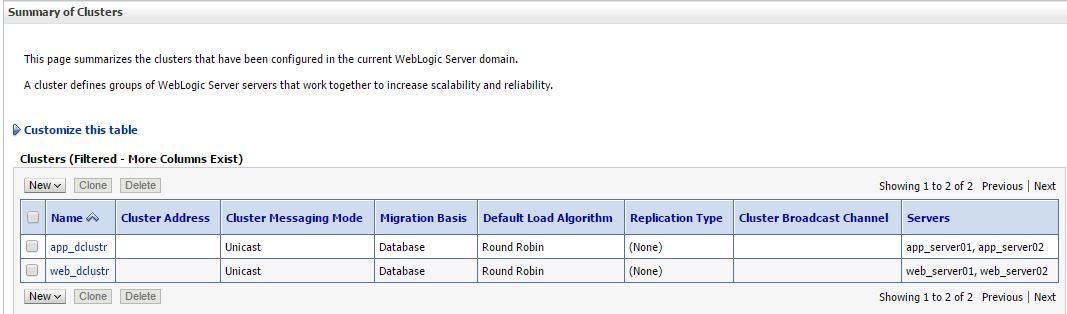
wlst output confirm Admin console
Dynamic Cluster configuration in WebLogic 12.2.1 Domain


Suggestion for future enhancements to the above script you can do following:

  1. create a properties file and pass all the main program required arguments
  2. Cluster Message Mode can be dynamic
  3. Machine per template can be set dynamic
Elastic Cluster on-demand scale up

In the WLST prompt you can test it as :

scaleUp ("app_dclustr",1, true, true)

scaleUp execution for single server:

WLST Scalability implementation
ScaleUp in WLST Execution 

scaleDown('app_dclustr',2,true,true)

Scale down weblogic cluster

scale down in WebLogic 12.2.1 Domain
Scale Down cluster size in WLST

Troubleshooting issues
Issue 1: Unable to Connect to Admin Server Error:
Connection refused
Verify: 
Verify: 
  1.  Administration Server is running 
  2. Hostname is reachable 
  3. Port number is correct 
  4. Firewall is not blocking connectivity 
Issue 2: Authentication Failure Error:
Authentication denied
Verify: 
  1.  Username and password 
  2. userConfigFile and userKeyFile 
  3. Security realm configuration 
Hope you enjoyed by reading this post,  Stay tuned to this blog and share with your friends techies...
Waiting for your comments and suggestions!!

Sunday, February 12, 2023

Server State using WLST in Oracle WebLogic

Hello! Dear Automation focused engineer we have this post about how to work simple server status list for a WebLogic domain. This logic can be build and executed for huge number of WebLogic or FMW Servers in Production helps to view all at a time hostnames, their corresponding states.   

Why we need WebLogic Server State? What all those states?

Knowing the status of the WebLogic Server  is one of the first troubleshoot steps performed by Middleware Administrator.  

Typical use cases include:

  • Verifying server availability after maintenance activities
  • Checking managed server status after deployments
  • Monitoring cluster members during production incidents
  • Validating startup and shutdown operations
  • Automating health checks for large WebLogic environments
  • Generating operational reports
This is the basic need when the all the servers are in bounced for production code move. This same script can be applicable for the pre-production or staging environment too. WLST provides the built-in methods, which gives the status of the Server instance or servers in a Cluster. Here we will deal with individual instance wise data.

Image of ServerLifeCycle in WLST
WebLogic Server Life cycle state diagram

There are several ways to list out the servers. The simple way here you go with interactive way...
In the following example 
  1. We are collecting all the list of servers present inside the WebLogic domain
  2. The state function applied on each server as item  passed to it
  3. repeat this step 2 until all server list ends
 
wls:/demodomain/serverConfig> x=ls('Servers',returnMap='true')
dr--   demoadm
dr--   demoms1
dr--   demoms2

wls:/demodomain/serverConfig> x
[demoadm, demoms1, demoms2]
wls:/demodomain/serverConfig> for i in x:
... state(i,'Server')
...
Current state of "demoadm" : RUNNING
Current state of "demoms1" : SHUTDOWN
Current state of "demoms2" : SHUTDOWN

Cluster listing
wls:/demodomain/serverConfig> c=ls('Clusters',returnMap='true')
dr--   clstr01

wls:/demodomain/serverConfig> c
[clstr01]
wls:/demodomain/serverConfig> state(c[0],'Cluster')

There are 2 server(s) in cluster: clstr01

States of the servers are
demoms1---SHUTDOWN
demoms2---SHUTDOWN

ServerLIfecycleRuntime Mbean tree


Using above shown MBean hierarchy we can fetch the all WebLogic domain server instance's states. If your production WebLogic domain consists of two digit (eg. 60 instances) or three digit number (eg. 120 instances) of managed server then, it is difficult to see all server’s state at once. Weblogic Administration console is unable to show all the servers in the domain on a single page. Navigating in between also a time eating process so think! think better way!! WLST has the solution.

To get the status of all servers in the domain can be obtained with the following steps
  1. Connect to the WebLogic Admin Server
  2. Fetch the Managed server list from the domainRuntime MBean
  3. Iterate the loop and get the state of each Managed Server with ServerLifeCycle Runtime MBean
  4. Repeat if required the step 3 as per the user input to Continue...
  5. Finally if all desired output is visible then disconnect from the AdminServer and exit.

################################################## 
# This script is used to check the status of all WL instances including the admin
###########################################################

def conn():
    UCF='/path/.AdminScripts/userConfigFile.sec'
    UKF='/path/.AdminScripts/userKeyFile.sec'
    admurl = "t3://hostname:wlport"

    try:
        connect(userConfigFile=UCF, userKeyFile=UKF, url=admurl)
    except ConnectionException,e:
        print '\033[1;31m Unable to find admin server...\033[0m'
        exit()

def ServrState():
    print 'Fetching state of every WebLogic instance'
#Fetch the state of the every WebLogic instance
    for name in serverNames:
        cd("/ServerLifeCycleRuntimes/" + name.getName())
        serverState = cmo.getState()
        if serverState == "RUNNING":
            print 'Server ' + name.getName() + ' is :\033[1;32m' + serverState + '\033[0m'
        elif serverState == "STARTING":
            print 'Server ' + name.getName() + ' is :\033[1;33m' + serverState + '\033[0m'
        elif serverState == "UNKNOWN":
            print 'Server ' + name.getName() + ' is :\033[1;34m' + serverState + '\033[0m'
        else:
            print 'Server ' + name.getName() + ' is :\033[1;31m' + serverState + '\033[0m'
        quit()

def quit():
    print '\033[1;35mRe-Run the script HIT any key..\033[0m'
    Ans = raw_input("Are you sure Quit from WLST... (y/n)")
    if (Ans == 'y'):
        disconnect()
        stopRedirect()
        exit()
    else:
        ServrState()

if __name__== "main":
    redirect('./logs/Server.log', 'false')       
    conn()
    serverNames = cmo.getServers()
    domainRuntime()
    ServrState()

Smart Script

Recently I have online discussion with Dianyuan Wang, state of the Managed servers can be obtained with state() command. This function can be used in two ways: 
  • To get individual managed server status you need to pass arguments as managed server name, type as 'Server'. 
  • Other one is to get individual Cluster wise status. 
This can be achieved by passing two arguments cluster name and type as 'Cluster'. The following script will be illustrate the second option, which I found that shorten code that gives same script outcome as above script. It could be leverage your scripting thoughts it is like a plain vanilla form as shown below:

Note: Hope you follow the WLST Tricks & tips
try:
    connect(url = "t3://adminhostname:adminport")
except:
    print "Connection failed"
state('appclstr','Cluster')
state('web1clstr','Cluster')

...
state('webNclstr','Cluster')
-->

Extra Stroke of this new script is that prints how many servers available in each given cluster.

Server state with redirecting, re in WLST

Wang mailed me his situation clarity of explanation why he chosen state command. And how he resolved with Python script tricks here. Its a great learning for me so sharing with you when I saw same question in StackExchange today(28 April 2014) after 3 years!! "The reason I do not use (for now) domainConfig is because some how few Weblogic domains are not in a good state, and when I run the domainConfig command, it complains that it is not enabled. Hence the alternative way I've selected here is using state command. But it don't return the state. It always return None. But it prints out the state of the server. Here you go, Better way is capture that printing output to a file using WLST command redirect-stopRedirect and then, use the Python regular expression to extract the state of each server. The following is the Python snippet how I use the redirect:
 
# Fill your own connection details 
  serverlist=cmo.getServers()   
  for s in serverlist:   
    server_nm = s.getName()
    urldict[server_nm]='t3s://'+s.getListenAddress()+':'+str(s.getAdministrationPort())   
    #domainRuntime()
    #cd('ServerLifeCycleRuntimes/'+server_nm)
    fileName='/tmp/myserver_state.txt'
    redirect(fileName)
    state(server_nm,'Server')
    stopRedirect()
    f = open(fileName)
    try:
      for line in f.readlines():
        if re.search('Current state',line):
          status[server_nm]=line
    except:
      continue
 
  Ks = status.keys()
  for s in Ks:   
    if re.search('RUNNING',status[s]):
		try:
		connect(username,password,urldict[s])
		except:
		continue
		cd("/Servers/" + s)  


...

Troubleshooting Server State

Issue 1: Unable to Connect to Admin Server Error:
Connection refused
Verify: 
  1.  Administration Server is running 
  2. Hostname is reachable 
  3. Port number is correct 
  4. Firewall is not blocking connectivity 
Issue 2: Authentication Failure Error:
Authentication denied
Verify: 
  1.  Username and password 
  2. userConfigFile and userKeyFile 
  3. Security realm configuration 
Issue 3: Server State Returns UNKNOWN 
 
Possible causes: Node Manager is not running Network communication issue Server startup failure Machine configuration mismatch

The WLST state command relies on Node Manager for state retrieval in many scenarios.

Best Practices 

  • Use encrypted userConfigFile and userKeyFile instead of hardcoded passwords.
  • Store WLST scripts in version control.
  • Schedule automated health checks using cron or enterprise schedulers.
  • Generate server-state reports before and after deployments.
  • Monitor cluster health in addition to individual server status.
  • Log output for auditing and troubleshooting purposes.
  • Conclusion

    WLST provides a simple and powerful way to monitor WebLogic Server health and availability. Whether you need to check a single managed server, an entire cluster, or every server in a large domain, the WLST state() command offers a lightweight and automation-friendly solution. By combining WLST scripting with operational automation, WebLogic administrators can improve visibility, reduce manual effort, and accelerate troubleshooting across enterprise environments.
    best regards! Dianyuan Wang

    Here I request you please write back your experiencing with this posting looking ahead for your issues/ suggestions as comments.

    Popular Posts