Search This Blog

Showing posts with label WLST. Show all posts

Sunday, February 26, 2023

Dynamic Cluster Scaling with WLST in Oracle WebLogic

Hello Middleware Admin welcome back!

In this article we will explore the Dynamic Cluster configuration on Oracle WebLogic Domain with WLST automations.

Prerequisites
Before we start the automation, ensure the following prerequisites exists

In this exciting example 😊 new learning about how to use the dynamic cluster in the latest version of WebLogic 12c [12.1.2] and above this was introduced for WebLogic on Cloud computing. To workout this you must configure a Server template when you give the maximum number of cluster servers these managed server automatically increased. When you decrease it the number of managed servers come to SHUTDOWN state as expected. To do same task from the automation using WLST prompt you need to use the following two functions:
  1. scaleUp increase the number of managed servers in the cluster
  2. scaleDown to decrease the number of managed servers in the cluster.


Image for Dynamic cluster in WebLogic
Dynamic Cluster configuration on WebLogic Domain


now let's do the automation exercise
# Dated  : 4th Feb 2016
# ScriptName : dynamicCluster.py
# Purpose :
# This script will create server template and using that
# configures a dyanamic cluster

def createServer_Template(tmpName, basePort, sslPort, machine):
        print 'creating server tempalte for '+tmpName
        cd('/')
        cmo.createServerTemplate(''+tmpName)

        cd('/ServerTemplates/'+tmpName)
        cmo.setListenPort(int(basePort))

        cd('/ServerTemplates/'+tmpName+'/SSL/'+tmpName)
        cmo.setListenPort(int(sslPort))

        cd('/ServerTemplates/'+tmpName)
        cmo.setMachine(None)


def create_dynamicCluster(clustrName, tmpName, prefix):
        print 'Creating dynamic cluster: '+clustrName
        cd('/')
        cmo.createCluster(clustrName)

        cd('/Clusters/'+clustrName)
        cmo.setClusterMessagingMode('unicast')

        cd('/ServerTemplates/'+tmpName)
        cmo.setCluster(getMBean('/Clusters/'+clustrName))

        cd('/Clusters/'+clustrName+'/DynamicServers/'+clustrName)
        cmo.setServerTemplate(getMBean('/ServerTemplates/'+tmpName))
        cmo.setDynamicClusterSize(2)
        cmo.setMaxDynamicClusterSize(8)
        cmo.setCalculatedListenPorts(true)
        cmo.setCalculatedMachineNames(true)
        cmo.setCalculatedListenPorts(true)
        cmo.setServerNamePrefix(prefix)

def main():
        connect("weblogic","welcome1","t3://192.168.33.100:6100")
        edit()
        startEdit()

        print 'Creating server templates...'
        # creating server templates
        createServer_Template('app_tier_tmp', 7120, 8120, 'mydev')
        createServer_Template('web_tier_tmp', 6120, 9120, 'mydev') # Machine already configured

        create_dynamicCluster('app_dclustr', 'app_tier_tmp','app_server0')
        create_dynamicCluster('web_dclustr', 'web_tier_tmp','web_server0')
        print 'Dynamic cluster configuration completed...'
        activate()

main()

The above generic WLST script can be executed as shown below:

Elastic cluster configuration with WLST


You could also double confirm this from your WebLogic Admin Console work-area when you select clustser in the Environment of under your Domain .
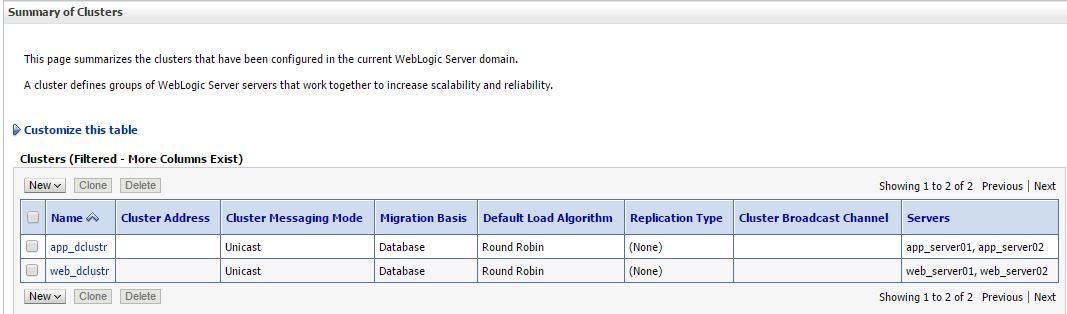
wlst output confirm Admin console
Dynamic Cluster configuration in WebLogic 12.2.1 Domain


Suggestion for future enhancements to the above script you can do following:

  1. create a properties file and pass all the main program required arguments
  2. Cluster Message Mode can be dynamic
  3. Machine per template can be set dynamic
Elastic Cluster on-demand scale up

In the WLST prompt you can test it as :

scaleUp ("app_dclustr",1, true, true)

scaleUp execution for single server:

WLST Scalability implementation
ScaleUp in WLST Execution 

scaleDown('app_dclustr',2,true,true)

Scale down weblogic cluster

scale down in WebLogic 12.2.1 Domain
Scale Down cluster size in WLST

Troubleshooting issues
Issue 1: Unable to Connect to Admin Server Error:
Connection refused
Verify: 
Verify: 
  1.  Administration Server is running 
  2. Hostname is reachable 
  3. Port number is correct 
  4. Firewall is not blocking connectivity 
Issue 2: Authentication Failure Error:
Authentication denied
Verify: 
  1.  Username and password 
  2. userConfigFile and userKeyFile 
  3. Security realm configuration 
Hope you enjoyed by reading this post,  Stay tuned to this blog and share with your friends techies...
Waiting for your comments and suggestions!!

Sunday, February 12, 2023

Server State using WLST in Oracle WebLogic

Hello! Dear Automation focused engineer we have this post about how to work simple server status list for a WebLogic domain. This logic can be build and executed for huge number of WebLogic or FMW Servers in Production helps to view all at a time hostnames, their corresponding states.   

Why we need WebLogic Server State? What all those states?

Knowing the status of the WebLogic Server  is one of the first troubleshoot steps performed by Middleware Administrator.  

Typical use cases include:

  • Verifying server availability after maintenance activities
  • Checking managed server status after deployments
  • Monitoring cluster members during production incidents
  • Validating startup and shutdown operations
  • Automating health checks for large WebLogic environments
  • Generating operational reports
This is the basic need when the all the servers are in bounced for production code move. This same script can be applicable for the pre-production or staging environment too. WLST provides the built-in methods, which gives the status of the Server instance or servers in a Cluster. Here we will deal with individual instance wise data.

Image of ServerLifeCycle in WLST
WebLogic Server Life cycle state diagram

There are several ways to list out the servers. The simple way here you go with interactive way...
In the following example 
  1. We are collecting all the list of servers present inside the WebLogic domain
  2. The state function applied on each server as item  passed to it
  3. repeat this step 2 until all server list ends
 
wls:/demodomain/serverConfig> x=ls('Servers',returnMap='true')
dr--   demoadm
dr--   demoms1
dr--   demoms2

wls:/demodomain/serverConfig> x
[demoadm, demoms1, demoms2]
wls:/demodomain/serverConfig> for i in x:
... state(i,'Server')
...
Current state of "demoadm" : RUNNING
Current state of "demoms1" : SHUTDOWN
Current state of "demoms2" : SHUTDOWN

Cluster listing
wls:/demodomain/serverConfig> c=ls('Clusters',returnMap='true')
dr--   clstr01

wls:/demodomain/serverConfig> c
[clstr01]
wls:/demodomain/serverConfig> state(c[0],'Cluster')

There are 2 server(s) in cluster: clstr01

States of the servers are
demoms1---SHUTDOWN
demoms2---SHUTDOWN

ServerLIfecycleRuntime Mbean tree


Using above shown MBean hierarchy we can fetch the all WebLogic domain server instance's states. If your production WebLogic domain consists of two digit (eg. 60 instances) or three digit number (eg. 120 instances) of managed server then, it is difficult to see all server’s state at once. Weblogic Administration console is unable to show all the servers in the domain on a single page. Navigating in between also a time eating process so think! think better way!! WLST has the solution.

To get the status of all servers in the domain can be obtained with the following steps
  1. Connect to the WebLogic Admin Server
  2. Fetch the Managed server list from the domainRuntime MBean
  3. Iterate the loop and get the state of each Managed Server with ServerLifeCycle Runtime MBean
  4. Repeat if required the step 3 as per the user input to Continue...
  5. Finally if all desired output is visible then disconnect from the AdminServer and exit.

################################################## 
# This script is used to check the status of all WL instances including the admin
###########################################################

def conn():
    UCF='/path/.AdminScripts/userConfigFile.sec'
    UKF='/path/.AdminScripts/userKeyFile.sec'
    admurl = "t3://hostname:wlport"

    try:
        connect(userConfigFile=UCF, userKeyFile=UKF, url=admurl)
    except ConnectionException,e:
        print '\033[1;31m Unable to find admin server...\033[0m'
        exit()

def ServrState():
    print 'Fetching state of every WebLogic instance'
#Fetch the state of the every WebLogic instance
    for name in serverNames:
        cd("/ServerLifeCycleRuntimes/" + name.getName())
        serverState = cmo.getState()
        if serverState == "RUNNING":
            print 'Server ' + name.getName() + ' is :\033[1;32m' + serverState + '\033[0m'
        elif serverState == "STARTING":
            print 'Server ' + name.getName() + ' is :\033[1;33m' + serverState + '\033[0m'
        elif serverState == "UNKNOWN":
            print 'Server ' + name.getName() + ' is :\033[1;34m' + serverState + '\033[0m'
        else:
            print 'Server ' + name.getName() + ' is :\033[1;31m' + serverState + '\033[0m'
        quit()

def quit():
    print '\033[1;35mRe-Run the script HIT any key..\033[0m'
    Ans = raw_input("Are you sure Quit from WLST... (y/n)")
    if (Ans == 'y'):
        disconnect()
        stopRedirect()
        exit()
    else:
        ServrState()

if __name__== "main":
    redirect('./logs/Server.log', 'false')       
    conn()
    serverNames = cmo.getServers()
    domainRuntime()
    ServrState()

Smart Script

Recently I have online discussion with Dianyuan Wang, state of the Managed servers can be obtained with state() command. This function can be used in two ways: 
  • To get individual managed server status you need to pass arguments as managed server name, type as 'Server'. 
  • Other one is to get individual Cluster wise status. 
This can be achieved by passing two arguments cluster name and type as 'Cluster'. The following script will be illustrate the second option, which I found that shorten code that gives same script outcome as above script. It could be leverage your scripting thoughts it is like a plain vanilla form as shown below:

Note: Hope you follow the WLST Tricks & tips
try:
    connect(url = "t3://adminhostname:adminport")
except:
    print "Connection failed"
state('appclstr','Cluster')
state('web1clstr','Cluster')

...
state('webNclstr','Cluster')
-->

Extra Stroke of this new script is that prints how many servers available in each given cluster.

Server state with redirecting, re in WLST

Wang mailed me his situation clarity of explanation why he chosen state command. And how he resolved with Python script tricks here. Its a great learning for me so sharing with you when I saw same question in StackExchange today(28 April 2014) after 3 years!! "The reason I do not use (for now) domainConfig is because some how few Weblogic domains are not in a good state, and when I run the domainConfig command, it complains that it is not enabled. Hence the alternative way I've selected here is using state command. But it don't return the state. It always return None. But it prints out the state of the server. Here you go, Better way is capture that printing output to a file using WLST command redirect-stopRedirect and then, use the Python regular expression to extract the state of each server. The following is the Python snippet how I use the redirect:
 
# Fill your own connection details 
  serverlist=cmo.getServers()   
  for s in serverlist:   
    server_nm = s.getName()
    urldict[server_nm]='t3s://'+s.getListenAddress()+':'+str(s.getAdministrationPort())   
    #domainRuntime()
    #cd('ServerLifeCycleRuntimes/'+server_nm)
    fileName='/tmp/myserver_state.txt'
    redirect(fileName)
    state(server_nm,'Server')
    stopRedirect()
    f = open(fileName)
    try:
      for line in f.readlines():
        if re.search('Current state',line):
          status[server_nm]=line
    except:
      continue
 
  Ks = status.keys()
  for s in Ks:   
    if re.search('RUNNING',status[s]):
		try:
		connect(username,password,urldict[s])
		except:
		continue
		cd("/Servers/" + s)  


...

Troubleshooting Server State

Issue 1: Unable to Connect to Admin Server Error:
Connection refused
Verify: 
  1.  Administration Server is running 
  2. Hostname is reachable 
  3. Port number is correct 
  4. Firewall is not blocking connectivity 
Issue 2: Authentication Failure Error:
Authentication denied
Verify: 
  1.  Username and password 
  2. userConfigFile and userKeyFile 
  3. Security realm configuration 
Issue 3: Server State Returns UNKNOWN 
 
Possible causes: Node Manager is not running Network communication issue Server startup failure Machine configuration mismatch

The WLST state command relies on Node Manager for state retrieval in many scenarios.

Best Practices 

  • Use encrypted userConfigFile and userKeyFile instead of hardcoded passwords.
  • Store WLST scripts in version control.
  • Schedule automated health checks using cron or enterprise schedulers.
  • Generate server-state reports before and after deployments.
  • Monitor cluster health in addition to individual server status.
  • Log output for auditing and troubleshooting purposes.
  • Conclusion

    WLST provides a simple and powerful way to monitor WebLogic Server health and availability. Whether you need to check a single managed server, an entire cluster, or every server in a large domain, the WLST state() command offers a lightweight and automation-friendly solution. By combining WLST scripting with operational automation, WebLogic administrators can improve visibility, reduce manual effort, and accelerate troubleshooting across enterprise environments.
    best regards! Dianyuan Wang

    Here I request you please write back your experiencing with this posting looking ahead for your issues/ suggestions as comments.

    Wednesday, August 31, 2022

    Database connection from WLST offline/Jython

    This blog post objective

    There are many monitoring scripts were developed by me in previous posts in this blog you might have seen in the above menu, we will have some wild requirement which uses pure Jython SQL module which will be full capable of 

    • You might need the output instantly with nice UI developed in AngularJS, JQuery. 
    • You could use the same logic for connecting the Fusion application schema and get the required information.
    • You can use this DB update logic in many other WLST scripts such as deployment tracking 
    Jython WLST code referring to Database
    WLST Jython code referring to Oracle JDBC / SQL query

    My Experiment setup

    1. Vagrant Ubuntu box with Weblogic 11g installed 
    2. Vagrant Ubuntu box with Oracle XE database

    Here is some sample snippets which could help you to workout differently!! Hope you like this thought.

    Connect to the Oracle DB from WLST


    Jython provides zxJDBC module to connect with the various Databases. one among is Oracle! Here I am tried out in the offline WLST.

    wls:/offline> from com.ziclix.python.sql import zxJDBC
    
    jdbc_url = "jdbc:oracle:thin:@192.168.33.115:1521:XE"
    username = "test"
    password = "welcome1"
    driver = "oracle.jdbc.xa.client.OracleXADataSource"
    
    conn = zxJDBC.connect(jdbc_url, username, password, driver)
    cursor = conn.cursor(1)
    

    Fetching records from DB from WLST

    Here is the sample of SQL query which fetch the records from the database into cursor object. We can use two methods to retrieve them: fetchall(), fetchone().
    wls:/offline> cursor.execute("select * from app_table")
    wls:/offline> print cursor.rowcount
    0
    wls:/offline> cursor.fetchall()
    [(100.0, 'Calendar'), (101.0, 'benfits')]
    
    wls:/offline> cursor.execute("select * from app_table where appname='benfits'")
    wls:/offline> cursor.fetchall()
    [(101.0, 'benfits')]
    wls:/offline> cursor.execute("select count(*) from app_table where appname='benfits'")
    wls:/offline> cursor.fetchone()
    (1.0,)
    

    Inserting records from WLST

    wls:/offline> stmt="INSERT INTO app_table values (?, ?)"
    wls:/offline> rs=cursor.executemany(stmt,[103,'secureapp.war'])
    wls:/offline> conn.commit()
    wls:/offline> cursor.execute("select * from app_table")
    wls:/offline> cursor.rowcount
    0
    wls:/offline> cursor.fetchall()
    [(100.0, 'Calendar'), (101.0, 'benfits'), (103.0, 'secureapp.war')]

    Update records in Database from WLST

    wls:/offline> stmt="UPDATE app_table set appname = 'benefits.war' where appid=101"
    wls:/offline> rs=cursor.execute(stmt)
    wls:/offline> conn.commit()
    wls:/offline> cursor.execute("select * from app_table")
    wls:/offline> cursor.fetchall()
    [(100.0, 'Calendar'), (101.0, 'benefits.war'), (103.0, 'secureapp.war')]
    wls:/offline>
    

    Troubleshooting: DatabaseError: IO Error: Connection reset [SQLCode: 17002], [SQLState: 08006]


    To fix this issue Change the setup for your application, so you add the next parameter to the java command: -Djava.security.egd=file:/dev/../dev/urandom

    We made this change in our java.security file and it has gotten rid of the error.
    $ export JAVA_OPTION='-Djava.security.egd=file:/dev/../dev/urandom'
    vagrant@mydev:/vagrant/pybin/reautomation$ wlst $JAVA_OPTION db_utility.py


    References:
    1. Jython 21 documentation 
    2. Jython Book 1.0 Documentation on database 
    3. Inspiring DB connection from WLST 

    JMS Module with ConnectionFactory and Queue configuration using WLST

    After almost three and half years again revisited to the JMS module script. This time the project needs are quite different. Where the Oracle WebLogic domains classified environments  but they are standalone server domains. That is only AdminServer will be there in the domain and that would be target for the JMS module, JMS Destinations.

    JMS Module using WLST
    JMS Module configuring using WLST


    Lets begin the experimenting now, the prerequisites for this are:

    1. A WebLogic Domain configured with single AdminServer
    2. AdminServer should be up and RUNNING
    3. To execute the WLST script required PATH, alias should be defined in the profile as shown below:
    4. export MW_HOME=/u01/app/oracle/fmw
      export WL_HOME=$MW_HOME/wls/wlserver
      export USER_MEM_ARGS="-Djava.security.egd=file:/dev/./urandom"
      alias wlst="$MW_HOME/oracle_common/common/bin/wlst.sh -skipWLSModuleScanning"
      

      You can use this freshly created alias wlst at any directory to invoke WLST shell.  The option -skipWLSModuleScanning is easy, faster learnt while working on docker containers and simple way to use.

    5. Execute the configure JMS Servers
    6. The WLST Script for JMS configurations and all frequently changing values are moved into the properties file.


    #========================================
    # WLST Script purpose: Configuring JMS Module
    # Author: Pavan Devarakonda
    # Update date: 3rd Aug 2017
    #========================================
    from java.util import Properties
    from java.io import FileInputStream
    from java.io import File
    from java.io import FileOutputStream
    from java import io
    from java.lang import Exception
    from java.lang import Throwable
    import os.path
    import sys
    
    envproperty=""
    if (len(sys.argv) > 1):
            envproperty=sys.argv[1]
    else:
            print "Environment Property file not specified"
            sys.exit(2)
    
    propInputStream=FileInputStream(envproperty)
    configProps=Properties()
    configProps.load(propInputStream)
    
    ##########################################
    # Create JMS Moudle will take the 
    # arguments as name, subdeployment name
    # target can be on admin or managed server or cluster
    ##########################################
    def createJMSModule(jms_module_name, adm_name, subdeployment_name):
            cd('/JMSServers')
            jmssrvlist=ls(returnMap='true')
            print jmssrvlist
            cd('/')
            module = create(jms_module_name, "JMSSystemResource")
            #cluster = getMBean("Clusters/"+cluster_target_name)
            #module.addTarget(cluster)
            #adm_name=get('AdminServerName')
            adm=getMBean("Servers/"+adm_name)
            module.addTarget(adm)
            cd('/SystemResources/'+jms_module_name)
    
            module.createSubDeployment(subdeployment_name)
            cd('/SystemResources/'+jms_module_name+'/SubDeployments/'+subdeployment_name)
            list=[]
            for j in jmssrvlist:
                    s='com.bea:Name='+j+',Type=JMSServer'
                    list.append(ObjectName(str(s)))
            set('Targets',jarray.array(list, ObjectName))
    
    
    def getJMSModulePath(jms_module_name):
            jms_module_path = "/JMSSystemResources/"+jms_module_name+"/JMSResource/"+jms_module_name
            return jms_module_path
    
    def createJMSTEMP(jms_module_name,jms_temp_name):
            jms_module_path= getJMSModulePath(jms_module_name)
            cd(jms_module_path)
            cmo.createTemplate(jms_temp_name)
            cd(jms_module_path+'/Templates/'+jms_temp_name)
            cmo.setMaximumMessageSize(20)
    
    ##########################################
    # JMS Queu configuration function 
    # arguments are : JMS module name, Queue jndiname
    # Queue name, jndi name hu
    ##########################################
    def createJMSQ(jms_module_name,jndi,jms_queue_name):
            jms_module_path = getJMSModulePath(jms_module_name)
            cd(jms_module_path)
            cmo.createQueue(jms_queue_name)
            cd(jms_module_path+'/Queues/'+jms_queue_name)
            cmo.setJNDIName(jndi)
            cmo.setSubDeploymentName(subdeployment_name)
    
    adminUser=configProps.get("adminUser")
    adminPassword=configProps.get("adminPassword")
    adminURL=configProps.get("adminURL")
    
    connect(adminUser,adminPassword,adminURL)
    #adm_name=get('AdminServerName')
    adm_name=ls('Servers',returnMap='true')[0]
    print adm_name
    edit()
    startEdit()
    
    ##########################################
    #   JMS CONFIGURATION## 
    ##########################################
    total_conf=configProps.get("total_conf")
    tot_djmsm=configProps.get("total_default_jms_module")
    #subdeployment_name=configProps.get("subdeployment_name")
    
    a=1
    while(a <= int(tot_djmsm)):
            i=int(a)
            jms_mod_name=configProps.get("jms_mod_name"+ str(i))
            #cluster=configProps.get("jms_mod_target"+ str(i))
            subdeployment_name=configProps.get("subdeployment_name"+ str(i))
            createJMSModule(jms_mod_name,adm_name,subdeployment_name)
            total_q=configProps.get("total_queue"+str(i))
            j=1
            while(j <= int(total_q)):
                    queue_name=configProps.get("queue_name"+ str(i)+str(j))
                    queue_jndi=configProps.get("queue_jndi"+ str(i)+str(j))
                    createJMSQ(jms_mod_name,queue_jndi,queue_name)
                    j = j + 1
            i=i+1
            a = a+1
    save()
    activate(block="true")
    disconnect() 


    Now see this is a sample of properties file that could help you to build the JMS Module, be read by the WLST script at the run time:
    ###################################################
    # JMS SUBDEPLOY CONFIGURATION
    ###################################################
    total_subdply=2
    total_default_jms_module=2
    total_conf=0
    subdeployment_name1=DemoJMSFAServer1
    subdeployment_name2=DemoJMSFAServer2
    
    ###################################################
    # JMS MODULE CONFIGURATION
    ###################################################
    jms_mod_name1=Demo-SystemModule1
    jms_mod_name2=Demo-SystemModule2
    
    ###################################################
    # JMS CONNECTION FACTORY CONFIGURATION
    ###################################################
    conf_jndi1=demoCF
    conf_name1=jms/demoCF
    
    ###################################################
    #   JMS QUEUE CONFIGURATION
    ###################################################
    
    total_queue1=2
    queue_name11=Q1
    queue_jndi11=Q1
    
    queue_name12= BQ1
    queue_jndi12= BQ1
    
    
    total_queue2=2
    queue_name21=Q2
    queue_jndi21=Q2
    
    queue_name22= BQ2
    queue_jndi22= BQ2
    
    #========== ADMIN DETAILS =========================
    adminUser=weblogic
    adminPassword=welcome1
    adminURL=t3://192.168.33.100:8100
    
    output
    $ wlst jms_module.py jms_module.properties
    
    
    let's see what happen when you apply this logic on your project? Did you notice any errors? Please write back 🔙 with your error screen shot. 

    How do you know everything went well? Open the WebLogic Administration console to check the JMS Module Configuration has successfully created a new JMS resource or not.

    You may be intrested to learn more WLST scripting for JMS you can also visit the Uniform Distributed Queue configuration post. Thanks for being with us in this post, Please write to us your errors and exceptions when you run this script.

    Saturday, August 14, 2021

    How to include modules and Java Options in WLST Shell?

    In recent developments in the Python impacting WLST Shell as well. We might want to use Python module into our WLST scripts as well. Sometimes you need a Python module that is available for Python Community same we may use in your WLST, and sometimes you might need some JAVA_OPTIONS must be included before the WLST shell is launched.

    Here I will walk you through some scenarios where you need to customize.
    1. When there is customization in WebLogic domains such as Oracle Utilities products uses the SSL enable communication for their AdminServer - Managed servers
    2. WLST shell using a connection to AdminServer with t3s protocol
    3. WebLogic domain for Oracle Data Integrator uses WLST when a managed server used to stop with 'stopManagedWebLogic.sh' or even AdminServer using 'stopWebLogic.sh' script calls WLST scripts to stop and when there is SSL enabled for the security purpose then WLST shell interaction requires SSL configuration details

    How to include the Python module in WLST?

    This could be a common requirement when automation scripts needs multiple Python modules into their WLST Shell.

    Better you can add to your profile script. I've added the following lines to the .bashrc profile script.
    alias wlst="$WL_HOME/../oracle_common/common/bin/wlst.sh"
    export CONFIG_JVM_ARGS="-Djava.security.egd=file:/dev/./urandom \
    -Dweblogic.security.SSL.enableJSSE=true \
    -Dweblogic.security.SSL.ignoreHostnameVerification=true \
    -Dweblogic.security.TrustKeyStore=DemoTrust \
    -Dweblogic.security.CustomTrustKeyStoreType=JKS"
    
    
    Note here if you are using Demo certificates then you can use the above. But if you have custom certificates then you need to provide Custom Certificates location. 

    How you can tune or optimize your WLST Shell launching time?


    In your .bashrc or bash_profile you can include the following environment variable which will boost-up or speed up your JVM launching time.
    export CONFIG_JVM_ARGS=-Djava.security.egd=file:/dev/./urandom
    

    Configuring FMW domains we expected more with CONFIG_JVM_ARG

    export CONFIG_JVM_ARGS=-Dcom.oracle.cie.config.showProfile=true
    
    This will enable the option in the configuration type screen to create a new compact SOA/OSB domain or any FMW 12+ domain. Without -Dcom.oracle.cie.config.showProfile=true FMW Domain creation will not show the Embedded Database option for Database configuration type in the Wizard.

    Friday, July 13, 2018

    Setting Keystore and SSL for a WebLogic Server using WLST

    Configuring Custom SSL for WebLogic server                     

    Working on the Oracle Utilities project, where our Environment requirement is that Mobile runtimes will communicates with secure servers. So we need to make the WebLogic server SSL Enabled with  Custom SSL certificates configuration.

    WLST keystore SSL for Admin Server, Managed Server


    Assumptions:

    • WebLogic 12.2.1.3 domain configured
    • Each WebLogic server SSL enabled already
    • AdminServer up and running


    Here in this example I am using CA provided certificates but to publish in this post giving dummy paths and file names. The prerequisites you must have the Custom Identity and Custom Trust store


    #!/usr/bin/python
    # Author    : Pavan Devarakonda
    # Save Script as  : set_keystoreSSL.py
    # Initial drafted : 12/07/2018
    #==========================================
    
    import re
    
    # Get location of the properties file.
    execfile('/opt/MWM/scripts/set_keystore.properties')
    def connectAdmin():
            # Connect to the AdminServer.
            try:
                    connect(admin_username, admin_password, admin_url)
            except:
                    print 'Unable to connect to AdminServer'
                    exit()
    
    def setKSnSSL4server(serverName, ksIdentityPath,ksIdentityPassword,ksTrustPath,ksTrustPassword,privateKeyAlias,keyPhrase):
            # Set keystore information.
            print "==============================="
            print "set keystore to "+serverName
            print "==============================="
            cd('/Servers/' + serverName)
            cmo.setKeyStores('CustomIdentityAndCustomTrust')
    
            cmo.setCustomIdentityKeyStoreFileName(ksIdentityPath)
            cmo.setCustomIdentityKeyStoreType('JKS')
            set('CustomIdentityKeyStorePassPhrase', ksIdentityPassword)
            cmo.setCustomTrustKeyStoreFileName(ksTrustPath)
            cmo.setCustomTrustKeyStoreType('JKS')
            set('CustomTrustKeyStorePassPhrase', ksTrustPassword)
            print "set SSL to "+serverName
            print "==============================="
            cd('/Servers/' + serverName + '/SSL/' + serverName)
            cmo.setServerPrivateKeyAlias(privateKeyAlias)
            set('ServerPrivateKeyPassPhrase', keyPhrase)
    
    def main():
            connectAdmin()
            print servers
            edit()
            startEdit()
            print "========================================================================="
            print "AdminServer, utilities_server1 server set keystore, SSL custom keystore"
            print "========================================================================="
      setKSnSSL4server(adm['name'], adm['identity.path'], adm['identity.password'],adm['trust.path'],adm['trust.password'],adm['privateKeyAlias'],adm['keyPhrase'])
      setKSnSSL4server(ms1['name'], ms1['identity.path'], ms1['identity.password'],ms1['trust.path'],ms1['trust.password'],ms1['privateKeyAlias'],ms1['keyPhrase'])
            save()
            activate()
            disconnect()
            exit()
    
    main()
    
    
    This time the properties file is also python script to use the dictionary capabilities of Python to refer to the Weblogic server and its corresponding server'S keystore, SSL details to store together.


    # AdminServer connection details.
    admin_username='system'
    admin_password='welcome1'
    admin_url='t3://test.server.com:7001'
    
    #Dictionaries for AdminServer, utilities_server1 keystore, SSL values
    
    adm = { 'name':'AdminServer','identity.path':'/opt/myalias_cert/myIdentity.jks', 'identity.password':'welcome1', \
    'trust.path':'/opt/myalias_cert/myTrustStore.jks', 'trust.password':'welcome1', \
    'keyPhrase':'welcome1', 'privateKeyAlias':'myalias'}
    
    ms1 = { 'name':'utilities_server1','identity.path':'/opt/myalias_cert/myIdentity.jks', 'identity.password':'welcome1', \
    'trust.path':'/opt/myalias_cert/myTrustStore.jks', 'trust.password':'welcome1', \
    'keyPhrase':'welcome1', 'privateKeyAlias':'myalias'}


     The execution or the above script output looks as below: You can execute.

    Saturday, February 3, 2018

    Remotely domain extension using WLST

    WebLogic latest version 12.2.x come up with different WebLogic domain templates and their usage methods in WLST. Usually WebLogic domain can be created with base domain template using wls.jar. Then after that domain need to be customized as the projects where we need the extended domain.

    1. When the domain spread across multiple machines/nodes
    2. One successful configuration domain reuse to create new domains
    Here is small experiment with the domain template, here we have two nodes associated with  192.168.33.100 - Machine100 and 192.168.33101 - Machine101 IP addresses and machine. The admin server configured in the Machine100 and also two web servers in webcluster, two app servers in appcluster. The whole configuration we need in Machine101.

    Earlier to WebLogic 12.2 version we have pack and unpack option only for the domain expansion in the remote machine otherwise copy the domain folder need to copy. 

    In the latest versions of WebLogic 12.2.x above are having different WLST methods that relates to template usage.
    Remotely extension of WebLogic Domain using WLST and pack-unpack
    Lets explore options available in WLST

    selectTemplate() in WLST

    There are multiple domain templates, extension templates for domains are available in Oracle WebLogic installation media pack it self. Some of the application specific templates also available with the media pack.

    selectCustomTemplate() in WLST

    We can create our own WebLogic domain template using writeTemplate() that will be containing the project specific configurations such as - servers, cluster, JDBC, JMS are pre-configured and reusable. The select custom template method followed by loadTemplate command.

    loadTemplates() in WLST

    The loadTemplates(0 is the command always used after selectTemplate or selectCustomTemplate commands.

    Automation solution: Create domain template and configure domain


    Like here we need to create extension domain in the Machine101, you may need to to do for multiple machines in production environments.

    The process is simplified into few steps
    1. connect to the existing domain
    2. Read the domain and generate the custom domain template
    3. Create the extended domain enter the same domain name and path or fresh domain can be configured with the new domain name, listen address modification as required

    #======================================
    # 
    # File: remoteDomain.py
    # Applicable WebLogic version: 12.2.x
    # This will solve pack and unpack strange issues
    #
    #===============================================
    def printline(s):
        print "-"*10 + s
     
    def createDomainTemplate(templateLocation):
        
        ''' Generate the custom domain template  '''
        connect(admuser,admpass,admurl)
        
        print ("Writing Custom Template...")
        writeTemplate(templateLocation)
        print ("Writing Template...: Completed")
        disconnect()
        
    def create_Domain(templateLocation, domainPath):
     ''' Creating extended domain remotely 
     selectCustomTemplate, loadTemplates will get the inputs
     then writeDomain will create the domain '''
     
     selectCustomTemplate(templateLocation)
     loadTemplates()
     print ("Creating extended domain...")
     writeDomain (domainPath)
     closeTemplate()
     print ("Creating domain...: Completed")
           
           
    def main():
     '''
     Change the following values according to your domain
     user security better to use storeuserconfig
     and domain template 
     you can move these variables into properties file
     '''
     templateLocation ='/u01/app/oracle/prod_domain_template.jar'
     domainPath='/u01/app/oracle/prod_domain'
     admuser='weblogic'
     admpass='welcome1'
     admurl='192.168.33.100:8001'
     
     createDomainTemplate(templateLocation)
     create_Domain(templateLocation, domainPath)
        
    if __name__ == "__main__":
        printline()
        print("SCRIPT BEING RUN DIRECTLY")
        printline()
        main()
     printline()
    

    Remotely execution of script

    WLST SCRIPT

    Wednesday, July 26, 2017

    Logging configuration for domain and WebLogic server

    Why we need Logging?
    To understand in a basic level, when we run the WebLogic Servers we don't know what is happening inside the process.  It is kind of black box to us. To know what is happening inside the domain or server side to get more details we have logging mechanism enabled in WebLogic domains.


    WebLogic Logging works for multiple hierarchical Subsystem. At the top level it is already enabled and we can use the existing setup. But for some reasons each project will have separate logging needs.

    When we can use this?
    If there are multiple Testing logging configuration at different levels:
    1. domain level logs - global status 
    2. Server level logs - admin or managed server status
    3. Resource level logs - JDBC, JMS, application status
    We can set the common attributes of JMX MBean reset with new values which will work for your project needs.

    While creating this snippet we have tried to execute it on WebLogic 11g [10.3.6] and WebLogic 12c.

    ########################################################################
    # Python Script file: logrotate.py
    # Author: Pavan Devarakonda
    # Date : 25-Jul-2017
    ########################################################################
    loadProperties('demodomain.properties')
    # Functions
    def editMode():
       edit()
       startEdit()
    
    def saveActivate():
       save()
       activate()
       print '###### Completed configuration of domain logs ##############'
    
    def exitDisconnect():
            disconnect()
            exit()
    
    def connectToAdmin():
        connect(username,password,url)
    
    def domainlog_rotation(domainname,FC,MinSize):
            """
            It will take the three parameters domainpath ,domainname is string values
            and FileCount -  FC and File MinSize - MinSize are integer values these values loaded from properties
            so they need to type cast to integers
            """
            cd('/Log/'+domainname)
            cmo.setRotationType('bySize')
            cmo.setRotateLogOnStartup(true)
            cmo.setFileCount(int(FC))
            cmo.setNumberOfFilesLimited(true)
            cmo.setFileMinSize(int(MinSize))
            cmo.setLogFileRotationDir(domainpath+domainname+'/RotationDir')
            save()
    
    def ServerLogRotation(S,SFC,SMinsize):
            """
            This module will rotate the AdminServer or Managed Server loggger settings
            It takes three params - S as name of the server, SFC - Server FileCount, SMinsize - Server FileMinSize
            """
            print S+ ' server log  setting...'
            cd('/Servers/'+S+'/Log/'+S)
            cmo.setRotationType('bySize')
            cmo.setRotateLogOnStartup(true)
            cmo.setFileCount(int(SFC))
            cmo.setNumberOfFilesLimited(true)
            cmo.setFileMinSize(int(SMinsize))
            cmo.setLogFileRotationDir(domainpath+domainname+'/RotationDir +S')
    
    def printline(): print '#'*50
    
    def main():
            printline(); print 'Starting domain logs Configurations '; printline()
            connectToAdmin()
            editMode()
            domainlog_rotation(domainname,FC,MinSize)
            printline(); print 'Starting Server logs configurations' ; printline()
            cd('/')
            for server_name in ls('Servers',returnMap='true'):
                    if server_name == 'AdminServer':
                            ServerLogRotation(server_name,ASFC,ASMinsize)
                    else:
                            ServerLogRotation(server_name,MSFC,MSMinsize)
            saveActivate()
            exitDisconnect()
    
    main()
    

    Please double check all indentation blocks.
    The properties file used for sample tests is as follows:

    #WebLogic console connection parameters
    username=weblogic
    password=welcome1
    url=t3://192.168.33.102:8001
    domainname=demo_domain
    
    # Domain logger configurations
    FC=4
    MinSize=5
    domainpath=/u01/oracle/domains/
    
    # ManagedServer logger configurations
    MSFC=3
    MSMinsize=2
    
    # AdminServer logger configurations
    ASFC=5


    Sample execution output as follows:
    WebLogic Logger enabled and configuration using WLST scrpt execution.

    Saturday, April 8, 2017

    WebLogic 12c Cluster Domain configuration using WLST offline

    Objective of this script is to Leverage the time takes to configure the WebLogic Domain and after starting the admin server then following list need to be configured for HA/reliability.
    Everytime I work on new project there is a need of creation of the clustered domain. From my past experiences collected all basic requirements together list them over here.

    • AdminServer configuration includes Name, Listen Address, ListenPort
    • User credentials username, password
    • After writing basic domain going for create machine which include Name, type of machine
    • Nodemaager includes NMTypes such as plain, ssl, hosted node, nodemanager port
    • Managed servers have Name, ListenAddress, ListenPort, set machine
    • Cluster includes name, ClusterAddress, Servers part of the cluster interesting part here
    Assumptions for this task:

    WebLogic 12.2.1 cluster domain creation with WLST
    WLST Configuring WebLogic Cluster Domain


    In the script as per my convenience some of them are hardcoded, My hardcoded values:
    1. Managed Server list
    2. Cluster list
    In this script lots of Python sequence functions are used.

    • List index, 
    • Dictionary keys
    • String startwith

    Lets begin the fun of WLST HERE...
    # purpose:  Create the domian with the one Admin Server along with the
    # two managed servers in each cluster. app_cluster, web_cluster
    # Assumption here all managed servers runs on the same machine
    # Modified date: 07-April-2017
    # File name     :       create_clusterdomain.py
    # Dependencies  :       cluster_domain.properties
    # Note this names of managed servers, cluster, hostname all hard coded
    #
    def printline(s):
        print "-"*10 + s
    
    loadProperties('/u01/app/software/scripts/pybin/cluster_domain.properties')
    
    # Created a Cluster and assaign the servers to that cluster
    # Create a domain from the weblogic domain template
    
    WLHOME=os.environ["WL_HOME"]
    readTemplate(WLHOME+'/common/templates/wls/wls.jar')
    printline("reading template completed")
    
    # Configure the Administration Servers with out using SSL Port
    
    cd('Servers/AdminServer')
    set('ListenAddress',WLSAdminIP)
    set('ListenPort', int(AdminPort))
    
    printline("AdminServer ListenAddress, port set")
    
    cd('/')
    cd('Security/base_domain/User/weblogic')
    cmo.setPassword(AdminPasswd)
    printline("User credentials set")
    
    setOption('OverwriteDomain', 'true')
    writeDomain(DomainPath+'/'+DomainName)
    printline("Domain creation done.")
    
    closeTemplate()
    readDomain(DomainPath+'/'+DomainName)
    machines={'myM100':'192.168.33.100', 'myM110':'192.168.33.110'}
    
    for m in machines.keys():
            cd('/')
            create(m, 'UnixMachine')
            cd('Machine/' + m)
            create(m, 'NodeManager')
            cd('NodeManager/' + m)
            set('ListenAddress', machines[m])
            set('NMType','ssl')
    
    # Create the Managed Servers and  configuration them
    ManagedServerList=['app01','app02','web01','web02']
    
    app_ca=""
    web_ca=""
    for s in ManagedServerList:
            cd('/')
            create(s,'Server')
            cd('Server/'+s)
            i=ManagedServerList.index(s)
            lp=8101+i
            set('ListenPort', int(lp))
            j=int(s[-1])
            m=machines.keys()[j-1]
            set('ListenAddress', machines[m])
            set('Machine', m)
    
            if s.startswith('app') :
                    if j%2==0:
                            app_ca+=','
                    app_ca+=machines[m]+':'+str(lp)
    
            elif s.startswith('web'):
                    if j%2==0:
                            web_ca+=','
                    web_ca+=machines[m]+':'+str(lp)
    
            printline("Managed server :"+s+" created")
    
    printline("configured managed servers done.")
    printline("app cluster address:"+app_ca)
    printline("Web cluster address:"+web_ca)
    
    # Create and Configure a Cluster and assian the Managed Servers to that cluster
    clusters={'app_clustr1':'app01,app02', 'web_clustr1':'web01,web02'}
    clstrs=clusters.keys()
    for c in clstrs:
            cd('/')
            create(c,'Cluster')
            assign('Server', clusters[c],'Cluster', c)
            cd('Clusters/'+c)
            set('ClusterMessagingMode','multicast')
            if c.startswith('app'):
                    set('ClusterAddress',app_ca)
            elif c.startswith('web'):
                    set('ClusterAddress',web_ca)
            set('MulticastAddress','237.0.0.101')
            set('MulticastPort',7200+clstrs.index(c))
            printline("cluster "+c+" created")
    
    printline("Configured clusters and assigned managed servers done.")
    #Write the domain and Close the domain template
    
    updateDomain()
    closeDomain()
    
    printline("Task completed successfully, exiting!!!")
    exit()
    
    
    Now the properties file which you can enhance with your limitations
    WLSAdminIP=192.168.33.100
    AdminPort=8001
    AdminPasswd=welcome1
    DomainPath=/u01/app/oracle/domains
    DomainName=uat_domain


    Lets have the execution screen for you:


    Please write your valuable feedback on this post, so that we can keep improve further to have more interesting fun stuff soon for you.

    Wednesday, February 22, 2017

    Restricted JRF WebLogic infrastructure domain configuration using WLST

    While working on Fusion Middleware products we need to prepare the WebLogic restricted JRF domain, most of the time configuration Wizard leads to confusion and stuck with what to do for RCU configurations. Even when you need to create a domain for Collocated OHS Environment.

    Pr-requisites
    1. Oracle JDK Installed
    2. Oracle Fusion Middleware Infrastructure 12.2.1 installed
    3. Environment setup with bash profile
    Templates used for configuring the Restricted JRF domain

    1. JRF Restricted template - oracle.jrf_restricted_template.jar
    2. Enterprise Manager - oracle.em_wls_restricted_template.jar
    3. Coherence - wls_coherence_template.jar [default selected with above anyone of the template]


     Lets first create the properties file:

    TEMPLATE=/u01/app/oracle/fmw1221/wlserver/common/templates/wls/wls.jar 
    MW_HOME=/u01/app/oracle/fmw1221
    ADMIN_LISTEN_ADDRESS=192.168.33.100
    ADMIN_PORT=8001
    ADMIN_USER=weblogic
    ADMIN_PWD=Welcome1
    DOMAIN_NAME=RestrictedJRF_Domain
    DOMAIN_DIR=/u01/app/oracle/domains
    

    Note: You could modifiy the MW_HOME  path

    The WLST Script is  as follows:

    def create_prod_domain():
     print "Reading base domain tempalte"
     readTemplate(TEMPLATE)
     cd('/')
    
     print "AdminServer settings"
     cmo.setName(DOMAIN_NAME)
     cd('Servers/AdminServer')
     cmo.setListenAddress(ADMIN_LISTEN_ADDRESS)
     cmo.setListenPort(int(ADMIN_PORT))
     cd( '/' )
     cd( 'Security/'+DOMAIN_NAME+'/User/' +ADMIN_USER)
     cmo.setPassword(ADMIN_PWD)
     cd('/')
    
     print "Production domain setup.."
     setOption("ServerStartMode", "prod")
     setOption("OverwriteDomain", "true")
     writeDomain( DOMAIN_DIR+'/'+DOMAIN_NAME )
     print "=============================================="
     print "Production domain created successfully..."
     print "=============================================="
    
     closeTemplate()
    
    
    def apply_jrf2domain():
     # Apply the JRF Template.
     print "reading domain:"+DOMAIN_NAME
     readDomain(DOMAIN_DIR+'/'+DOMAIN_NAME )
     addTemplate(MW_HOME + '/oracle_common/common/templates/wls/oracle.jrf_restricted_template.jar')
     print "Adding Template :oracle.jrf_restricted_template.jar"
    
     # I'm including the EM template too.
     addTemplate(MW_HOME + '/em/common/templates/wls/oracle.em_wls_restricted_template.jar')
     print "Added Template :oracle.em_wls_restricted_template.jar"
    
     updateDomain()
     print "Updated the domain with Restricted JRF and Enterprise Manager templates"
     closeDomain()
     print "Close the domain"
     exit()
    
    def main():
     print "=============================================="
     print "Welcome to Restricted JRF domain configuration"
     print "=============================================="
    
     create_prod_domain()
     print "Domain created successfully..."
     apply_jrf2domain()
    
    main()

    The script execution will be as follows:
    wlst -loadProperties RestrictedJRF_domain.properties create_RestrictedJRF_domain.py
    

    Note: wlst must be aliased to the Infrastructure installation wlserver path
    Restricted JRF WebLogic infrastructure domain with EM template
     Advantage of this domain:
    • Enterprise Manager Fusion Middleware Control
    • Easy to work on FW products such as SOA, OSB, and Collocated OHS etc
    Note that it will be consuming more memory foot print than regular base domain.

    Start your Restricted JRF Domain and when you look into WebLogic Admin console deployments see the following:

    WebLogic Restricted Domain deployment

    Saturday, June 18, 2016

    Multitenancy in WebLogic 12c Part -7 Deploy and Undeploy Application to a Domain Partition

    After almost four months took me to write this, due to busy in work this blog post on WebLogic 12.2.1 MT feature exploration took some time. To workout multiple deployment scenarios on MT environment we need real-time implementation environments. As of now I've limiting my scope to web application deployment on to a partition. You could do much more wider automation using WLST based on this script.

    Pre-requisites set-up for Multitenancy:

    You can also visit the following post so that you can have connectivity what we are discussing here.

    1. Configure Security Realm for MT
    2. Create Users & Groups for Partition domain
    3. Configure Virtual Target
    4. Creating Partition Domain
    5. Configure IDD for Partition
    6. Partition Control (start/stop using WLST)
    7. Deploy and Undeploy Application on Partition [This post]

    Download sample application

    You can download sample web application for WebLogic environment :
    Here I am using benefits.war which available in Oracle examples.
    Download Shopping Cart Sample Link

    Deploying an application to a WebLogic server fine it was upto 11g and regular WebLogic environment. In WebLogic 12.2.1 MT introduced with the great feature that is maintaining small domain partitions where you can feel the required resources all that need to run the application you will get in the partition. This MT deployment might more frequent when your application moved to WebLogic 12.2.1.

    The deploy() and undeploy() command variation with the number of arguments you pass that are related to partition or resource group template. Here I've used first option targeting to a RUNNING State partition. As Oracle recommends to use ResourceGroupTemplate as target in the MT environment.

    undeploy with WLST on Partition Domain
    WebLogic web application deployment with WLST to a partition


    The best benefit you can provide it to the partition deployment do one time deployment same partition you can package using export you will get final outcome as zip file. That you can reuse in other test environments as well.using import.

    def deploy2partition(a,ap, p,rg,o):
            progress=deploy(appName=a, path=ap, partition=p, resourceGroup=rg, deploymentOrder=o, securityModel='DDOnly')
            while not (progress.isCompleted() or progress.isFailed()) :
                    os.time.sleep(2)
            print progress.getState()
    
    def undeploy4mPartition(a, p):
            progress=undeploy(appName=a,  partition=p)
            while not (progress.isCompleted() or progress.isFailed()) :
                    java.lang.Thread.sleep(2000)
            print progress.getState()
    
    def main():
            # The following are the properties which can be changed according to your needs.
            APP_PATH='/u01/app/software/benefits.war'
            APPNAME='BENEFITS'
            USER='weblogic'
            PASSWD='welcome1'
            ADMURL='t3://192.168.33.100:6100'
    
            connect(USER, PASSWD, ADMURL)
            partitionName="Corporate_partition"
            rgName="Corporate_rg"
            DOrder=10
    
            if len(sys.argv) >1:
                    choice  = sys.argv[1]
            else:
                    usage()
    
            if choice == 'deploy':
                    deploy2partition(APPNAME, APP_PATH, partitionName, rgName, DOrder)
            elif choice == 'undeploy':
                    undeploy4mPartition(APPNAME, partitionName)
    
            disconnect()
            print "Deployment process on partition completed successful !!!"
    
    def usage():
            print """Usage:
            wlst """+sys.argv[0] +""" deploy | undeploy"""
            exit()
    
    main()
    

    The deploy option:
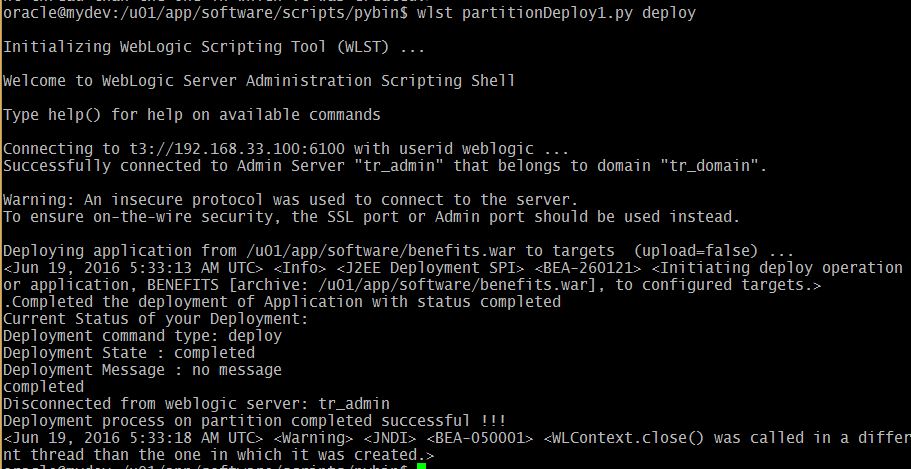
     wlst partitionDeploy1.py deploy
    
    WLST deploy on Partition Domain
    Administration Console deployment update:
    The undeploy option:
     wlst partitionDeploy1.py undeploy
    
    WLST Undeploy on Partion

    Monday, January 25, 2016

    Multitenancy in WebLogic 12c Part -6 Partition Domain Control

    Controlling means starting the partition and shutdown the partition that we have created in the earlier post. Here my exploration on the two important WLST functions:

    1. startPartitionWait
    2. forceShutdownPartitionWait

    Starts the given partition and waits until the partition reaches the requested state that is RUNNING state. To run this command the partition must already exist. Therefore startPartitionWait should not be used in the edit session.

    The forceShutdownPartitionWait command will Shutdown the given partition and waits until the partition state reaches the SHUTDOWN state. Same rule works for this command as well, the partition must be exists to control it.

    Prerequisites:

    1. Configure Security Realm
    2. Create Users & Groups for Partition domain
    3. Configure Virtual Target
    4. Creating Partition Domain
    5. Configure IDD for Partition
    6. Partition Control (start/stop using WLST)

    Here I've prepared the customized script for stop, start and restart all the partitions in the domain.
    # This script will start the partition
    
    def startPartition(partitionName):
            print "Staring the partition :"+ partitionName
            partitionBean=cmo.lookupPartition(partitionName)
            startPartitionWait(partitionBean)
    
    def startAllPartitions():
            print "Starting all partitions ..."
            startPartition('Corporate_partition')
            startPartition('Online_partition')
    
    def stopPartition(partitionName):
            print "Stoping the partition :"+ partitionName
            partitionBean=cmo.lookupPartition(partitionName)
            forceShutdownPartitionWait(partitionBean)
    
    def stopAllPartitions():
            print "Starting all partitions ..."
            stopPartition('Corporate_partition')
            stopPartition('Online_partition')
    
    
    def main():
            connect("weblogic","welcome1","t3://192.168.33.100:6100")
    
            print "Partition Control Menu..."
            print "==========================="
            print "1. Start all partitions"
            print "2. Shutdown all partitions"
            print "3. Restart all partitions"
            control=input("Enter your control choice: ")
    
            if control==1:
                    startAllPartitions()
            elif control==2:
                    stopAllPartitions()
            elif control==3:
                    stopAllPartitions()
                    startAllPartitions()
            else:
                    print "invalid option..."
            disconnect()
    
    
    main()
    
    
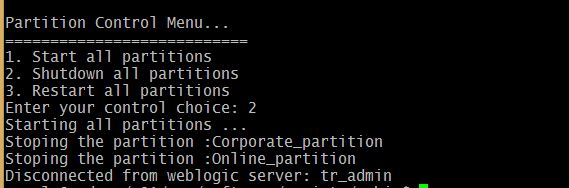
    The execution goes as shown below...
    Starting Partition using WLST

    Partition state RUNNING
    Stop the Partition with menu option 2

    Stop Partition using WLST
    Double check the same on the WebLogic Admin console:

    Shutdown Partitions on WebLogic Admin Console

    Sunday, July 12, 2015

    NodeManager Status from WLST

    When you use WebLogic admin console you know the Node manager is 'Reachable' or 'Inactive' state. The same thing if you wish to get it from WLST machine monitoring, this is not available as exposed MBean attribute.


    How to find the NodeManager Running from WLST?
    Brainstorming...
    Found three alternative solutions.

    1. Use jps command to find the NodeManager Pid exist or not
    2. Connect the Nodemanager if it is succeeds then NM Reachable otherwise not.
    3. Use a simple socket module to create the socket object on the host, port

    NodeManager Check with jps command

    JDK provides jps command to show the list of Java Pids with name of the Java program. provided your JAVA_HOME must be available in os environment variables. So conditions applied here!! anyways lets see the solution :

    def nm_status():
            NMstatus=os.system('jps |grep -i nodemanager|grep -v grep')
            if NMstatus==0:
                    return 'Reachable'
            else:
                    return 'Inactive'
    
    Note: Please check indentations after copying to your editor.
    The disadvantage of this method is it is going to work on Linux/Unix environments only, No Windows.

    Connect to NodeMnager get State


    WLST Command nmConnect() is going to connect if the machine have a Node Manager running, but here it does not returns the output to a variable. The output normally redirecting to standard output stdout. If we can redirect that to a file and check that contians "Connected"word then you can confirm Nodemanager is 'Reachable' otherwise 'Inactive' state.

    def NM_status(nmUser, nmPassword, nmHost, nmPort, dName, domainPath,nmTYPE):
     """ This option nmConnect will give that it is reachable or not from stdout """
            redirect('/tmp/mywlst.out')
            nmConnect(nmUser, nmPassword, nmHost, nmPort, dName, domainPath,nmTYPE)
            stopRedirect()
            flag=0
            for line in open("/tmp/mywlst.out"):
             if "Connected" in line:
              flag=1
              break
    
     nmDisconnect()
            if flag==1:
              return "Reachable"
            else:
             return "Inactive"
    

    Here we met the purpose of knowing about the status of Node manager. Still looking for better alternative than this!

    Node manager status by Socket module

    In Python we have Socket object and its related methods to check weather a port is available or not. On a machine if we try to create socket object with Node manager ip address, port then it is going to check the port availability that gives us status!

    def is_available(address, port):
        import socket
        try:
            s = socket.socket()
            s.connect((address, int(port)))
            return true
        except:
            return false
    
    def nmStatus(machinesList):
     """ This will create global string with Node manager status"
     machine_port=5556
     machine_host=localhost
     global g_str  
     g_str+="NM "+machine+ " -   "
         
     if is_available(machine_host, machine_port):
      g_str+="Reachable"+"\n"
     else:
      g_str+="Inactive"+"\n"
     
    
    In you main script you could call nmStatus to know about the nodemanager status. Do you have any new thoughts, ideas or suggestions are welcome, Thanks for being with me.

    Thursday, December 25, 2014

    File IO in WLST: How to store output of WLST/Jython?

    Hey WLST scripting enthos Guys!!

    I was prepared some of industry most reffered WLST monitoring scripts... they are running well and good... Now the need is to store the result of this monitoring script into a FILE. How to make this? how to redirect this output... normally output is coming from print command in the jython/python. I was searching in google for this output storing to a file from WLST not really good outcomes... then I thought better I choose file style as in C programming allows Standard Output to a files with file pointers. This found a jython tutorial which is already available in online...

    WLST File input output operations

    -->

    Standard Out and Error


    Standard output and standard error (commonly abbreviated stdout and stderr) are pipes that are built into every unix-like platform. The stdout (fileObject) is defined in the Python standard sys module, and it is a stream object. Calling its write() function which will print out whatever string you pass as argument to it, then return the length of the output. In fact, this is what the print function really does; it adds a carriage return to the end of the string that you’re printing, and calls sys.stdout.write function.
    ##############################################
    # This program is to illustrate sys fileojects
    # Standard Output stdout
    # Standard Error stderr
    ##############################################
    print "Normal print..."
    for i in range(3):
            print "WLST is awesome!!!"
    
    import sys
    print "sys.stdout...."
    for i in range(5):
            l=sys.stdout.write('WLST By Examples\n')
    
    print "sys.stderr...."
    for i in range(4):
            errline=sys.stderr.write('WLST in 12.1.3 Wonderful!! ')
    
    
    Here it shows the difference of print, write function with/without carriage return example.
    $ wlst fileObj_sys.py
    
    Initializing WebLogic Scripting Tool (WLST) ...
    
    Welcome to WebLogic Server Administration Scripting Shell
    
    Type help() for help on available commands
    
    Normal print...
    WLST is awesome!!!
    WLST is awesome!!!
    WLST is awesome!!!
    sys.stdout....
    WLST By Examples
    WLST By Examples
    WLST By Examples
    WLST By Examples
    WLST By Examples
    sys.stderr....
    WLST in 12.1.3 Wonderful!! WLST in 12.1.3 Wonderful!! WLST in 12.1.3 Wonderful!!
    
    
    In the simplest case, sys.stdout and sys.stderr send their output to the same place. In Python, standard output, standard error does not add carriage returns for you. If you want carriage returns. you’ll need to write manually include the carriage return characters. sys.stdout and sys.stderr are stream objects, but they are write-only. Here important fact is that when you attempting to call their read() method will always raise an IOError.

    Redirecting output with file descriptor is fine worked good... 
    now one more thing... need a timestamp for everytime when you run the monitoring script...
    Solution again available in the same tutorial...
    jython is going to support Java internally... Java's Date utility gives you the facility to have a time stamp redirect this print to the same file descriptor ... your job is done!!
    fileObj = open('test.txt', 'w')
    writeList=["I am an Indian", "I love my India", \
    "I want to go to USA", "I want to earn dollars", \
    "I want to die in India"]
    
    for i in writeList:
     print >>fileObj, i
    
    fileObj.close()
    
    # Default file mode is read (r)
    fileObj = open('test.txt')
    
    # We can move fileObj position here it is 0
    fileObj.seek(0)
    
    for lines in fileObj.readlines():
     print lines
    
    fileObj.close()
    
    Creates test.txt with lines in list and then will read lines from same file.
    wls:/offline> execfile('filereadWrite.py')
    I am an Indian
    
    I love my India
    
    I want to go to USA
    
    I want to earn dollars
    
    I want to die in India


    The file attributes

    Following table have the list of the file object attributes. Which we can directly access them public.
    AttributeDescription
    file.closedReturns true if file is closed, false otherwise.
    file.modeReturns access mode with which file was opened.
    file.nameReturns name of the file.
    # This program illustrates the file attributes
    
    f=open('fileattr.py')
    print "mode:",f.mode
    print "name:",f.name
    
    if f.closed:
            print f.name, " is closed"
    else:
            print f.name," is not closed"
    
    
    Its execution gives the output as follows
    wls:/offline> execfile('fileattr.py')
    mode: r
    name: fileattr.py
    fileattr.py  is not closed


    Testing

    with-as operation on Files

    Following example shows how to use with

    How do I test a simple Jython script at Jython prompt?

    You can use the following lines to invoke Jython Shell on your WebLogic environment. This is possible because WLST is based on Jython Shell, obviously you can get a Jython prompt in the WebLogic environment.
    Normally you can get with
    $ java  org.python.util.jython

    Otherwise use the following way to skip caching:
    $ java -Dpython.cachedir.skip=true org.python.util.jython

    Remember that, WebLogic 9.2 supports Jython 2.1 featured shell, The new Oracle Fusion middleware, WebLogic 11g supports Jython 2.2 features.

    In many capacity planning analysis you need the statistcs of day or hour by hour etc., These statistics can be for JVM monitoring or for JMS or JDBC DataSource or Thread Count of a WebLogic domain.
    Simply printing to standard output you can redirect them to your desired filenames which you specify in the Jython script. To do print to a file use:
    f = open("JVMStat.txt", "w")
    # JVM monitoasring Script loop
           print >>f, "JVM Status Line here"
    f.close()
    
    And to add to the end of a existing file use:
    f = open("JVMStat.txt", "a")
           print >>f, "Added lines comes here"
    f.close()
    

    Hope this will give you hint for your need in WLST and file usage. For any issue keep writing back to me.

    Enjoy with Jython!!! in WLST !!!

    Popular Posts