Search This Blog

Wednesday, February 22, 2017

Restricted JRF WebLogic infrastructure domain configuration using WLST

While working on Fusion Middleware products we need to prepare the WebLogic restricted JRF domain, most of the time configuration Wizard leads to confusion and stuck with what to do for RCU configurations. Even when you need to create a domain for Collocated OHS Environment.

Pr-requisites
  1. Oracle JDK Installed
  2. Oracle Fusion Middleware Infrastructure 12.2.1 installed
  3. Environment setup with bash profile
Templates used for configuring the Restricted JRF domain

  1. JRF Restricted template - oracle.jrf_restricted_template.jar
  2. Enterprise Manager - oracle.em_wls_restricted_template.jar
  3. Coherence - wls_coherence_template.jar [default selected with above anyone of the template]


 Lets first create the properties file:

TEMPLATE=/u01/app/oracle/fmw1221/wlserver/common/templates/wls/wls.jar 
MW_HOME=/u01/app/oracle/fmw1221
ADMIN_LISTEN_ADDRESS=192.168.33.100
ADMIN_PORT=8001
ADMIN_USER=weblogic
ADMIN_PWD=Welcome1
DOMAIN_NAME=RestrictedJRF_Domain
DOMAIN_DIR=/u01/app/oracle/domains

Note: You could modifiy the MW_HOME  path

The WLST Script is  as follows:

def create_prod_domain():
 print "Reading base domain tempalte"
 readTemplate(TEMPLATE)
 cd('/')

 print "AdminServer settings"
 cmo.setName(DOMAIN_NAME)
 cd('Servers/AdminServer')
 cmo.setListenAddress(ADMIN_LISTEN_ADDRESS)
 cmo.setListenPort(int(ADMIN_PORT))
 cd( '/' )
 cd( 'Security/'+DOMAIN_NAME+'/User/' +ADMIN_USER)
 cmo.setPassword(ADMIN_PWD)
 cd('/')

 print "Production domain setup.."
 setOption("ServerStartMode", "prod")
 setOption("OverwriteDomain", "true")
 writeDomain( DOMAIN_DIR+'/'+DOMAIN_NAME )
 print "=============================================="
 print "Production domain created successfully..."
 print "=============================================="

 closeTemplate()


def apply_jrf2domain():
 # Apply the JRF Template.
 print "reading domain:"+DOMAIN_NAME
 readDomain(DOMAIN_DIR+'/'+DOMAIN_NAME )
 addTemplate(MW_HOME + '/oracle_common/common/templates/wls/oracle.jrf_restricted_template.jar')
 print "Adding Template :oracle.jrf_restricted_template.jar"

 # I'm including the EM template too.
 addTemplate(MW_HOME + '/em/common/templates/wls/oracle.em_wls_restricted_template.jar')
 print "Added Template :oracle.em_wls_restricted_template.jar"

 updateDomain()
 print "Updated the domain with Restricted JRF and Enterprise Manager templates"
 closeDomain()
 print "Close the domain"
 exit()

def main():
 print "=============================================="
 print "Welcome to Restricted JRF domain configuration"
 print "=============================================="

 create_prod_domain()
 print "Domain created successfully..."
 apply_jrf2domain()

main()

The script execution will be as follows:
wlst -loadProperties RestrictedJRF_domain.properties create_RestrictedJRF_domain.py

Note: wlst must be aliased to the Infrastructure installation wlserver path
Restricted JRF WebLogic infrastructure domain with EM template
 Advantage of this domain:
  • Enterprise Manager Fusion Middleware Control
  • Easy to work on FW products such as SOA, OSB, and Collocated OHS etc
Note that it will be consuming more memory foot print than regular base domain.

Start your Restricted JRF Domain and when you look into WebLogic Admin console deployments see the following:

WebLogic Restricted Domain deployment

Saturday, June 18, 2016

Multitenancy in WebLogic 12c Part -7 Deploy and Undeploy Application to a Domain Partition

After almost four months took me to write this, due to busy in work this blog post on WebLogic 12.2.1 MT feature exploration took some time. To workout multiple deployment scenarios on MT environment we need real-time implementation environments. As of now I've limiting my scope to web application deployment on to a partition. You could do much more wider automation using WLST based on this script.

Pre-requisites set-up for Multitenancy:

You can also visit the following post so that you can have connectivity what we are discussing here.

  1. Configure Security Realm for MT
  2. Create Users & Groups for Partition domain
  3. Configure Virtual Target
  4. Creating Partition Domain
  5. Configure IDD for Partition
  6. Partition Control (start/stop using WLST)
  7. Deploy and Undeploy Application on Partition [This post]

Download sample application

You can download sample web application for WebLogic environment :
Here I am using benefits.war which available in Oracle examples.
Download Shopping Cart Sample Link

Deploying an application to a WebLogic server fine it was upto 11g and regular WebLogic environment. In WebLogic 12.2.1 MT introduced with the great feature that is maintaining small domain partitions where you can feel the required resources all that need to run the application you will get in the partition. This MT deployment might more frequent when your application moved to WebLogic 12.2.1.

The deploy() and undeploy() command variation with the number of arguments you pass that are related to partition or resource group template. Here I've used first option targeting to a RUNNING State partition. As Oracle recommends to use ResourceGroupTemplate as target in the MT environment.

undeploy with WLST on Partition Domain
WebLogic web application deployment with WLST to a partition


The best benefit you can provide it to the partition deployment do one time deployment same partition you can package using export you will get final outcome as zip file. That you can reuse in other test environments as well.using import.

def deploy2partition(a,ap, p,rg,o):
        progress=deploy(appName=a, path=ap, partition=p, resourceGroup=rg, deploymentOrder=o, securityModel='DDOnly')
        while not (progress.isCompleted() or progress.isFailed()) :
                os.time.sleep(2)
        print progress.getState()

def undeploy4mPartition(a, p):
        progress=undeploy(appName=a,  partition=p)
        while not (progress.isCompleted() or progress.isFailed()) :
                java.lang.Thread.sleep(2000)
        print progress.getState()

def main():
        # The following are the properties which can be changed according to your needs.
        APP_PATH='/u01/app/software/benefits.war'
        APPNAME='BENEFITS'
        USER='weblogic'
        PASSWD='welcome1'
        ADMURL='t3://192.168.33.100:6100'

        connect(USER, PASSWD, ADMURL)
        partitionName="Corporate_partition"
        rgName="Corporate_rg"
        DOrder=10

        if len(sys.argv) >1:
                choice  = sys.argv[1]
        else:
                usage()

        if choice == 'deploy':
                deploy2partition(APPNAME, APP_PATH, partitionName, rgName, DOrder)
        elif choice == 'undeploy':
                undeploy4mPartition(APPNAME, partitionName)

        disconnect()
        print "Deployment process on partition completed successful !!!"

def usage():
        print """Usage:
        wlst """+sys.argv[0] +""" deploy | undeploy"""
        exit()

main()

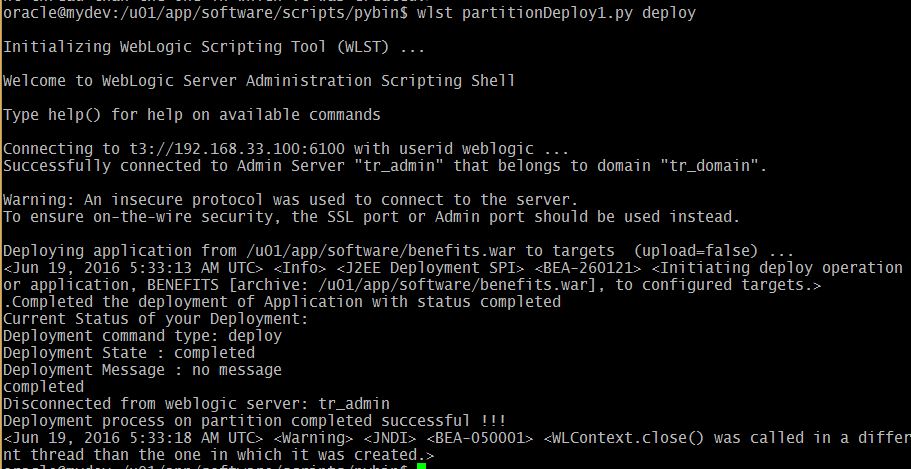
The deploy option:
 wlst partitionDeploy1.py deploy
WLST deploy on Partition Domain
Administration Console deployment update:
The undeploy option:
 wlst partitionDeploy1.py undeploy
WLST Undeploy on Partion

Monday, January 25, 2016

Multitenancy in WebLogic 12c Part -6 Partition Domain Control

Controlling means starting the partition and shutdown the partition that we have created in the earlier post. Here my exploration on the two important WLST functions:

  1. startPartitionWait
  2. forceShutdownPartitionWait

Starts the given partition and waits until the partition reaches the requested state that is RUNNING state. To run this command the partition must already exist. Therefore startPartitionWait should not be used in the edit session.

The forceShutdownPartitionWait command will Shutdown the given partition and waits until the partition state reaches the SHUTDOWN state. Same rule works for this command as well, the partition must be exists to control it.

Prerequisites:

  1. Configure Security Realm
  2. Create Users & Groups for Partition domain
  3. Configure Virtual Target
  4. Creating Partition Domain
  5. Configure IDD for Partition
  6. Partition Control (start/stop using WLST)

Here I've prepared the customized script for stop, start and restart all the partitions in the domain.
# This script will start the partition

def startPartition(partitionName):
        print "Staring the partition :"+ partitionName
        partitionBean=cmo.lookupPartition(partitionName)
        startPartitionWait(partitionBean)

def startAllPartitions():
        print "Starting all partitions ..."
        startPartition('Corporate_partition')
        startPartition('Online_partition')

def stopPartition(partitionName):
        print "Stoping the partition :"+ partitionName
        partitionBean=cmo.lookupPartition(partitionName)
        forceShutdownPartitionWait(partitionBean)

def stopAllPartitions():
        print "Starting all partitions ..."
        stopPartition('Corporate_partition')
        stopPartition('Online_partition')


def main():
        connect("weblogic","welcome1","t3://192.168.33.100:6100")

        print "Partition Control Menu..."
        print "==========================="
        print "1. Start all partitions"
        print "2. Shutdown all partitions"
        print "3. Restart all partitions"
        control=input("Enter your control choice: ")

        if control==1:
                startAllPartitions()
        elif control==2:
                stopAllPartitions()
        elif control==3:
                stopAllPartitions()
                startAllPartitions()
        else:
                print "invalid option..."
        disconnect()


main()

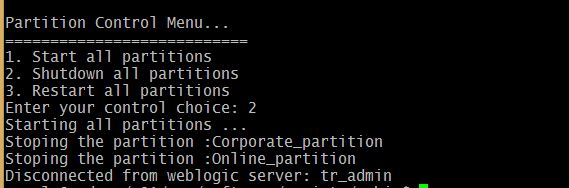
The execution goes as shown below...
Starting Partition using WLST

Partition state RUNNING
Stop the Partition with menu option 2

Stop Partition using WLST
Double check the same on the WebLogic Admin console:

Shutdown Partitions on WebLogic Admin Console

Popular Posts