Search This Blog

Wednesday, July 26, 2017

Logging configuration for domain and WebLogic server

Why we need Logging?
To understand in a basic level, when we run the WebLogic Servers we don't know what is happening inside the process.  It is kind of black box to us. To know what is happening inside the domain or server side to get more details we have logging mechanism enabled in WebLogic domains.


WebLogic Logging works for multiple hierarchical Subsystem. At the top level it is already enabled and we can use the existing setup. But for some reasons each project will have separate logging needs.

When we can use this?
If there are multiple Testing logging configuration at different levels:
  1. domain level logs - global status 
  2. Server level logs - admin or managed server status
  3. Resource level logs - JDBC, JMS, application status
We can set the common attributes of JMX MBean reset with new values which will work for your project needs.

While creating this snippet we have tried to execute it on WebLogic 11g [10.3.6] and WebLogic 12c.

########################################################################
# Python Script file: logrotate.py
# Author: Pavan Devarakonda
# Date : 25-Jul-2017
########################################################################
loadProperties('demodomain.properties')
# Functions
def editMode():
   edit()
   startEdit()

def saveActivate():
   save()
   activate()
   print '###### Completed configuration of domain logs ##############'

def exitDisconnect():
        disconnect()
        exit()

def connectToAdmin():
    connect(username,password,url)

def domainlog_rotation(domainname,FC,MinSize):
        """
        It will take the three parameters domainpath ,domainname is string values
        and FileCount -  FC and File MinSize - MinSize are integer values these values loaded from properties
        so they need to type cast to integers
        """
        cd('/Log/'+domainname)
        cmo.setRotationType('bySize')
        cmo.setRotateLogOnStartup(true)
        cmo.setFileCount(int(FC))
        cmo.setNumberOfFilesLimited(true)
        cmo.setFileMinSize(int(MinSize))
        cmo.setLogFileRotationDir(domainpath+domainname+'/RotationDir')
        save()

def ServerLogRotation(S,SFC,SMinsize):
        """
        This module will rotate the AdminServer or Managed Server loggger settings
        It takes three params - S as name of the server, SFC - Server FileCount, SMinsize - Server FileMinSize
        """
        print S+ ' server log  setting...'
        cd('/Servers/'+S+'/Log/'+S)
        cmo.setRotationType('bySize')
        cmo.setRotateLogOnStartup(true)
        cmo.setFileCount(int(SFC))
        cmo.setNumberOfFilesLimited(true)
        cmo.setFileMinSize(int(SMinsize))
        cmo.setLogFileRotationDir(domainpath+domainname+'/RotationDir +S')

def printline(): print '#'*50

def main():
        printline(); print 'Starting domain logs Configurations '; printline()
        connectToAdmin()
        editMode()
        domainlog_rotation(domainname,FC,MinSize)
        printline(); print 'Starting Server logs configurations' ; printline()
        cd('/')
        for server_name in ls('Servers',returnMap='true'):
                if server_name == 'AdminServer':
                        ServerLogRotation(server_name,ASFC,ASMinsize)
                else:
                        ServerLogRotation(server_name,MSFC,MSMinsize)
        saveActivate()
        exitDisconnect()

main()

Please double check all indentation blocks.
The properties file used for sample tests is as follows:

#WebLogic console connection parameters
username=weblogic
password=welcome1
url=t3://192.168.33.102:8001
domainname=demo_domain

# Domain logger configurations
FC=4
MinSize=5
domainpath=/u01/oracle/domains/

# ManagedServer logger configurations
MSFC=3
MSMinsize=2

# AdminServer logger configurations
ASFC=5


Sample execution output as follows:
WebLogic Logger enabled and configuration using WLST scrpt execution.

Saturday, April 8, 2017

WebLogic 12c Cluster Domain configuration using WLST offline

Objective of this script is to Leverage the time takes to configure the WebLogic Domain and after starting the admin server then following list need to be configured for HA/reliability.
Everytime I work on new project there is a need of creation of the clustered domain. From my past experiences collected all basic requirements together list them over here.

  • AdminServer configuration includes Name, Listen Address, ListenPort
  • User credentials username, password
  • After writing basic domain going for create machine which include Name, type of machine
  • Nodemaager includes NMTypes such as plain, ssl, hosted node, nodemanager port
  • Managed servers have Name, ListenAddress, ListenPort, set machine
  • Cluster includes name, ClusterAddress, Servers part of the cluster interesting part here
Assumptions for this task:

WebLogic 12.2.1 cluster domain creation with WLST
WLST Configuring WebLogic Cluster Domain


In the script as per my convenience some of them are hardcoded, My hardcoded values:
  1. Managed Server list
  2. Cluster list
In this script lots of Python sequence functions are used.

  • List index, 
  • Dictionary keys
  • String startwith

Lets begin the fun of WLST HERE...
# purpose:  Create the domian with the one Admin Server along with the
# two managed servers in each cluster. app_cluster, web_cluster
# Assumption here all managed servers runs on the same machine
# Modified date: 07-April-2017
# File name     :       create_clusterdomain.py
# Dependencies  :       cluster_domain.properties
# Note this names of managed servers, cluster, hostname all hard coded
#
def printline(s):
    print "-"*10 + s

loadProperties('/u01/app/software/scripts/pybin/cluster_domain.properties')

# Created a Cluster and assaign the servers to that cluster
# Create a domain from the weblogic domain template

WLHOME=os.environ["WL_HOME"]
readTemplate(WLHOME+'/common/templates/wls/wls.jar')
printline("reading template completed")

# Configure the Administration Servers with out using SSL Port

cd('Servers/AdminServer')
set('ListenAddress',WLSAdminIP)
set('ListenPort', int(AdminPort))

printline("AdminServer ListenAddress, port set")

cd('/')
cd('Security/base_domain/User/weblogic')
cmo.setPassword(AdminPasswd)
printline("User credentials set")

setOption('OverwriteDomain', 'true')
writeDomain(DomainPath+'/'+DomainName)
printline("Domain creation done.")

closeTemplate()
readDomain(DomainPath+'/'+DomainName)
machines={'myM100':'192.168.33.100', 'myM110':'192.168.33.110'}

for m in machines.keys():
        cd('/')
        create(m, 'UnixMachine')
        cd('Machine/' + m)
        create(m, 'NodeManager')
        cd('NodeManager/' + m)
        set('ListenAddress', machines[m])
        set('NMType','ssl')

# Create the Managed Servers and  configuration them
ManagedServerList=['app01','app02','web01','web02']

app_ca=""
web_ca=""
for s in ManagedServerList:
        cd('/')
        create(s,'Server')
        cd('Server/'+s)
        i=ManagedServerList.index(s)
        lp=8101+i
        set('ListenPort', int(lp))
        j=int(s[-1])
        m=machines.keys()[j-1]
        set('ListenAddress', machines[m])
        set('Machine', m)

        if s.startswith('app') :
                if j%2==0:
                        app_ca+=','
                app_ca+=machines[m]+':'+str(lp)

        elif s.startswith('web'):
                if j%2==0:
                        web_ca+=','
                web_ca+=machines[m]+':'+str(lp)

        printline("Managed server :"+s+" created")

printline("configured managed servers done.")
printline("app cluster address:"+app_ca)
printline("Web cluster address:"+web_ca)

# Create and Configure a Cluster and assian the Managed Servers to that cluster
clusters={'app_clustr1':'app01,app02', 'web_clustr1':'web01,web02'}
clstrs=clusters.keys()
for c in clstrs:
        cd('/')
        create(c,'Cluster')
        assign('Server', clusters[c],'Cluster', c)
        cd('Clusters/'+c)
        set('ClusterMessagingMode','multicast')
        if c.startswith('app'):
                set('ClusterAddress',app_ca)
        elif c.startswith('web'):
                set('ClusterAddress',web_ca)
        set('MulticastAddress','237.0.0.101')
        set('MulticastPort',7200+clstrs.index(c))
        printline("cluster "+c+" created")

printline("Configured clusters and assigned managed servers done.")
#Write the domain and Close the domain template

updateDomain()
closeDomain()

printline("Task completed successfully, exiting!!!")
exit()

Now the properties file which you can enhance with your limitations
WLSAdminIP=192.168.33.100
AdminPort=8001
AdminPasswd=welcome1
DomainPath=/u01/app/oracle/domains
DomainName=uat_domain


Lets have the execution screen for you:


Please write your valuable feedback on this post, so that we can keep improve further to have more interesting fun stuff soon for you.

Wednesday, February 22, 2017

Restricted JRF WebLogic infrastructure domain configuration using WLST

While working on Fusion Middleware products we need to prepare the WebLogic restricted JRF domain, most of the time configuration Wizard leads to confusion and stuck with what to do for RCU configurations. Even when you need to create a domain for Collocated OHS Environment.

Pr-requisites
  1. Oracle JDK Installed
  2. Oracle Fusion Middleware Infrastructure 12.2.1 installed
  3. Environment setup with bash profile
Templates used for configuring the Restricted JRF domain

  1. JRF Restricted template - oracle.jrf_restricted_template.jar
  2. Enterprise Manager - oracle.em_wls_restricted_template.jar
  3. Coherence - wls_coherence_template.jar [default selected with above anyone of the template]


 Lets first create the properties file:

TEMPLATE=/u01/app/oracle/fmw1221/wlserver/common/templates/wls/wls.jar 
MW_HOME=/u01/app/oracle/fmw1221
ADMIN_LISTEN_ADDRESS=192.168.33.100
ADMIN_PORT=8001
ADMIN_USER=weblogic
ADMIN_PWD=Welcome1
DOMAIN_NAME=RestrictedJRF_Domain
DOMAIN_DIR=/u01/app/oracle/domains

Note: You could modifiy the MW_HOME  path

The WLST Script is  as follows:

def create_prod_domain():
 print "Reading base domain tempalte"
 readTemplate(TEMPLATE)
 cd('/')

 print "AdminServer settings"
 cmo.setName(DOMAIN_NAME)
 cd('Servers/AdminServer')
 cmo.setListenAddress(ADMIN_LISTEN_ADDRESS)
 cmo.setListenPort(int(ADMIN_PORT))
 cd( '/' )
 cd( 'Security/'+DOMAIN_NAME+'/User/' +ADMIN_USER)
 cmo.setPassword(ADMIN_PWD)
 cd('/')

 print "Production domain setup.."
 setOption("ServerStartMode", "prod")
 setOption("OverwriteDomain", "true")
 writeDomain( DOMAIN_DIR+'/'+DOMAIN_NAME )
 print "=============================================="
 print "Production domain created successfully..."
 print "=============================================="

 closeTemplate()


def apply_jrf2domain():
 # Apply the JRF Template.
 print "reading domain:"+DOMAIN_NAME
 readDomain(DOMAIN_DIR+'/'+DOMAIN_NAME )
 addTemplate(MW_HOME + '/oracle_common/common/templates/wls/oracle.jrf_restricted_template.jar')
 print "Adding Template :oracle.jrf_restricted_template.jar"

 # I'm including the EM template too.
 addTemplate(MW_HOME + '/em/common/templates/wls/oracle.em_wls_restricted_template.jar')
 print "Added Template :oracle.em_wls_restricted_template.jar"

 updateDomain()
 print "Updated the domain with Restricted JRF and Enterprise Manager templates"
 closeDomain()
 print "Close the domain"
 exit()

def main():
 print "=============================================="
 print "Welcome to Restricted JRF domain configuration"
 print "=============================================="

 create_prod_domain()
 print "Domain created successfully..."
 apply_jrf2domain()

main()

The script execution will be as follows:
wlst -loadProperties RestrictedJRF_domain.properties create_RestrictedJRF_domain.py

Note: wlst must be aliased to the Infrastructure installation wlserver path
Restricted JRF WebLogic infrastructure domain with EM template
 Advantage of this domain:
  • Enterprise Manager Fusion Middleware Control
  • Easy to work on FW products such as SOA, OSB, and Collocated OHS etc
Note that it will be consuming more memory foot print than regular base domain.

Start your Restricted JRF Domain and when you look into WebLogic Admin console deployments see the following:

WebLogic Restricted Domain deployment

Saturday, June 18, 2016

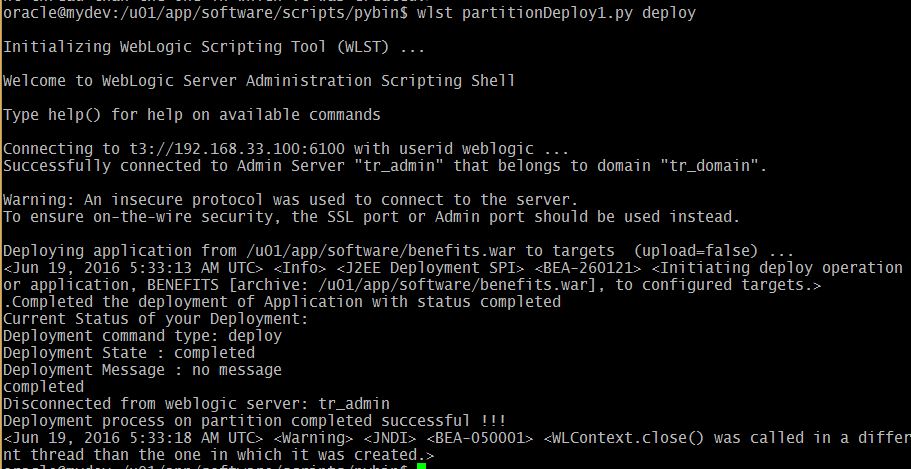
Multitenancy in WebLogic 12c Part -7 Deploy and Undeploy Application to a Domain Partition

After almost four months took me to write this, due to busy in work this blog post on WebLogic 12.2.1 MT feature exploration took some time. To workout multiple deployment scenarios on MT environment we need real-time implementation environments. As of now I've limiting my scope to web application deployment on to a partition. You could do much more wider automation using WLST based on this script.

Pre-requisites set-up for Multitenancy:

You can also visit the following post so that you can have connectivity what we are discussing here.

  1. Configure Security Realm for MT
  2. Create Users & Groups for Partition domain
  3. Configure Virtual Target
  4. Creating Partition Domain
  5. Configure IDD for Partition
  6. Partition Control (start/stop using WLST)
  7. Deploy and Undeploy Application on Partition [This post]

Download sample application

You can download sample web application for WebLogic environment :
Here I am using benefits.war which available in Oracle examples.
Download Shopping Cart Sample Link

Deploying an application to a WebLogic server fine it was upto 11g and regular WebLogic environment. In WebLogic 12.2.1 MT introduced with the great feature that is maintaining small domain partitions where you can feel the required resources all that need to run the application you will get in the partition. This MT deployment might more frequent when your application moved to WebLogic 12.2.1.

The deploy() and undeploy() command variation with the number of arguments you pass that are related to partition or resource group template. Here I've used first option targeting to a RUNNING State partition. As Oracle recommends to use ResourceGroupTemplate as target in the MT environment.

undeploy with WLST on Partition Domain
WebLogic web application deployment with WLST to a partition


The best benefit you can provide it to the partition deployment do one time deployment same partition you can package using export you will get final outcome as zip file. That you can reuse in other test environments as well.using import.

def deploy2partition(a,ap, p,rg,o):
        progress=deploy(appName=a, path=ap, partition=p, resourceGroup=rg, deploymentOrder=o, securityModel='DDOnly')
        while not (progress.isCompleted() or progress.isFailed()) :
                os.time.sleep(2)
        print progress.getState()

def undeploy4mPartition(a, p):
        progress=undeploy(appName=a,  partition=p)
        while not (progress.isCompleted() or progress.isFailed()) :
                java.lang.Thread.sleep(2000)
        print progress.getState()

def main():
        # The following are the properties which can be changed according to your needs.
        APP_PATH='/u01/app/software/benefits.war'
        APPNAME='BENEFITS'
        USER='weblogic'
        PASSWD='welcome1'
        ADMURL='t3://192.168.33.100:6100'

        connect(USER, PASSWD, ADMURL)
        partitionName="Corporate_partition"
        rgName="Corporate_rg"
        DOrder=10

        if len(sys.argv) >1:
                choice  = sys.argv[1]
        else:
                usage()

        if choice == 'deploy':
                deploy2partition(APPNAME, APP_PATH, partitionName, rgName, DOrder)
        elif choice == 'undeploy':
                undeploy4mPartition(APPNAME, partitionName)

        disconnect()
        print "Deployment process on partition completed successful !!!"

def usage():
        print """Usage:
        wlst """+sys.argv[0] +""" deploy | undeploy"""
        exit()

main()

The deploy option:
 wlst partitionDeploy1.py deploy
WLST deploy on Partition Domain
Administration Console deployment update:
The undeploy option:
 wlst partitionDeploy1.py undeploy
WLST Undeploy on Partion

Monday, January 25, 2016

Multitenancy in WebLogic 12c Part -6 Partition Domain Control

Controlling means starting the partition and shutdown the partition that we have created in the earlier post. Here my exploration on the two important WLST functions:

  1. startPartitionWait
  2. forceShutdownPartitionWait

Starts the given partition and waits until the partition reaches the requested state that is RUNNING state. To run this command the partition must already exist. Therefore startPartitionWait should not be used in the edit session.

The forceShutdownPartitionWait command will Shutdown the given partition and waits until the partition state reaches the SHUTDOWN state. Same rule works for this command as well, the partition must be exists to control it.

Prerequisites:

  1. Configure Security Realm
  2. Create Users & Groups for Partition domain
  3. Configure Virtual Target
  4. Creating Partition Domain
  5. Configure IDD for Partition
  6. Partition Control (start/stop using WLST)

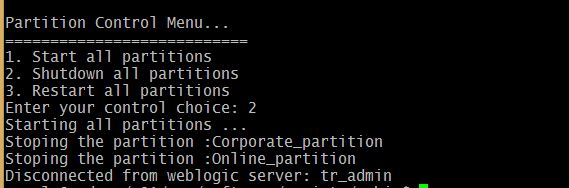
Here I've prepared the customized script for stop, start and restart all the partitions in the domain.
# This script will start the partition

def startPartition(partitionName):
        print "Staring the partition :"+ partitionName
        partitionBean=cmo.lookupPartition(partitionName)
        startPartitionWait(partitionBean)

def startAllPartitions():
        print "Starting all partitions ..."
        startPartition('Corporate_partition')
        startPartition('Online_partition')

def stopPartition(partitionName):
        print "Stoping the partition :"+ partitionName
        partitionBean=cmo.lookupPartition(partitionName)
        forceShutdownPartitionWait(partitionBean)

def stopAllPartitions():
        print "Starting all partitions ..."
        stopPartition('Corporate_partition')
        stopPartition('Online_partition')


def main():
        connect("weblogic","welcome1","t3://192.168.33.100:6100")

        print "Partition Control Menu..."
        print "==========================="
        print "1. Start all partitions"
        print "2. Shutdown all partitions"
        print "3. Restart all partitions"
        control=input("Enter your control choice: ")

        if control==1:
                startAllPartitions()
        elif control==2:
                stopAllPartitions()
        elif control==3:
                stopAllPartitions()
                startAllPartitions()
        else:
                print "invalid option..."
        disconnect()


main()

The execution goes as shown below...
Starting Partition using WLST

Partition state RUNNING
Stop the Partition with menu option 2

Stop Partition using WLST
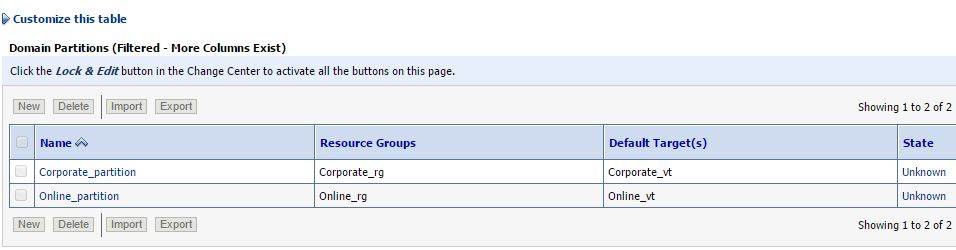
Double check the same on the WebLogic Admin console:

Shutdown Partitions on WebLogic Admin Console

Multitenancy in WebLogic 12c Part -5: Identity Domain (IDD) for Partition

Welcome back to the series of Multitenancy experiments on partitioned domain.


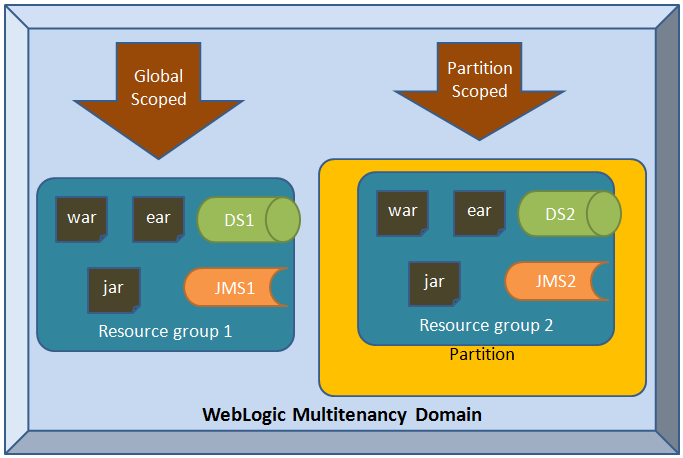
Resource groups in WebLogic Multitenancy Domain partition
Prerequsites
  1. Configure Security Realm
  2. Create Users & Groups for Partition domain
  3. Configure Virtual Target
  4. Creating Partition Domain
  5. Configure IDD for Partition
  6. Partition Control (start/stop using WLST)


def add_IDD4_Partition(realmName, partitionName, primary_IDD ): 
 """
 This function is developed for generic  use to adding Identity domain 
 to a partition domain.
 """
 sec = cmo.getSecurityConfiguration()
 sec.setAdministrativeIdentityDomain("AdminIDD")
 
 realm = cmo.getSecurityConfiguration().lookupRealm(realmName)
 
 # Authentication 
 defAtnP = realm.lookupAuthenticationProvider('ATNPartition')
 defAtnP.setIdentityDomain(primary_IDD)
 defAtnA = realm.lookupAuthenticationProvider('ATNAdmin')
 defAtnA.setIdentityDomain("AdminIDD")
 
 # Search for the Partition and set it as primary IDD
 p= cmo.lookupPartition(partitionName)
 p.setPrimaryIdentityDomain(primary_IDD)
 
 # For Default realm setting the IDD
 realm = sec.getDefaultRealm()
 defAtn = realm.lookupAuthenticationProvider('DefaultAuthenticator')
 defAtn.setIdentityDomain("AdminIDD")
 
 
def main():
 connect("weblogic","welcome1","t3://192.168.33.100:6100")
 edit()
 startEdit()
 
 add_IDD4_Partition('Corporate_Realm', "Corporate_partition", "Corporate_IDD" )
 add_IDD4_Partition('Online_Realm', "Online_partition", "Online_IDD" )
 
 save()
 activate()
 disconnect()
 
main()


Lets run the script that will add the Identity Domain for each partition.

WebLogic Multitenancy Partition domain with Security Realm
Select the Corporate Realm in the Security


Now select one of the security realm which you have created for the partition.


Sunday, January 17, 2016

Multitenancy in WebLogic 12c Part -4: Creating Partiton domain

Welcome back to the series of Multitenancy experiments on partitioned domain.

  1. Configure Security Realm
  2. Create Users & Groups for Partition domain
  3. Configure Virtual Target
  4. Creating Partition Domain
WebLogic domain partitions are an administrative and runtime slice of a WebLogic domain that is dedicated to running application instances and related resources for different tenant.
def create_Partition(vtName, partitionName, rgName, realmName):
        """
        This function programmed for creating partition in WebLogic domain
        it takes four arguments virtual target, Partition Name, Resource Group
        and Security Realm Name.

        """
        vt = cmo.lookupVirtualTarget(vtName)
        p = cmo.createPartition(partitionName)
        p.addAvailableTarget(vt)
        p.addDefaultTarget(vt)
        rg=p.createResourceGroup(rgName)
        rg.addTarget(vt)
        realm = cmo.getSecurityConfiguration().lookupRealm(realmName)
        p.setRealm(realm)

def main():
        connect("weblogic","welcome1","t3://192.168.33.100:6100")
        edit()
        startEdit()
        create_Partition("Online_vt","Online_partition","Online_rg",'Online_Realm')
        create_Partition("Corporate_vt","Corporate_partition","Corporate_rg",'Corporate_Realm')
        save()
        activate()
        disconnect()

main()

creating partition requires partition name, there should be resource group which can be created with default or you can have your own template for resource group. The resources could be JMS, JDBC Data source, JCA, JTA

WLST Script for create partition on WebLogic domain


admin console output

Partition successful execution of WLST 
Note: After you configure the new partitions in the domain you must restart the environment.

Popular Posts