
In this article we will explore the Dynamic Cluster configuration on Oracle WebLogic Domain with WLST automations.
Prerequisites
Before we start the automation, ensure the following prerequisites exists
- Install Oracle WebLogic 12.2.1 or above versions on any platform
- Configure a fresh WebLogic domain
- To test the automation you should have a Sandbox WebLogic domain
In this exciting example 😊 new learning about how to use the dynamic cluster in the latest version of WebLogic 12c [12.1.2] and above this was introduced for WebLogic on Cloud computing. To workout this you must configure a Server template when you give the maximum number of cluster servers these managed server automatically increased. When you decrease it the number of managed servers come to SHUTDOWN state as expected. To do same task from the automation using WLST prompt you need to use the following two functions:
- scaleUp increase the number of managed servers in the cluster
- scaleDown to decrease the number of managed servers in the cluster.
 |
| Dynamic Cluster configuration on WebLogic Domain |
now let's do the automation exercise
The above generic WLST script can be executed as shown below:

You could also double confirm this from your WebLogic Admin Console work-area when you select clustser in the Environment of under your Domain .
Suggestion for future enhancements to the above script you can do following:
scaleUp execution for single server:
Scale down weblogic cluster
Troubleshooting issues
# Dated  : 4th Feb 2016
# ScriptName : dynamicCluster.py
# Purpose :
# This script will create server template and using that
# configures a dyanamic cluster

def createServer_Template(tmpName, basePort, sslPort, machine):
        print 'creating server tempalte for '+tmpName
        cd('/')
        cmo.createServerTemplate(''+tmpName)

        cd('/ServerTemplates/'+tmpName)
        cmo.setListenPort(int(basePort))

        cd('/ServerTemplates/'+tmpName+'/SSL/'+tmpName)
        cmo.setListenPort(int(sslPort))

        cd('/ServerTemplates/'+tmpName)
        cmo.setMachine(None)


def create_dynamicCluster(clustrName, tmpName, prefix):
        print 'Creating dynamic cluster: '+clustrName
        cd('/')
        cmo.createCluster(clustrName)

        cd('/Clusters/'+clustrName)
        cmo.setClusterMessagingMode('unicast')

        cd('/ServerTemplates/'+tmpName)
        cmo.setCluster(getMBean('/Clusters/'+clustrName))

        cd('/Clusters/'+clustrName+'/DynamicServers/'+clustrName)
        cmo.setServerTemplate(getMBean('/ServerTemplates/'+tmpName))
        cmo.setDynamicClusterSize(2)
        cmo.setMaxDynamicClusterSize(8)
        cmo.setCalculatedListenPorts(true)
        cmo.setCalculatedMachineNames(true)
        cmo.setCalculatedListenPorts(true)
        cmo.setServerNamePrefix(prefix)

def main():
        connect("weblogic","welcome1","t3://192.168.33.100:6100")
        edit()
        startEdit()

        print 'Creating server templates...'
        # creating server templates
        createServer_Template('app_tier_tmp', 7120, 8120, 'mydev')
        createServer_Template('web_tier_tmp', 6120, 9120, 'mydev') # Machine already configured

        create_dynamicCluster('app_dclustr', 'app_tier_tmp','app_server0')
        create_dynamicCluster('web_dclustr', 'web_tier_tmp','web_server0')
        print 'Dynamic cluster configuration completed...'
        activate()

main()
The above generic WLST script can be executed as shown below:

You could also double confirm this from your WebLogic Admin Console work-area when you select clustser in the Environment of under your Domain .
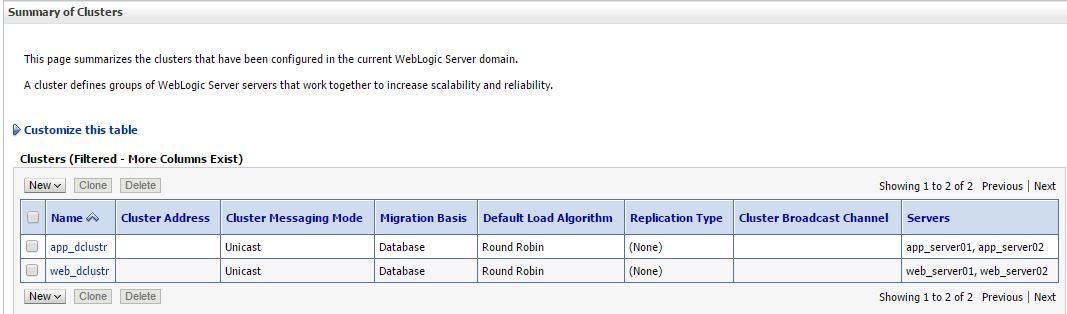 |
| Dynamic Cluster configuration in WebLogic 12.2.1 Domain |
Suggestion for future enhancements to the above script you can do following:
- create a properties file and pass all the main program required arguments
- Cluster Message Mode can be dynamic
- Machine per template can be set dynamic
Elastic Cluster on-demand scale up
In the WLST prompt you can test it as :
In the WLST prompt you can test it as :
scaleUp ("app_dclustr",1, true, true)
scaleUp execution for single server:
 |
| ScaleUp in WLST Execution |
scaleDown('app_dclustr',2,true,true)
Scale down weblogic cluster
 |
| Scale Down cluster size in WLST |
Troubleshooting issues
Issue 1: Unable to Connect to Admin Server Error:
Connection refusedVerify:
Verify:
- Administration Server is running
- Hostname is reachable
- Port number is correct
- Firewall is not blocking connectivity
Authentication deniedVerify:
- Username and password
- userConfigFile and userKeyFile
- Security realm configuration
Hope you enjoyed by reading this post, Stay tuned to this blog and share with your friends techies...
Waiting for your comments and suggestions!!


The syntax's for scaleUp and scaleDOWN are helps me.Thank you for valuable post.
ReplyDeleteRegards,
Weblogic Training.
QUANTUM BINARY SIGNALS
ReplyDeleteProfessional trading signals sent to your cell phone daily.
Start following our trades today & make up to 270% per day.
Dynamic Cluster Scaling with WLST allows you web hosting to automatically adjust the size of WebLogic Server clusters based on workload demands using the WebLogic Scripting Tool (WLST). This ensures optimal performance and resource utilization by adding or removing server instances dynamically.
ReplyDeleteDynamic Cluster Scaling with allows you to automatically adjust the size of WebLogic Server clusters based on workload demands hostbet using the WebLogic Scripting Tool This ensures optimal performance and resource utilization by adding or removing server instances dynamically.
ReplyDelete