Search This Blog

Sunday, January 17, 2016

Multitenancy in WebLogic 12c Part -3: Create Virtual target for the Partition Domain

Create Virtual target for the Partition Domain

Welcome back to the series of Multitenancy experiments with WLST.

  1. Configure Security Realm
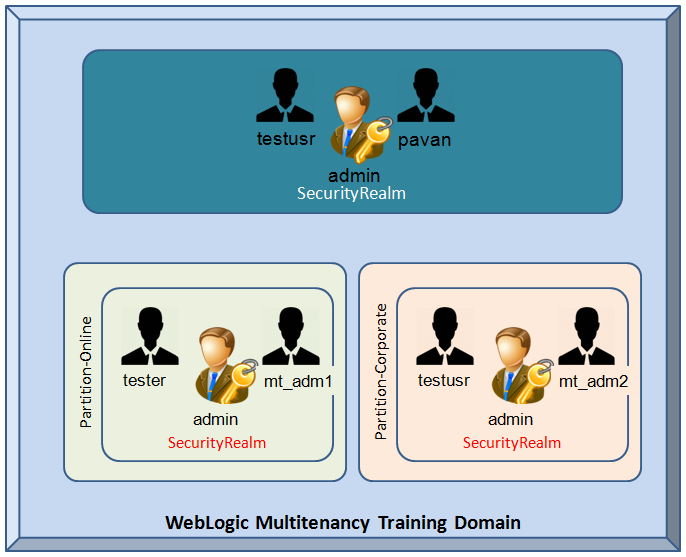
  2. Create Users & Groups for Partition domain
  3. Configure Virtual Target

In this sample virtual target is targeted to the admin server, you can also target to cluster. The uri prefix is /corporate This is the url prefix used for making JMX connections to  MBeanServer.

In this example you could find the re-usability of the functions easy to call them!


def create_VirtualTarget(vt_name, uriPrefix, serverName):
        """
        This method is developed for create Virtual Targets
        based on three arguments Virtual Target Name, URI prefix and actual physical target
        """
        vt = cmo.createVirtualTarget(vt_name)
        vt.setHostNames(array(["192.168.33.100"],java.lang.String))
        vt.setUriPrefix(uriPrefix)
        as = cmo.lookupServer(serverName)
        vt.addTarget(as)

def main():
        connect("weblogic","welcome1","t3://192.168.33.100:6100")
        edit()
        startEdit()
        create_VirtualTarget("Corporate_vt", "/corporate","tr_admin")
        create_VirtualTarget("Online_vt", "/online","tr_admin")
        save()
        activate()
        disconnect()

main()

Execute it with the following way!
 wlst createVirtualTargets.py


Execution of WLST Script for create Virtual Targets for partition domain 

On the WebLogic Admin Console you could select the domain structure expand "Environment" branch. You can select Virtual Target on the tree.

domain Structure with Virtual Target
On the work area you could see following screen :

WebLogic 12.2.1 Virtual Target configuration WLST
Virtual Target configuration using WLST


Multitenancy in WebLogic 12c Part -2: Create User and Group per Domain Partition

def create_userGroup(realmName, userName, groupName):
 cd('/')
 print 'add user: r
ealmName ' + realmName
 if realmName == 'DEFAULT_REALM':
   realm = cmo.getSecurityConfiguration().getDefaultRealm()
 else:
   realm = cmo.getSecurityConfiguration().lookupRealm(realmName)
 print "Creating user " + userName + " in realm: " + realm.getName()
 atn = realm.lookupAuthenticationProvider('ATNPartition')
 if atn.userExists(userName):
   print "User already exists."
 else:
   atn.createUser(userName, '${password}', realmName + ' Realm User')
 print "Done creating user. ${password}"
 print "Creating group " + groupName + " in realm: " + realm.getName()
 if atn.groupExists(groupName):
   print "Group already exists."
 else:
   atn.createGroup(groupName, realmName + ' Realm Group')
 if atn.isMember(groupName,userName,true) == 0:
   atn.addMemberToGroup(groupName, userName)
 else:
   print "User is already member of the group."
def main():
 connect("weblogic","welcome1","t3://192.168.33.100:6100")

 create_userGroup('Online_Realm', 'mt_adm1','Administrator')
 create_userGroup('Corporate_Realm', 'mt_adm2','Administrator')

 disconnect()

main()


Note: Remember this important point when you modify a security related configurations we should not use edit() or startEdit(). We are good to go lets execute the script...


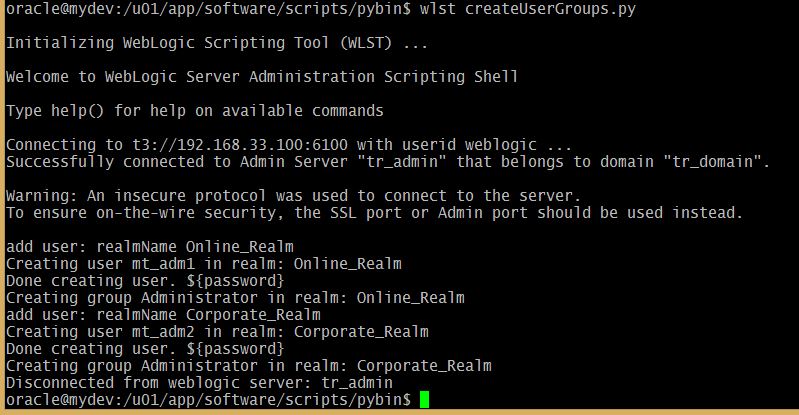
wlst createUserGroups.py
create User and Group per Domain partition using WLST

WebLogic Admin Console sreen User configuration for Partitioned Domain

Tuesday, January 12, 2016

Multitenancy in WebLogic 12c Part -1: Security Realm for Partition Domain

In the new ear of  Multi-tenancy environment with WebLogic the application server software it self changed a lot internally to support the Partition based domains which supporting existing features as well. When we create a new SecurityRealm for a Partition, we need to create the following MBeans :

Let me begin with sample Training project where it runs with Online and Corporate training partitions. Here in this post we can configure security realm for each partition.
  • Authenticator
  • Role
  • Identity Asserter
  • Role Mapper
  • Authorizer
  • Adjucator
  • Auditor
  • Credential Mapper
  • Certificate Path Provider
  • Password Validator
WebLogic Multi-tenancy - SecurityRealm configuration


Lets make re-usable module so that everyone can use the function as it is. The changes could be in the main module only. Further simplification you could also move the values into a separate properties file.


def create_securityRealm4partition(realmName):
 
 security = cmo.getSecurityConfiguration()
 print 'realm name is ' + realmName
 realm = security.createRealm(realmName)
 
 # ATN
 atnp = realm.createAuthenticationProvider('ATNPartition','weblogic.security.providers.authentication.DefaultAuthenticator')
 atna = realm.createAuthenticationProvider('ATNAdmin','weblogic.security.providers.authentication.DefaultAuthenticator')
 
 # IA
 ia = realm.createAuthenticationProvider('IA','weblogic.security.providers.authentication.DefaultIdentityAsserter')
 ia.setActiveTypes(['AuthenticatedUser'])
 
 # ATZ/Role
 realm.createRoleMapper('Role','weblogic.security.providers.xacml.authorization.XACMLRoleMapper')
 realm.createAuthorizer('ATZ','weblogic.security.providers.xacml.authorization.XACMLAuthorizer')
 
 # Adjudicator
 realm.createAdjudicator('ADJ','weblogic.security.providers.authorization.DefaultAdjudicator')
 
 # Auditor
 realm.createAuditor('AUD','weblogic.security.providers.audit.DefaultAuditor')

 # Credential Mapper
 realm.createCredentialMapper('CM','weblogic.security.providers.credentials.DefaultCredentialMapper')
 
 # Cert Path
 realm.setCertPathBuilder(realm.createCertPathProvider('CP','weblogic.security.providers.pk.WebLogicCertPathProvider'))
 
 # Password Validator
 pv = realm.createPasswordValidator('PV', 'com.bea.security.providers.authentication.passwordvalidator.SystemPasswordValidator')
 pv.setMinPasswordLength(8)
 pv.setMinNumericOrSpecialCharacters(1)

def main():
 connect("weblogic","welcome1","t3://192.168.33.100:6100")
 edit()
 startEdit()

 create_securityRealm4partition('Online_Realm')
 create_securityRealm4partition('Corporate_Realm')

 save()
 activate()
 disconnect()
main()


 wlst createSecurityRealm.py


SecurityRealm using WLST
Configure Security realm for partitions using WLST Script createSecurityRealm.py 

On the other hand you can see the WebLogic Admin console output as well:
Security Realm on Domain Partition

This article is a series of blog posts you will be more excited to see the next posts see below:

  1. Configure Security Realm for MT
  2. Create Users & Groups for Partition domain
  3. Configure Virtual Target
  4. Creating Partition Domain
  5. Configure IDD for Partition
  6. Partition Control (start/stop using WLST)
  7. Deploy and Undeploy Application on Partition 

Friday, November 6, 2015

WLST Programming Controls

Effective programming could be developed using right decision making in your scripts. Here I would like to share some basics of Python program controls that would be used in the WLST scripts.


if-else in WLST


This is common decision making control in every programming language same in WLST. Python based program control much simple no braces required when you construct the if condition. There is no complex confusions for string comparisons and numeric value comparisons. As you know there is no semicolons for statements. The relational operators we have to use straight English words and, or, not. 


if-elif-else in WLST : if-else ladder


In normal programming need this would be mostly used in two or three steps on the ladder preferable. Before you enter here you need to check this really required that gives optimizing your WLST script.

if-elif-else in WLST Scripting

Most of the WLST scripts that you develop for reuse with iterative process need to be in the looping structures for more time. If you write the script optimized way means you need to focus on few facts:
clean, faster, better

While loop can be used when you want to pass the iterations with numbers. We need to initialize the iteration variable and within the loop we need to increase or decrease that value to complete the loop. While loop will be entered into its block when the given expression is executed and resulted true.

Iterations in WLST Scripts


We can see the major categories of WLST iterations control flows available such as 'for loop' and 'while loop'. Before iterating important Python function for automatic number list generation is given below.

The range() function

When you are using for-loop best trick to use with range built in Python function. It will take three different optional arguments and gives you different variety of values in the range of list as output.

  • Until the given number
  • From one particular value to another
  • From one value to another with increment by value

Experimenting with range function to understand all its capabilities The range command always start from the 0 if you pass single argument that is considered as number of values you want as output.

wls:/offline> R=range(11)
wls:/offline> R
[0, 1, 2, 3, 4, 5, 6, 7, 8, 9, 10]
wls:/offline> R=range(2,10,2)
wls:/offline> R
[2, 4, 6, 8]
wls:/offline> R=range(2,10,3)
wls:/offline> R
[2, 5, 8]


While loop control

This loop control works as same as in C programming style loop. The execution of while loop should not have any control on the variable that is used for iterate the loop. You need to initialize, check the termination condition and in the while loop block it should be iterated by increase or decrease as per program needs.
WLST While loop - WLST for loop

wls:/offline> i=0
wls:/offline> while i < 10:
... jms_server="JMSServer"+str(i)
... print jms_server
... i+=1
...

While loop in WLST Script example

The 'for loop' in WLST


Every scripts developer favorite iterator controller is for loop. Let us dive into some of the examples with it. The example of the 'for loop' in WLST is given below

wls:/offline> slist=range(1,11)
wls:/offline> for i in slist:
...     print 'managed'+str(i)+'_server'
...
managed1_server
managed2_server
managed3_server
managed4_server
managed5_server
managed6_server
managed7_server
managed8_server
managed9_server
managed10_server

Now lets get our WebLogic stuff here :) There could be a deployment on specific standalone servers instances which are not part of the cluster. Fetching only the managed servers excluding the adminserver from the server list that we get them from the ServerLifeCycleRuntimes MBean, Here I've considered the AdminServer name can be any name that includes Admin or adm etc. To solve this we can use lower() string function on the server name and check server names not contains 'adm' then it is managed server list!
wls:/offline> connect('weblogic','welcome1','t3://192.168.33.100:7001')
Connecting to t3://192.168.33.100:7001 with userid weblogic ...
Successfully connected to Admin Server 'wappAdmin' that belongs to domain 'wappdomain'.

wls:/wappdomain/serverConfig> domainRuntime()
Location changed to domainRuntime tree. This is a read-only tree with DomainMBean as the root.
For more help, use help(domainRuntime)

wls:/wappdomain/domainRuntime> cd('/ServerLifeCycleRuntimes/')
wls:/wappdomain/domainRuntime/ServerLifeCycleRuntimes> ls()
dr--   wappAdmin
dr--   wappMS1
dr--   wappMS2

wls:/wappdomain/domainRuntime/ServerLifeCycleRuntimes>  x=ls(returnMap='true')
dr--   wappAdmin
dr--   wappMS1
dr--   wappMS2

wls:/wappdomain/domainRuntime/ServerLifeCycleRuntimes> [s for s in x if 'adm' in s.lower()]
['wappAdmin']
wls:/wappdomain/domainRuntime/ServerLifeCycleRuntimes> [s for s in x if 'adm' not in s.lower()]
['wappMS1', 'wappMS2']
The last output is really awesome you will save lines as well because you don't need new line for if condition.

While loop usage vs for loop


While loop
  1.  Takes more time to executed 
  2. initialization, increase/decrease iterator variable  
  3. Easy to construct infinite loops with intervals  
For loop 
  1.  Fastest loop 
  2. depends on range function to iterate on numbers 
  3. Flexible for including single lambda conditions 
 Will update the following soon after sample executions completed. But these control flags works as in C language.

The break statement in WLST

Some of the code scenarios we need to terminate the iteration with a certain conditions. The 'break' statement in WLST will terminates the current loop. This control jump statement could be under if or else block only.
 
# check for prime
n=input("enter a number: ")

i = 2
while i < n:
        if n%i == 0:
                print "Given ", n, " not prime"
                break
        i+=1
else:
        print n, " is prime"

This logic will be applicable in many scenario, When an application is available on a WebLogic instance overall state for the application would be available. So you could break the loop and come out.
The break statement in WLST

The continue statement in WLST

To skip an iteration in the loop that could be for-loop or while-loop the keyword you need to use 'continue'. This continue statement also requires certain condition for skip the loop. So it can be part of either in the if or in the else block. Lets experiment with continue statement, printing the 0-10 numbers except when 5, 6,7 in the sequence.
 
# This script will illustrate for loop skip
r=range(11)
for i in r:
        if i in (5, 6, 7):
                continue
        print i

The continue statement in WLST
The pass statement in WLST

Sunday, July 19, 2015

startNodeManager with WLST in Windows

If you are working on OFMW environments there is a utility script startNMProps.sh/.cmd file present in the ORACLE_COMMON_HOME/common/bin. This script would update the nodemanager.properties file, which is exists in the WL_HOME/common/nodemanger [NM_Home].
When I've used the example command given in the WLST help got the following error:

Caused by: java.lang.UnsatisfiedLinkError: no nodemanager in java.library.path

Here the problem could be solved or workaround with two options:

  1. Check your JAVA_HOME, JAVA_VENDOR values correctly pointed or not.
  2. Change the nodemanager.properties content with the following option

NativeVersionEnabled=false

When you execute the startNodeManager command for the WLST offline you could pass two arguments: DomainRegistrationEnabled, NodeManagerHome.

wls:/offline> startNodeManager(DomainRegistrationEnabled='true',NodeManagerHome='c:/Oracle/product/fmw/wlserver_10.3/common/nodemanager')
Launching NodeManager ...
Removed output here...
Where it displays that generated nodemanager.properties and also shows the domain mapping.
:
:
NMProcess: INFO: Secure socket listener started on port 5556
Successfully launched the Node Manager.
The Node Manager process is running independent of the WLST process.
Exiting WLST will not stop the Node Manager process. Please refer
to the Node Manager logs for more information.
The Node Manager logs will be under c:\Oracle\product\fmw\wlserver_10.3\common\nodemanager
Node Manager starting in the background

You could experiment on NodeManager on Windows share your issues in the comments.


Sunday, July 12, 2015

NodeManager Status from WLST

When you use WebLogic admin console you know the Node manager is 'Reachable' or 'Inactive' state. The same thing if you wish to get it from WLST machine monitoring, this is not available as exposed MBean attribute.


How to find the NodeManager Running from WLST?
Brainstorming...
Found three alternative solutions.

  1. Use jps command to find the NodeManager Pid exist or not
  2. Connect the Nodemanager if it is succeeds then NM Reachable otherwise not.
  3. Use a simple socket module to create the socket object on the host, port

NodeManager Check with jps command

JDK provides jps command to show the list of Java Pids with name of the Java program. provided your JAVA_HOME must be available in os environment variables. So conditions applied here!! anyways lets see the solution :

def nm_status():
        NMstatus=os.system('jps |grep -i nodemanager|grep -v grep')
        if NMstatus==0:
                return 'Reachable'
        else:
                return 'Inactive'
Note: Please check indentations after copying to your editor.
The disadvantage of this method is it is going to work on Linux/Unix environments only, No Windows.

Connect to NodeMnager get State


WLST Command nmConnect() is going to connect if the machine have a Node Manager running, but here it does not returns the output to a variable. The output normally redirecting to standard output stdout. If we can redirect that to a file and check that contians "Connected"word then you can confirm Nodemanager is 'Reachable' otherwise 'Inactive' state.

def NM_status(nmUser, nmPassword, nmHost, nmPort, dName, domainPath,nmTYPE):
 """ This option nmConnect will give that it is reachable or not from stdout """
        redirect('/tmp/mywlst.out')
        nmConnect(nmUser, nmPassword, nmHost, nmPort, dName, domainPath,nmTYPE)
        stopRedirect()
        flag=0
        for line in open("/tmp/mywlst.out"):
         if "Connected" in line:
          flag=1
          break

 nmDisconnect()
        if flag==1:
          return "Reachable"
        else:
         return "Inactive"

Here we met the purpose of knowing about the status of Node manager. Still looking for better alternative than this!

Node manager status by Socket module

In Python we have Socket object and its related methods to check weather a port is available or not. On a machine if we try to create socket object with Node manager ip address, port then it is going to check the port availability that gives us status!

def is_available(address, port):
    import socket
    try:
        s = socket.socket()
        s.connect((address, int(port)))
        return true
    except:
        return false

def nmStatus(machinesList):
 """ This will create global string with Node manager status"
 machine_port=5556
 machine_host=localhost
 global g_str  
 g_str+="NM "+machine+ " -   "
     
 if is_available(machine_host, machine_port):
  g_str+="Reachable"+"\n"
 else:
  g_str+="Inactive"+"\n"
 
In you main script you could call nmStatus to know about the nodemanager status. Do you have any new thoughts, ideas or suggestions are welcome, Thanks for being with me.

Wednesday, December 31, 2014

Regular Expressions (re module) in WLST

Python based WLST tutorial is to present a detailed and descriptive introduction into regular expressions. Every scripting language powered up with this regular expressions.


Regular expressions examples in WLST
Regular Expressions in WLST

In scripting, Very complex problems can be resolved with simple regular expressions. If you are not aware of each expressions meaning then it would be Greek &  Latin. You need to understand how they can be applicable then you can construct your WLST script in such a way that it could give a fantastic outcomes. A regular expression is that a set of possible input raw strings (includes alphanumerical, whitespaces, symbols).

Regular expressions descends from fundament concept in Computer Science called finite automata theory. A regular expression can match a string in more than one place.

Meta Characters in WLST

The special meaning for each symbol that we use in the regular expression. We have the following meta characters allowed in WLST.
WLST using meta chars


Dot . in expression – any char

The . dot or period regular expression can be used to matches any character. Remember this don’t matches new line ‘\n’.


The Character classes

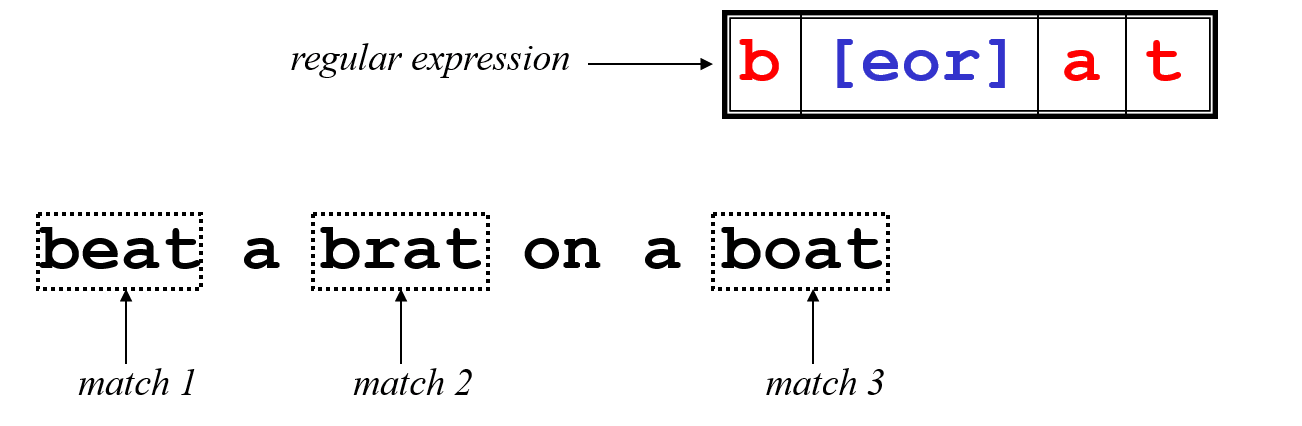
Character classes [] can be used to match any specific set of characters.
Here is the example to understand the expression that uses character class. The expression second char can be one of the three chars given in the char class [eor]. So the pattern matches three words from the given text.


Negate character class

Character class can be negated with ^ symbol inside the character class. That is [^].
[aeiou] will match any of the characters a, e, i, o, or u
[yY]es will match Yes or yes
Negate Character class in re


Ranges can also be specified in character classes
[1-9] is the same as [123456789]
[abcde] is equivalent to [a-e]


You can also combine multiple ranges in the pattern
[abcde123456789] is equivalent to [a-e1-9]

Note that the hyphen - character has a special meaning in a character class but only if it is used within a range, if you use hypen at beginning its meaning changes it doesn't meant for range.
[-123] would match the characters -, 1, 2, or 3

Commonly used character classes can be referred to by name (alpha, lower, upper, alnum, digit, punct, cntrl)
Syntax [:name:]
[a-zA-Z]       [[:alpha:]]
[a-zA-Z0-9]    [[:alnum:]]
[45a-z]      [45[:lower:]]
Important for portability across languages
compile - search, match patterns on data 

import re

t="Demoadmin, demo_ms1, demo_ms2, my_clustr1"
p=re.compile('(d\w+)',re.I)
pos=0
while 1:
        m=p.search(t, pos)
        if m:
                print "Now search start position :", pos
                print m.group()
                pos=m.end()
        else:
                break


Regular expression Compile pattern on search method

Regular expression FLAGS


re.I == re.IGNORECASE Ignore case
re.L == re.LOCALE Make \w, \b, and \s locale dependent
re.M == re.MULTILINE Multiline
re.S == re.DOTALL Dot matches all (including newline)
re.U == re.UNICODE Make \w, \b, \d, and \s unicode dependent
re.X == re.VERBOSE Verbose (unescaped whitespace in pattern
is ignored, and '#' marks comment lines)


5 important re functions on WLST

There are few regular expression functions defined in the re module. Lets experiment with each one and see how they work.
wls:/offline> dir(re)
['DOTALL', 'I', 'IGNORECASE', 'L', 'LOCALE', 'M', 'MULTILINE', 'S', 'U', 'UNICODE', 'VERBOSE', 'X', '__all__', '__doc__', '__file__', '__name__', 'compile', 'error', 'escape', 'findall', 'match', 'module', 'name', 'purge', 'search', 'split', 'sre', 'sub', 'subn', 'sys', 'template']
The re module methods and their functionality

Lets begin here...

  1. The re.match() method
  2. The match() method works is that it will only find matches if they occur at the start of the string being searched.
    wls:/offline> import re
    wls:/offline> str="WLST WebLogic wsadmin WebSphere"
    wls:/offline> mo=re.match(r'WLST',str)
    wls:/offline> mo.group(0)
    'WLST'
    

  3. The re.split() method
  4. The re.split() method accepts a pattern argument. This pattern specifies the delimiter(s) with it, we can use any text that matches a pattern as the delimiter to separate text data. This is powerful to get the desired data from the text data.

     
    clstrAddress="machine01.vybhava.com:8901,machine02.vybhava.com:8902"
    wls:/offline>  s=re.split(r"[:,]\d{4}",clstrAddress)
    wls:/offline> s
    ['machine01.vybhava.com', ',machine02.vybhava.com', '']
    

    Now lets experiment with simple script where various forms of split works.

     
    Split method samples in WLST
    import re
    
    servers="admin, ms1, ms2, ms3, cluster1"
    print re.split('\W+', servers)
    
    print re.split('(\W+)', servers)
    
    print re.split('\W+', servers, 2)
    
    print re.split('\W+', servers, 3)
    
    # The split mehtod works with multiple delimiters
    e=os.environ['PATH']
    for p in re.split(r':', e):
        print p


  1. The re.search() method 
  2. The following examples will illustrate how to search function with re module flags without it.
    #=====================================================================
    # Created by : Manish K
    # Updated by : Pavan Devarakonda
    # Date : 20 Dec 2014
    #=====================================================================
    import re
    
    s1 = "India is a country!"
    s2 = "Delhi is the capital of India"
    str = s1 + "\n" + s2
    
    ###### To Search first char in multilne
    mo = re.search(r"^D[\w]*", str, re.M)
    print "searched word with first char D:",mo.group()
    
    ###### To Search last char in multilne
    
    mo1 = re.search(r"I[\w]*$", str, re.M)
    print "Searched India:", mo1.group()
    
    ##### To match ignoring case
    
    mo2 = re.search(r"india", str, re.I)
    print "Ignore case:", mo2.group()
    
    if re.search(r'[!@#$%^&*()]', str):
     print "Some special Char found"
    else:
     print "Nothing special found"
    
    print "Original str:", str
    splitstr = re.split("\n", str)
    print "split string with newline:",splitstr
    
    ## Optional Items
    optSearch = "Find date Feb 2015, 12"
    mo3 = re.search(r"Feb(ruary)? 2015", optSearch)
    print "Optional search:", mo3.group()
    
    ## using +
    mo4 = re.search(r"(Feb(ruary)?) ([0-9]+)", optSearch)
    print "Search with + : ", mo4.group()
    
    
    ## unsing *
    mo5 = re.search(r"[0-9].*", optSearch)
    print "Using *", mo5.group()
    
    ### Grouping by the use of ()
    
    gprStr = "Customer number: 232454, Date: February 12, 2015"
    mo6 = re.search("([0-9]+).*: (.*)", gprStr)
    print "Grouping with ():"
    print mo6.group()
    print mo6.group(1)
    print mo6.group(2)
    print mo6.groups()
    
    
    Lets execute the above experiment on search function.
    $ wlst search_re.py
    
    Initializing WebLogic Scripting Tool (WLST) ...
    
    Welcome to WebLogic Server Administration Scripting Shell
    
    Type help() for help on available commands
    
    searched word with first char D: Delhi
    Searched India: India
    Ignore case: India
    Some special Char found
    Original str: India is a country!
    Delhi is the capital of India
    split string with newline: ['India is a country!', 'Delhi is the capital of India']
    Optional search: Feb 2015
    Search with + :  Feb 2015
    Using * 2015, 12
    Grouping with ():
    232454, Date: February 12, 2015
    232454
    February 12, 2015
    ('232454', 'February 12, 2015')


  3. The re.findall() method

  4. When there is the need to find the multiple occurrences of a pattern in a text then findall() is the best function to use. This function returns a list of resulted strings.

    Example on findall method in re module.
    import re
    line="WebLogic Automation course helps WebLogic Admins fish best opportunities"
    
    print "words starts with A"
    print re.findall(r"\bA[\w]*",line)
    
    print "Find all five characthers long words"
    print re.findall(r"\b\w{5}\b", line)
    
    # Find all four, six characthers long words
    print "4, 6 char long words"
    print re.findall(r"\b\w{4,6}\b", line)
    
    # Find all words which are at least 13 characters long
    print "13 char"
    print re.findall(r"\b\w{13,}\b", line)
    
    Execution of the above example gives the output as follows:
    $ wlst findallre.py
    
    Initializing WebLogic Scripting Tool (WLST) ...
    
    Welcome to WebLogic Server Administration Scripting Shell
    
    Type help() for help on available commands
    
    words starts with A
    ['Automation', 'Admins']
    Find all five characthers long words
    ['helps']
    4, 6 char long words
    ['course', 'helps', 'Admins', 'fish', 'best']
    13 char
    ['opportunities']


  5. The re.sub() method in WLST

  6. One of the most important function in the re module is sub(). It works like 'find and replace'.
    sub(pattern, repl, string [, count=0])


    This method replaces all occurrences of the re pattern in the given string with repl, substituting all occurrences unless max count provided. This method would return modified string as output.
    #!/usr/bin/python
    import re
    
    DOB = "28-11-2003# This is DOB "
    
    # Delete Python-style comments
    num = re.sub(r'#.*$', "", DOB)
    print "DOB Num : ", num
    
    # Remove anything other than digits
    x = re.sub(r'\D', "", DOB)
    print "DOB without - : ", x
    
    # Substituting other symbol in anything other than digits
    FDOB = re.sub(r'\D', "/", num)
    print "DOB in new format : ", FDOB
    
    This find and replacement experiment output
    DOB Num :  28-11-2003
    DOB without - :  28112003
    DOB in new format :  28/11/2003
    

    Hope this has given you some basic idea on re module usage in WLST shell. This can help you when you write a monitoring script and that will be given to reporting or graph designs on UI.

    Extract hostname and IP from a String using re

    Python gives us wonderful option to name the pattern which you are searching for. To make it possible ?P will be used in the searching pattern and within angular braces name will be defined.
    wls:/offline> s='www.vybhava.com=192.168.33.100'
    wls:/offline> hi=re.match(r'(?P[_a-z]\w*\.[_a-z]\w*.[_a-z]\w*)\s*=\s*(?P\d+\.\d+\.\d+\.\d+)',s)
    wls:/offline> hi.group('hostname')
    'www.vybhava.com'
    wls:/offline> hi.group('ip')
    '192.168.33.100'
    
Write back to us with your Feedback, queries on regular expressions usage in WLST.

Popular Posts